

正真正銘のAssociate-Developer-Apache-Spark-3.5問題集で無料PDF問題で合格させる
結果を保証するには最新2026年05月無料で提供するAssociate-Developer-Apache-Spark-3.5
質問 # 81
43 of 55.
An organization has been running a Spark application in production and is considering disabling the Spark History Server to reduce resource usage.
What will be the impact of disabling the Spark History Server in production?
- A. Improved job execution speed due to reduced logging overhead
- B. Loss of access to past job logs and reduced debugging capability for completed jobs
- C. Prevention of driver log accumulation during long-running jobs
- D. Enhanced executor performance due to reduced log size
正解:B
解説:
The Spark History Server provides a web UI for viewing past completed applications, including event logs, stages, and performance metrics.
If disabled:
Spark jobs still run normally,
But users lose the ability to review historical job metrics, DAGs, or logs after completion.
Thus, debugging, performance analysis, and audit capabilities are lost.
Why the other options are incorrect:
A: Disabling History Server doesn't manage logs.
B/D: Minimal overhead; disabling doesn't improve runtime speed or executor performance.
Reference:
Databricks Exam Guide (June 2025): Section "Apache Spark Architecture and Components" - Spark UI, History Server, and event logging.
Spark Administration Docs - History Server functionality and configuration.
質問 # 82
In the code block below, aggDF contains aggregations on a streaming DataFrame:
Which output mode at line 3 ensures that the entire result table is written to the console during each trigger execution?
- A. aggregate
- B. complete
- C. replace
- D. append
正解:B
解説:
The correct output mode for streaming aggregations that need to output the full updated results at each trigger is "complete".
From the official documentation:
"complete: The entire updated result table will be output to the sink every time there is a trigger." This is ideal for aggregations, such as counts or averages grouped by a key, where the result table changes incrementally over time.
append: only outputs newly added rows
replace and aggregate: invalid values for output mode
質問 # 83
A developer initializes a SparkSession: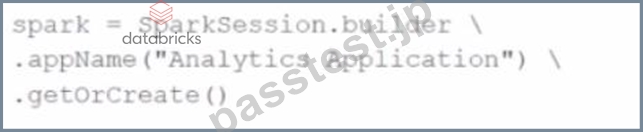
spark = SparkSession.builder \
.appName("Analytics Application") \
.getOrCreate()
Which statement describes the spark SparkSession?
- A. A SparkSession is unique for each appName, and calling getOrCreate() with the same name will return an existing SparkSession once it has been created.
- B. The getOrCreate() method explicitly destroys any existing SparkSession and creates a new one.
- C. If a SparkSession already exists, this code will return the existing session instead of creating a new one.
- D. A new SparkSession is created every time the getOrCreate() method is invoked.
正解:C
解説:
According to the PySpark API documentation:
"getOrCreate(): Gets an existing SparkSession or, if there is no existing one, creates a new one based on the options set in this builder." This means Spark maintains a global singleton session within a JVM process. Repeated calls to getOrCreate() return the same session, unless explicitly stopped.
Option A is incorrect: the method does not destroy any session.
Option B incorrectly ties uniqueness to appName, which does not influence session reusability.
Option D is incorrect: it contradicts the fundamental behavior of getOrCreate().
(Source: PySpark SparkSession API Docs)
質問 # 84
A developer runs:
What is the result?
Options:
- A. It throws an error if there are null values in either partition column.
- B. It appends new partitions to an existing Parquet file.
- C. It stores all data in a single Parquet file.
- D. It creates separate directories for each unique combination of color and fruit.
正解:D
解説:
The partitionBy() method in Spark organizes output into subdirectories based on unique combinations of the specified columns:
e.g.
/path/to/output/color=red/fruit=apple/part-0000.parquet
/path/to/output/color=green/fruit=banana/part-0001.parquet
This improves query performance via partition pruning.
It does not consolidate into a single file.
Null values are allowed in partitions.
It does not "append" unless .mode("append") is used.
質問 # 85
26 of 55.
A data scientist at an e-commerce company is working with user data obtained from its subscriber database and has stored the data in a DataFrame df_user.
Before further processing, the data scientist wants to create another DataFrame df_user_non_pii and store only the non-PII columns.
The PII columns in df_user are name, email, and birthdate.
Which code snippet can be used to meet this requirement?
- A. df_user_non_pii = df_user.remove("name", "email", "birthdate")
- B. df_user_non_pii = df_user.dropFields("name", "email", "birthdate")
- C. df_user_non_pii = df_user.drop("name", "email", "birthdate")
- D. df_user_non_pii = df_user.select("name", "email", "birthdate")
正解:C
解説:
To exclude sensitive (PII) columns from a DataFrame, the easiest method is to use the .drop() function with the list of column names to remove.
Correct syntax:
df_user_non_pii = df_user.drop("name", "email", "birthdate")
This creates a new DataFrame containing all remaining columns.
Why the other options are incorrect:
B: .dropFields() is not valid for standard DataFrames - it's used for struct fields only.
C: .select() would keep only PII columns, not remove them.
D: .remove() does not exist in Spark DataFrame API.
Reference:
PySpark DataFrame API - drop() method for removing multiple columns.
Databricks Exam Guide (June 2025): Section "Developing Apache Spark DataFrame/DataSet API Applications" - data manipulation, selecting, and dropping columns.
質問 # 86
48 of 55.
A data engineer needs to join multiple DataFrames and has written the following code:
from pyspark.sql.functions import broadcast
data1 = [(1, "A"), (2, "B")]
data2 = [(1, "X"), (2, "Y")]
data3 = [(1, "M"), (2, "N")]
df1 = spark.createDataFrame(data1, ["id", "val1"])
df2 = spark.createDataFrame(data2, ["id", "val2"])
df3 = spark.createDataFrame(data3, ["id", "val3"])
df_joined = df1.join(broadcast(df2), "id", "inner") \
.join(broadcast(df3), "id", "inner")
What will be the output of this code?
- A. The code will result in an error because broadcast() must be called before the joins, not inline.
- B. The code will fail because the second join condition (df2.id == df3.id) is incorrect.
- C. The code will fail because only one broadcast join can be performed at a time.
- D. The code will work correctly and perform two broadcast joins simultaneously to join df1 with df2, and then the result with df3.
正解:D
解説:
Spark supports multiple broadcast joins in a single query plan, as long as each broadcasted DataFrame is small enough to fit under the configured threshold.
Execution Plan:
Spark broadcasts df2 to all executors.
Joins df1 (big) with broadcasted df2.
Then broadcasts df3 and performs another join with the intermediate result.
The result is efficient and avoids shuffling large data.
Why the other options are incorrect:
B: Multiple broadcast joins are supported in Spark 3.x.
C: The join condition is correct since all use id as the key.
D: broadcast() can be used inline; it's valid syntax.
Reference:
PySpark SQL Functions - broadcast() usage.
Databricks Exam Guide (June 2025): Section "Developing Apache Spark DataFrame/DataSet API Applications" - multiple broadcast join optimization.
質問 # 87
A developer needs to produce a Python dictionary using data stored in a small Parquet table, which looks like this:
The resulting Python dictionary must contain a mapping of region -> region id containing the smallest 3 region_id values.
Which code fragment meets the requirements?
A)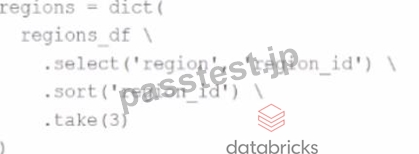
B)
C)
D)
The resulting Python dictionary must contain a mapping of region -> region_id for the smallest 3 region_id values.
Which code fragment meets the requirements?
- A. regions = dict(
regions_df
.select('region_id', 'region')
.limit(3)
.collect()
) - B. regions = dict(
regions_df
.select('region', 'region_id')
.sort(desc('region_id'))
.take(3)
) - C. regions = dict(
regions_df
.select('region', 'region_id')
.sort('region_id')
.take(3)
) - D. regions = dict(
regions_df
.select('region_id', 'region')
.sort('region_id')
.take(3)
)
正解:C
解説:
The question requires creating a dictionary where keys are region values and values are the corresponding region_id integers. Furthermore, it asks to retrieve only the smallest 3 region_id values.
Key observations:
.select('region', 'region_id') puts the column order as expected by dict() - where the first column becomes the key and the second the value.
.sort('region_id') ensures sorting in ascending order so the smallest IDs are first.
.take(3) retrieves exactly 3 rows.
Wrapping the result in dict(...) correctly builds the required Python dictionary: { 'AFRICA': 0, 'AMERICA': 1, 'ASIA': 2 }.
Incorrect options:
Option B flips the order to region_id first, resulting in a dictionary with integer keys - not what's asked.
Option C uses .limit(3) without sorting, which leads to non-deterministic rows based on partition layout.
Option D sorts in descending order, giving the largest rather than smallest region_ids.
Hence, Option A meets all the requirements precisely.
質問 # 88
A data engineer wants to create a Streaming DataFrame that reads from a Kafka topic called feed.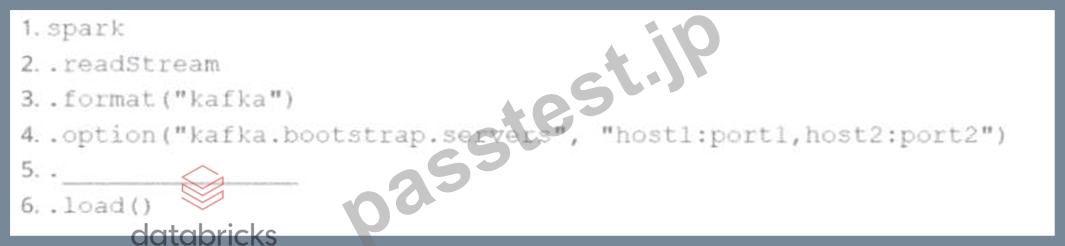
Which code fragment should be inserted in line 5 to meet the requirement?
Code context:
spark \
.readStream \
.format("kafka") \
.option("kafka.bootstrap.servers","host1:port1,host2:port2") \
.[LINE5] \
.load()
Options:
- A. .option("kafka.topic", "feed")
- B. .option("subscribe", "feed")
- C. .option("topic", "feed")
- D. .option("subscribe.topic", "feed")
正解:B
解説:
Comprehensive and Detailed Explanation:
To read from a specific Kafka topic using Structured Streaming, the correct syntax is:
python
CopyEdit
option("subscribe","feed")
This is explicitly defined in the Spark documentation:
"subscribe - The Kafka topic to subscribe to. Only one topic can be specified for this option." (Source:Apache Spark Structured Streaming + Kafka Integration Guide)
B)."subscribe.topic" is invalid.
C)."kafka.topic" is not a recognized option.
D)."topic" is not valid for Kafka source in Spark.
質問 # 89
A data engineer is reviewing a Spark application that applies several transformations to a DataFrame but notices that the job does not start executing immediately.
Which two characteristics of Apache Spark's execution model explain this behavior?
Choose 2 answers:
- A. Transformations are evaluated lazily.
- B. Only actions trigger the execution of the transformation pipeline.
- C. Transformations are executed immediately to build the lineage graph.
- D. The Spark engine optimizes the execution plan during the transformations, causing delays.
- E. The Spark engine requires manual intervention to start executing transformations.
正解:A、B
解説:
Apache Spark employs a lazy evaluation model for transformations. This means that when transformations (e.g., map(), filter()) are applied to a DataFrame, Spark does not execute them immediately. Instead, it builds a logical plan (lineage) of transformations to be applied.
Execution is deferred until an action (e.g., collect(), count(), save()) is called. At that point, Spark's Catalyst optimizer analyzes the logical plan, optimizes it, and then executes the physical plan to produce the result.
This lazy evaluation strategy allows Spark to optimize the execution plan, minimize data shuffling, and improve overall performance by reducing unnecessary computations.
質問 # 90
25 of 55.
A Data Analyst is working on employees_df and needs to add a new column where a 10% tax is calculated on the salary.
Additionally, the DataFrame contains the column age, which is not needed.
Which code fragment adds the tax column and removes the age column?
- A. employees_df = employees_df.withColumn("tax", col("salary") + 0.1).drop("age")
- B. employees_df = employees_df.withColumn("tax", col("salary") * 0.1).drop("age")
- C. employees_df = employees_df.dropField("age").withColumn("tax", col("salary") * 0.1)
- D. employees_df = employees_df.withColumn("tax", lit(0.1)).drop("age")
正解:B
解説:
To create a new calculated column in Spark, use the .withColumn() method.
To remove an unwanted column, use the .drop() method.
Correct syntax:
from pyspark.sql.functions import col
employees_df = employees_df.withColumn("tax", col("salary") * 0.1).drop("age")
.withColumn("tax", col("salary") * 0.1) → adds a new column where tax = 10% of salary.
.drop("age") → removes the age column from the DataFrame.
Why the other options are incorrect:
B: lit(0.1) creates a constant value, not a calculated tax.
C: .dropField() is not a DataFrame API method (used only in struct field manipulations).
D: Adds 0.1 to salary instead of calculating 10%.
Reference:
PySpark DataFrame API - withColumn(), drop(), and col().
Databricks Exam Guide (June 2025): Section "Developing Apache Spark DataFrame/DataSet API Applications" - manipulating, renaming, and dropping columns.
質問 # 91
A developer is running Spark SQL queries and notices underutilization of resources. Executors are idle, and the number of tasks per stage is low.
What should the developer do to improve cluster utilization?
- A. Enable dynamic resource allocation to scale resources as needed
- B. Increase the size of the dataset to create more partitions
- C. Increase the value of spark.sql.shuffle.partitions
- D. Reduce the value of spark.sql.shuffle.partitions
正解:C
解説:
The number of tasks is controlled by the number of partitions. By default, spark.sql.shuffle.partitions is 200. If stages are showing very few tasks (less than total cores), you may not be leveraging full parallelism.
From the Spark tuning guide:
"To improve performance, especially for large clusters, increase spark.sql.shuffle.partitions to create more tasks and parallelism." Thus:
A is correct: increasing shuffle partitions increases parallelism
B is wrong: it further reduces parallelism
C is invalid: increasing dataset size doesn't guarantee more partitions D is irrelevant to task count per stage Final answer: A
質問 # 92
A data scientist at a financial services company is working with a Spark DataFrame containing transaction records. The DataFrame has millions of rows and includes columns fortransaction_id,account_number, transaction_amount, andtimestamp. Due to an issue with the source system, some transactions were accidentally recorded multiple times with identical information across all fields. The data scientist needs to remove rows with duplicates across all fields to ensure accurate financial reporting.
Which approach should the data scientist use to deduplicate the orders using PySpark?
- A. df = df.filter(F.col("transaction_id").isNotNull())
- B. df = df.dropDuplicates(["transaction_amount"])
- C. df = df.dropDuplicates()
- D. df = df.groupBy("transaction_id").agg(F.first("account_number"), F.first("transaction_amount"), F.first ("timestamp"))
正解:C
解説:
dropDuplicates() with no column list removes duplicates based on all columns.
It's the most efficient and semantically correct way to deduplicate records that are completely identical across all fields.
From the PySpark documentation:
dropDuplicates(): Return a new DataFrame with duplicate rows removed, considering all columns if none are specified.
- Source:PySpark DataFrame.dropDuplicates() API
質問 # 93
Given the following code snippet inmy_spark_app.py:
What is the role of the driver node?
- A. The driver node stores the final result after computations are completed by worker nodes
- B. The driver node orchestrates the execution by transforming actions into tasks and distributing them to worker nodes
- C. The driver node only provides the user interface for monitoring the application
- D. The driver node holds the DataFrame data and performs all computations locally
正解:B
解説:
Comprehensive and Detailed Explanation From Exact Extract:
In the Spark architecture, the driver node is responsible for orchestrating the execution of a Spark application.
It converts user-defined transformations and actions into a logical plan, optimizes it into a physical plan, and then splits the plan into tasks that are distributed to the executor nodes.
As per Databricks and Spark documentation:
"The driver node is responsible for maintaining information about the Spark application, responding to a user's program or input, and analyzing, distributing, and scheduling work across the executors." This means:
Option A is correct because the driver schedules and coordinates the job execution.
Option B is incorrect because the driver does more than just UI monitoring.
Option C is incorrect since data and computations are distributed across executor nodes.
Option D is incorrect; results are returned to the driver but not stored long-term by it.
Reference: Databricks Certified Developer Spark 3.5 Documentation # Spark Architecture # Driver vs Executors.
質問 # 94
What is the risk associated with this operation when converting a large Pandas API on Spark DataFrame back to a Pandas DataFrame?
- A. The operation will load all data into the driver's memory, potentially causing memory overflow
- B. Data will be lost during conversion
- C. The conversion will automatically distribute the data across worker nodes
- D. The operation will fail if the Pandas DataFrame exceeds 1000 rows
正解:A
解説:
Comprehensive and Detailed Explanation From Exact Extract:
When you convert a largepyspark.pandas(aka Pandas API on Spark) DataFrame to a local Pandas DataFrame using.toPandas(), Spark collects all partitions to the driver.
From the Spark documentation:
"Be careful when converting large datasets to Pandas. The entire dataset will be pulled into the driver's memory." Thus, for large datasets, this can cause memory overflow or out-of-memory errors on the driver.
Final Answer: D
質問 # 95
An engineer has two DataFrames: df1 (small) and df2 (large). A broadcast join is used:
python
CopyEdit
from pyspark.sql.functions import broadcast
result = df2.join(broadcast(df1), on='id', how='inner')
What is the purpose of using broadcast() in this scenario?
Options:
- A. It filters the id values before performing the join.
- B. It increases the partition size for df1 and df2.
- C. It ensures that the join happens only when the id values are identical.
- D. It reduces the number of shuffle operations by replicating the smaller DataFrame to all nodes.
正解:D
解説:
broadcast(df1) tells Spark to send the small DataFrame (df1) to all worker nodes.
This eliminates the need for shuffling df1 during the join.
Broadcast joins are optimized for scenarios with one large and one small table.
質問 # 96
......
Associate-Developer-Apache-Spark-3.5ブレーン問題集PDF、Databricks Associate-Developer-Apache-Spark-3.5試験問題詰合せ:https://www.passtest.jp/Databricks/Associate-Developer-Apache-Spark-3.5-shiken.html
有効な問題最新版を無料で試そうAssociate-Developer-Apache-Spark-3.5試験問題集解答:https://drive.google.com/open?id=1TjT3DLPuhArRVQQpf6riDElechGMrQLQ