

F5 F5CAB1問題集で必ず試験合格させる
F5CAB1試験問題(更新されたのは2026年)100%リアル問題解答
質問 # 19
A secondary administrator has been granted access to a BIG-IP device through itsManagement Interface, but is unable to access theConfiguration Utility (WebUI).
What command can be run from the CLI to capture the network traffic on themanagement interfaceand troubleshoot the issue?
(Choose two.)
- A. tcpdump -i mgmt -n port 443
- B. tcpdump -i tun0 -n port 443
- C. tcpdump -i eth0 -n port 443
- D. tcpdump -i management -n port 443
- E. tcpdump -i 0.0 -n port 443
正解:A、C
解説:
The BIG-IP has two distinct planes:
* Management-plane# handled entirely by the management interface (MGMT)
* Data-plane (TMM)# handles Self IPs, VLAN interfaces, and traffic processing To capture traffic on the management interface, only the management-side NICs may be used:
* mgmt# Logical name for the management interface
* eth0# Physical Linux interface mapped to the management port on most BIG-IP platforms Both of these correctly capture inbound/outbound WebUI (HTTPS/443) traffic on the management port.
Why the correct answers are A and B
A). tcpdump -i eth0 -n port 443
* On BIG-IP appliances and VMs, the management port maps toeth0at the Linux OS level.
* Capturing on eth0 correctly shows HTTPS traffic to the WebUI.
B). tcpdump -i mgmt -n port 443
* mgmtis the BIG-IP alias for the management interface.
* This is thepreferredand most explicit capture interface for management-plane packet captures.
Why the other options are incorrect:
C). tcpdump -i 0.0
* Interface0.0is the TMM switch interface used for data-plane packet captures.
* Itdoes NOTcapture management-plane traffic.
D). tcpdump -i tun0
* Used for tunnel interfaces (IPsec, VXLAN, etc.)
* Not related to management access.
E). tcpdump -i management
* There isnointerface named management on BIG-IP.
* The correct names are mgmt or eth0.
質問 # 20
The Configuration Utility of a BIG-IP device is currently accessible via its management IP10.53.1.245from all VLANs.
The BIG-IP Administrator needs to restrict access so only hosts from the10.0.0.0/24subnet can access the Configuration Utility.
Which TMSH command accomplishes this?
- A. (tmos)# modify /ltm httpd allow replace-all-with {10.0.0.0/24}
- B. (tmos)# modify /sys httpd allow replace-all-with {10.0.0.0/24}
- C. (tmos)# create /net acl MGMT.HTTP rule add { (permit tcp 10.0.0.0/24 10.53.1.245 http) (deny ip any any http) }
- D. (tmos)# create /net acl MGMT.HTTP rule add { (permit tcp 10.0.0.0 0.0.0.255 host 10.53.1.245 http) }
正解:B
解説:
BIG-IP controls access to the web-based Configuration Utility (TMUI) through the/sys httpd allowlist. This parameter specifies which client IPs or subnets may initiate HTTP/HTTPS connections to the management interface.
To restrict TMUI access toonlythe 10.0.0.0/24 subnet:
* The correct method is tomodify the HTTPD allow listso that it contains only this subnet.
* This requires replacing the entire current list with the new subnet using:
modify /sys httpd allow replace-all-with {10.0.0.0/24}
This ensures thatonlyclients within 10.0.0.0/24 can reach the Configuration Utility.
Why the other options are incorrect:
* Options A and Ccreate network ACL objects under /net acl, which apply to data-plane traffic, not management-plane TMUI access. TMUI access is not controlled by LTM ACLs but by the HTTPD allow directive.
* Option Bis incorrect syntax and references /ltm httpd, which is not the proper object; the correct hierarchy is /sys httpd.
Thus, only modifying the/sys httpd allowlist achieves the required restriction.
質問 # 21
Refer to the exhibit.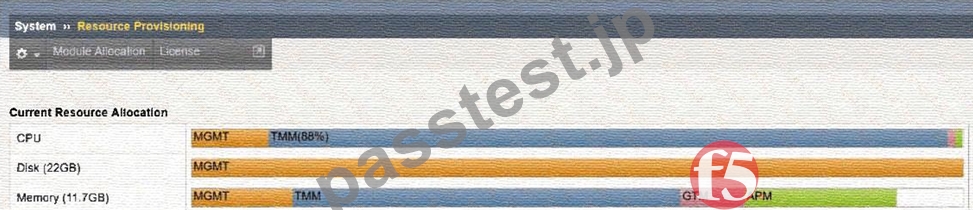
An organization has purchased a BIG-IP license that includes all available modules but has chosen to provision only the modules they require.
The exhibit displays the current resource allocation from theSystem # Resource Provisioningpage.
Based on the information provided, which F5 modules have been provisioned?
- A. LTM, APM
- B. DNS, APM
- C. LTM, DNS, APM
- D. TMM, DNS, APS
正解:C
解説:
The exhibit shows theCurrent Resource Allocationfor:
* CPU
* Disk
* Memory
In particular, theMemory Allocationbar displays the modules that are currently provisioned.
Memory is the most reliable indicator because BIG-IP allocates memoryonlyto modules that are actively provisioned.
From the exhibit:
* MGMT(Management) - always present
* TMM(Traffic Management Microkernel) - indicatesLTM is provisioned
* GTM- this label indicates that theDNS moduleis provisioned (GTM = Global Traffic Manager, now called DNS)
* APM- explicitly shown, indicatingAccess Policy Manageris provisioned
Therefore, the provisioned modules are:
* LTM(implied by TMM allocation)
* DNS/GTM
* APM
This matchesOption C: LTM, DNS, APM.
質問 # 22
For an upgrade of a standalone BIG-IP, a maintenance window is available in which brief interruptions are allowed.
Actions with no impact can be done outside the maintenance window.
When should a license reactivation be performed?
- A. Before the maintenance window.
- B. After the maintenance window.
- C. During the maintenance window.
正解:A
解説:
License reactivation updates the BIG-IP device's license file to ensure:
* TheService Check Dateis current
* The device is eligible to install the intended TMOS version
* Any module entitlement updates are received
Reactivationdoes not interrupt trafficand does not require a reboot, making it safe to performbeforethe maintenance window.
F5 best practices state:
* Performall non-impact tasks priorto the scheduled maintenance window
* Leave the window available for activities that require rebooting, such as the software installation itself Since license reactivation isnon-disruptive, it should be donebeforethe upgrade window starts.
質問 # 23
When using the tmsh shell of a BIG-IP system, which command will display the management-ip address?
- A. run /util bash ifconfig mgmt
- B. list /sys management-ip
- C. show /sys management-ip
正解:B
解説:
Comprehensive and Detailed Explanation (Paraphrased from F5 BIG-IP Administration / Installation / Initial Configuration concepts) Within the BIG-IP Traffic Management Shell (tmsh), system configuration objects-including the management IP-are organized under the/syshierarchy. The management IP address is a configurable property stored in the system configuration and can be viewed using the tmshlistcommand, which displays configuration objects and their currently assigned values.
Why "list /sys management-ip" is correct
* The list command in tmsh is used todisplay configured system values, not runtime statistics.
* The object that holds the management IP settings on BIG-IP systems is located at:/sys management-ip
* Running the command:list /sys management-ipwill reveal the settings for the management IP interface, including the address, netmask, and any associated attributes.
* This is the standard method used during system setup and verification to confirm the management IP configuration.
This behavior aligns with BIG-IP administration procedures, where configuration information is retrieved usinglist, while operational data is retrieved usingshow.
Why the other options are incorrect
A). run /util bash ifconfig mgmt
* This command enters the Bash shell, then runs ifconfig to display the management interface.
* While this can show the management interface address, it isnot a tmsh-native command, and the question specifically asks for a tmsh command.
* Administrators use tmsh directly for configuration display rather than leaving the shell.
C). show /sys management-ip
* The show command displaysstatistics or operational data, not configuration values.
* The management-ip object does not maintain statistics; therefore show does not return the configuration details required.
* Only thelistcommand reveals stored configuration data such as IP address and netmask.
質問 # 24
The BIG-IP Administrator uses Secure Copy Protocol (SCP) to upload a TMOS image to the/shared/images/ directory in preparation for a TMOS upgrade.
After the upload is completed, what will the system dobeforethe image is shown in the GUI under:
System » Software Management » Image List?
- A. The system verifies the internal checksum
- B. The system performs a reboot into a new partition
- C. The system copies the image to /var/local/images/
正解:A
解説:
When a TMOS image (.iso file) is uploaded into the/shared/images/directory, the BIG-IP performs an internal validation step before the ISO appears in the GUI.
1. The system verifies the internal checksum
* BIG-IP automatically reads the embedded checksum inside the ISO file
* Verifies integrity of the uploaded image
* Confirms the file is not corrupted or incomplete
* Ensures the image is a valid F5 TMOS software image
Only after this checksum verification succeeds does the image appear under:
System # Software Management # Image List
Why the other options are incorrect:
A). The system performs a reboot into a new partition
* Uploading an ISO file never triggers a reboot.
C). The system copies the image to /var/local/images/
* All valid TMOS images remain in/shared/images/.
* No copying occurs.
質問 # 25
Refer to the exhibit.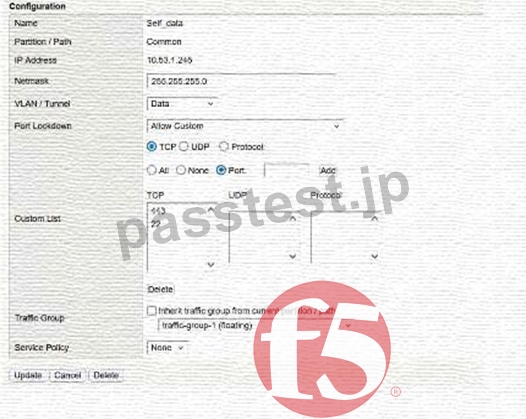
What traffic will be permitted to reach the BIG-IP?
- A. FTP
- B. Telnet
- C. SSH
正解:C
解説:
The exhibit shows the configuration of aSelf IPwith:
* Port Lockdown: Allow Custom
* ACustom Listthat includes the following TCP ports:
* 443
* 22
Meaning of these ports:
* TCP 443# HTTPS (TMUI - web-based management)
* TCP 22# SSH (command-line remote access)
No other TCP, UDP, or protocol entries are listed; therefore, only these two services are allowed to reach the BIG-IP via this Self IP.
Evaluating the answer choices:
Option
Service
Port
Allowed?
FTP
TCP 21
Not listed
#Not allowed
SSH
TCP 22
Listed
#Allowed
Telnet
TCP 23
Not listed
#Not allowed
Thus,SSHis the only traffic permitted through this Self IP configuration.
質問 # 26
The BIG-IP Administrator received a ticket that an authorized user is attempting to connect to the Configuration Utility from a jump host and is being denied.
The HTTPD allow list is configured as:
sys httpd {
allow { 172.28.31.0/255.255.255.0 172.28.65.0/255.255.255.0 }
}
The jump host IP is172.28.32.22.
What command should the BIG-IP Administrator use to allow HTTPD access for this jump host?
- A. modify /sys httpd allow add { 172.28.32.22 }
- B. modify /sys httpd allow delete { 172.28.31.0/255.255.255.0 172.28.65.0/255.255.255.0 }
- C. modify /sys httpd allow replace-all-with { 172.28.32.22 }
正解:A
解説:
The HTTPD allow list controls which IP addresses or subnets may access the Configuration Utility (TMUI) on the BIG-IP system. The Administrator already has two subnets allowed and needs to add asingle host IPto the existing list.
* The object/sys httpd allowsupports actions such asadd,delete, andreplace-all-with.
* Because the goal is toaddone more entry without removing the existing permitted subnets, the correct command is:
modify /sys httpd allow add { 172.28.32.22 }
This appends the new host to the existing list while preserving the previously configured networks.
Why the other options are incorrect:
* Option A (replace-all-with)wouldoverwritethe entire allow list, removing existing permitted subnets- unacceptable.
* Option B (delete)wouldremovethe existing networks and not add the required host.
Therefore, the correct administrative action is toaddthe jump host's IP.
質問 # 27
A BIG-IP Administrator is using Secure Copy Protocol (SCP) to transfer a TMOS image to the BIG-IP system in preparation for an upgrade.
To what directory should the file be transferred?
- A. /local/images/
- B. /var/images/
- C. /shared/images/
正解:C
解説:
BIG-IP systems require all ISO images (base TMOS images and HotFix images) to be stored in a specific directory used for software installation:
/shared/images/
This directory:
* Is theonly supported locationfrom which the BIG-IP software installation system validates and installs ISO files
* Is accessible by both the GUI and TMSH installers
* Has adequate storage space allocated specifically for images
* Is part of the shared partition that persists across reboots
When transferring images via SCP, the administrator must copy them directly into/shared/images/so that:
* The GUI (System # Software Management # Available Images) can detect the image
* TMSH install software image commands can reference it
Other directories such as/local/images/or/var/images/are not valid storage paths for software images.
質問 # 28
Which configuration file can a BIG-IP administrator use to verify theprovisioned modules?
- A. /config/bigip.conf
- B. /config/bigip_base.conf
- C. /var/local/ucs/config.ucs
- D. /config/bigip.license
正解:A
解説:
Provisioning settings define which modules are enabled and how system resources are allocated to them.
These provisioning declarations are stored in:
/config/bigip.conf
This file contains:
* Full module provisioning statements
* TMSH-equivalent provisioning configurations such as:
* sys provision ltm { level nominal }
* sys provision asm { level nominal }
It is theprimary system configuration filethat stores all active provisioning details.
Why the other answers are incorrect
A). /config/bigip.license
* Showslicensedmodules, not provisioned modules.
B). /config/bigip_base.conf
* Stores base networking (VLANs, Self-IPs, routes), not provisioning.
D). config.ucs
* A backup archive, not a live configuration file.
Thus, the correct file to review active module provisioning is/config/bigip.conf.
質問 # 29
Which two items demonstrate thecreation of a new volumefor software images?
(Choose two.)
- A. tmsh install /sys software image BIGIP-<version>.iso volume HD1.5 create-volume
- B. Using the GUI, go toSystem > Disk Management, selectNew Volume. In the pop-up window, type the name or number of the new volume and clickApply.
- C. tmsh install sys software image /shared/images/BIGIP-<version>.iso volume HD1.5 create-volume
- D. Using the GUI, go toSystem > Software Management > Available Images > Install, and in the Install Software Image pop-up window, type the new volume name or number and clickInstall.
- E. tmsh install software image /shared/images/BIGIP-<version>.iso volume HD1.5 create-volume
正解:B、E
解説:
In BIG-IP, software images are installed onboot volumes(for example, HD1.1, HD1.2, HD1.3, etc.).
To install software on anew volume, the administrator must instruct the system to create a new boot location before installation.
There are two correct ways to create a new volume:
A). tmsh command (with correct syntax)
tmsh install software image /shared/images/BIGIP-<version>.iso volume HD1.5 create-volume This syntax correctly includes:
* install software image
* full path to ISO (/shared/images/...)
* volume name (HD1.5)
* create-volumekeyword
This instructs BIG-IP to create the new boot volume as part of the installation.
C). Using the GUI # System > Disk Management
From the Disk Management menu, the administrator can:
* Select "New Volume"
* Enter the volume identifier (e.g., HD1.5)
* Apply changes
This GUI method is officially supported and explicitly creates a new boot volume before installing the software.
Why the other options are incorrect:
B). Incorrect tmsh syntax
* Missing /shared/images/ path
* Incorrect command structure
D). Incorrect command structure
* Missing required keywords and correct command hierarchy
E). Software Management # Install does NOT create volumes
* This installs to anexistingvolume only
* The GUI install dialog does not create new boot volumes
Thus, onlyOption AandOption Cproperly create a new software volume.
質問 # 30
A new logging solution is being implemented on the network. Policy requires keeping management traffic sent from the BIG-IPout of the management interface. After configuring the BIG-IP to forward messages to the new Syslog server, the BIG-IP Administrator notices that packets are being sentfrom a numbered data- plane Self IP.
What should the BIG-IP Administrator change to send the traffic out of thecorrect interface?
- A. Create a Management Route for the specific address/subnet of the syslog service via TMSH.
- B. Set the Management IP as the source address when configuring a Remote Syslog destination.
- C. Create a new Self IP in the same subnet as the management IP address using a route domain.
- D. Modify the port lockdown settings on the Self IP address to allow UDP port 514 traffic.
正解:A
解説:
By default,management-plane trafficuses themanagement routing table, whiledata-plane trafficuses the TMM routing table.
Remote Syslog traffic ismanagement-planetrafficunlessa management route exists.
If noManagement Routematches the Syslog server's destination IP, the BIG-IP will instead:
* UseTMM routes, and
* Source the packets from aSelf IP
This is exactly what the administrator is observing.
To force Syslog traffic out the management port:
You must create aManagement Route, which is configured using:
tmsh create /sys management-route <name> gateway <ip> network <syslog subnet> This sends syslog traffic:
* Out of themanagement interface
* Using theManagement IPas the source
Thus,Option Bis correct.
Why the other options are incorrect:
A). Set the Management IP as the source address
* Source address selection is overridden by routing.
* Without a management route, traffic still goes out the data plane.
C). Create a new Self IP using a route domain
* Unnecessary and not related to management-plane routing.
* Syslog traffic should not rely on data-plane Self IPs.
D). Modify port lockdown on Self IP to allow UDP/514
* This would allow Syslog trafficintothe BIG-IP over a Self IP, not forceoutboundtraffic via management.
質問 # 31
How should a BIG-IP Administrator check theprovisioned CPU percentfor a module?
(Choose two.)
- A. By runningtmsh show /sys provisionand reviewing the specific module in the output.
- B. By going toSystem / Resource Provisioningand hovering over the CPU section colors.
- C. By running thetopcommand and reviewing the output for the provisioned module.
- D. By runningtmsh show /sys cpuand reviewing the specific module provisioned output.
- E. By checking theDashboardoutput in the Statistics tab in the GUI.
正解:A、B
解説:
BIG-IP allocates CPU and memory resources based on module provisioning levels.
To view how much CPU a module is assigned, administrators must check provisioning information from:
C). GUI - System Resource Provisioning
This page visually displays CPU allocation via color-coded bars.
Hovering over the CPU bar shows:
* CPU usage percent per module
* Which modules share CPU cycles
* The system's total resource allocation
This is the primary GUI method.
D). tmsh show /sys provision
This command displays detailed module provisioning information including:
* Provisioned modules
* Their provisioning level
* CPU and memory allocation data
It is the authoritative CLI method for resource provisioning status.
Why the other options are incorrect:
A). top
* Shows real-time process usage, notprovisionedCPU allocation.
B). tmsh show /sys cpu
* Displays CPU runtime utilization, not per-module provisioning.
E). Statistics Dashboard
* Only shows traffic / system runtime metrics, not provisioning resource allocations.
Therefore,C and Dare correct.
質問 # 32
What will setting a Self IP to"Allow None"for Port Lockdown do?
- A. Default allow port 1026 access between peer devices and traffic processing across the network failover.
- B. Block HA communications, causing the systems to report their peer as offline and go active-active.
- C. Block HA communications, causing the systems to report their peer as online ready.
正解:B
解説:
ThePort Lockdownfeature controls which services a Self-IP will respond to.
Setting a Self-IP toAllow Nonemeans:
* The Self-IP will not acceptanytraffic except the very limited, hard-coded HA ports such asTCP 4353 used for device trust and configuration sync.
* All other HA ports, including those needed for network failover and other HA mechanisms,are blocked.
When essential HA services cannot communicate, each device assumes its peer is down.
This results in:
* HA failover misbehavior
* Both devices thinking the other is offline
* Potentialactive-active condition, which is not intended and can cause traffic disruption Thus,Allow Nonecan break HA functionality unless the Self-IP is not used for HA links.
質問 # 33
The BIG-IP Administrator needs to update access to the Configuration Utility to include the172.28.31.0/24and
172.28.65.0/24networks.
From the TMOS Shell (tmsh), which command should the BIG-IP Administrator use to complete this task?
- A. modify /sys httpd allow add { 172.28.31.0 172.28.65.0 }
- B. modify /sys httpd allow add { 172.28.31.0/255.255.255.0 172.28.65.0/255.255.255.0 }
- C. modify /sys httpd permit add { 172.28.31.0/255.255.255.0 172.28.65.0/255.255.255.0 }
正解:B
解説:
Access to the BIG-IP Configuration Utility (TMUI) is controlled through the/sys httpd allowlist.
This list defines which IP addresses or subnets are allowed to connect to the management web interface.
To allow two new subnets-172.28.31.0/24and172.28.65.0/24-the administrator mustaddboth subnets to the existing list without removing current entries.
In tmsh, subnet entries must be specified innetwork/netmask format, for example:
172.28.31.0/255.255.255.0
The correct tmsh command to append these networks is:
modify /sys httpd allow add { 172.28.31.0/255.255.255.0 172.28.65.0/255.255.255.0 } Why the other options are incorrect:
Option B:
* IPs are listed without masks, which is invalid for subnet-based access control.
* The system requiresnetwork/netmaskformat.
Option C:
* The command uses permit instead of allow, which is not a valid attribute of /sys httpd.
* The correct keyword must beallow.
Thus, onlyOption Acorrectly adds both permitted subnets in the proper tmsh format.
質問 # 34
A BIG-IP Administrator plans to upgrade a BIG-IP device to the latest TMOS version.
Which two tools could the administrator leverage to verify known issues for the target versions? (Choose two.)
- A. F5 End User Diagnostics (EUD)
- B. F5 iHealth
- C. F5 Downloads
- D. F5 University
- E. F5 Bug Tracker
正解:B、E
解説:
Comprehensive and Detailed Explanation (Paraphrased from F5 BIG-IP Administration Install, Initial Configuration, and Upgrade concepts) When performing a TMOS upgrade, F5 recommends validating the target software version to ensure that the release does not contain defects that may impact system behavior. The upgrade preparation process includes checking for known issues, validating compatibility, and reviewing advisory information for the intended version. Two primary F5 tools serve this purpose:
B). F5 iHealth
iHealth is a cloud-based diagnostic and analysis platform used to evaluate the operational state of a BIG-IP system.
Administrators upload a QKView file to iHealth to receive an automated assessment of the system. As part of upgrade planning, iHealth provides:
* Version-specific issue analysis, comparing the system's configuration and hardware against F5's internal catalog of published issues.
* Upgrade advisories, identifying potential risks such as deprecated features, module compatibility concerns, or changes in behavior between TMOS versions.
* Checks against known defects, allowing administrators to determine whether the target TMOS version contains issues relevant to their deployment.
This aligns with F5's recommended upgrade workflow, where iHealth is used before upgrading to confirm system readiness and detect software-level concerns.
D). F5 Bug Tracker
The Bug Tracker is F5's dedicated interface for reviewing software defects across TMOS releases.
It enables administrators to:
* Search forknown bugs by TMOS version, module, severity, or defect ID.
* Review thestatus of defects(open, resolved, fixed in later releases).
* Identify whether high-impact or security-related issues are associated with the target upgrade version.
F5 documentation emphasizes reviewing known defects prior to installation of new software images, making the Bug Tracker a critical resource for upgrade validation.
Why the other options are not correct
A). F5 End User Diagnostics (EUD)
EUD is used exclusively forhardware diagnostics(ports, memory, fans). It does not provide software-related issue verification and is not used for upgrade planning.
C). F5 University
This is atraining platform, not an operational tool. It does not provide defect listings or upgrade-specific warnings.
E). F5 Downloads
Although it provides access to software images and release notes, it isnot a tool for identifying known bugs.
Release notes summarize general fixes and features, but systematic bug verification requires iHealth or the Bug Tracker.
質問 # 35
......
合格させるF5 F5CAB1試験最速合格にはPassTest:https://www.passtest.jp/F5/F5CAB1-shiken.html
準備F5CAB1問題解答でF5CAB1試験問題集:https://drive.google.com/open?id=1_RhjGdE_VTr8lN7lX4pbxt-CiXHVNVM_