

初心者向けのB2B-Commerce-Developer試験 [2023] 問題集でSalesforceのPDF問題
B2B-Commerce-Developerプレミアム試験エンジンPDFをダウンロード
Salesforce B2B-Commerce-Developer試験は、Salesforceテクノロジーを使用してB2Bコマースソリューションを構築および実装するために必要なトピックをカバーしています。試験で取り上げられる主要なトピックには、B2Bコマースアーキテクチャ、データモデリングおよび管理、サードパーティシステムとの統合、セキュリティとコンプライアンス、テストとデプロイメントなどがあります。試験は、これらの概念やスキルを実世界のシナリオに適用できるかどうかをテストするように設計されています。
Salesforce B2B-Commerce-Developer認定試験は、SalesforceのB2B Commerceプラットフォームで作業する開発者の知識とスキルをテストするために設計されています。この認定は、開発者がB2B Commerceの技術的側面を確実に理解していることを検証します。これには、カスタムソリューションを設計および開発し、B2B Commerce機能を実装および構成し、問題をトラブルシューティングする機能が含まれます。
質問 # 16
What is a best practice when passing query parameters from user interface to an apex controller?
- A. Query parameters should be stored on a backbone model prior to passing them to the server
- B. String parameters should be trimmed using String.trim().
- C. Query parameters should be properly sanitized by using JSINHTMLENCODE within the VisualForce Page or Component.
- D. Query parameters should be passed only to Salesforce B2B Commerce classes that you are extending.
正解:C
質問 # 17
Northern Trail Outfitters (NTO) has a B2B Commerce store for its resellers. It has received many customer service calls involving questions about the delivery date of customer orders.
How should a developer expose delivery time estimates to NTO's customers in the storefront to reduce call volume?
- A. Add a Desired Delivery Date input field during the checkout flow.
- B. Configure an email alert to the customer when the Expected Delivery Date changes.
- C. Add the Expected Delivery Date field to the order confirmation email.
- D. Display the Expected Delivery Date on the order page with a Lightning web component.
正解:D
解説:
To expose delivery time estimates to NTO's customers in the storefront, a developer should display the Expected Delivery Date on the order page with a Lightning web component. The Expected Delivery Date is a custom field on the Order object that stores the date when the order is expected to be delivered to the customer. The developer can use the @wire decorator to get the current order object and use its properties, such as order number, status, total amount, and expected delivery date, to display them on the order page. The developer can also use Apex methods or third-party APIs to calculate and update the expected delivery date based on various factors, such as inventory availability, shipping method, shipping address, and carrier service level. Displaying the expected delivery date on the order page allows the customer to see their delivery time estimate at any time and reduce their need to call customer service. Adding the Expected Delivery Date field to the order confirmation email is not a good solution, as it does not allow the customer to see their delivery time estimate if they lose or delete their email. Adding a Desired Delivery Date input field during the checkout flow is not a good solution either, as it does not guarantee that the customer's desired delivery date will be met or reflect any changes in delivery time due to unforeseen circumstances. Configuring an email alert to the customer when the Expected Delivery Date changes is not a good solution either, as it can create confusion or frustration for the customer if they receive multiple or conflicting emails about their delivery date. Salesforce Reference: B2B Commerce Developer Guide: Order Object, [B2B Commerce Developer Guide: Order Page], [Lightning Web Components Developer Guide: Call an Apex Method Imperatively]
質問 # 18
What are the templating, Javascript, and CSS frameworks what the cloudcraze managed package leverages?
- A. Bootstrap, Backbonejs, and handlebarsjs
- B. Angularjs, react.js, and handlebarsjs
- C. Angularjs, Backbonejs, and handlebarsjs
- D. Bootstrap, Angularjs, and Backbonejs
正解:A
質問 # 19
Northern Tail Outfitters (NTO) is converting an existing aura component into a Lightning Web Component. The aura component has the following source code:
What is the equivalent of this code in a Lightning Web Component?
- A.

- B.

- C.
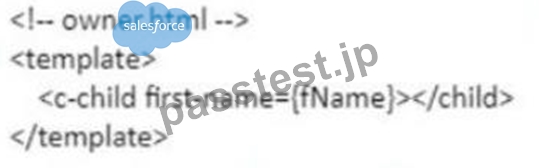
- D.

正解:C
解説:
The equivalent of this code in a Lightning web component is option B. Option B uses the @api decorator to expose firstName as a public property of the Lightning web component and communicate it with other components or services. The @api decorator is a decorator that marks a property or method as public, which means that it can be accessed by other components or services that use or consume this component. The @api decorator also makes the property reactive, which means that it can track changes and update the component accordingly. In option B, firstName is exposed as a public property using the @api decorator and passed to the child element using an attribute. Option A is incorrect because it uses an invalid syntax for exposing firstName as a public property. The @api decorator should be used before the property declaration, not after it. Option C is incorrect because it uses an invalid syntax for exposing firstName as a public property. The @api decorator should be used with parentheses, not without them. Option D is incorrect because it uses an invalid syntax for exposing firstName as a public property. The @api decorator should be used with camel case, not with hyphens. Salesforce Reference: Lightning Web Components Developer Guide: Communicate with Properties, Lightning Web Components Developer Guide: Decorators
質問 # 20
How does a project implement the process to persist payment information datain the Checkout flow for Salesforce B2B Commerce version 4.2 and beyond?
- A. Trigger a remote action when the process payment button is selected to capture the payment.
- B. Trigger the processPayment event and pass in the payment information object as an argument.
- C. Trigger a remote action to store the payment information in the URL query parameters.
- D. Trigger the externalprocessedPayment and pass in the payment information object as an argument.
正解:B
解説:
To persist payment information data in the Checkout flow for Salesforce B2B Commerce version 4.2 and beyond, the project needs to trigger the processPayment event and pass in the payment information object as an argument. This event will invoke the processPayment method of the ccServicePayment class, which will validate and process the payment information and return a payment result object. The payment result object will contain the status and details of the payment transaction.
質問 # 21
A developer is trying to integrate a new shipping provider to use during checkout in a storefront Which two steps must the developer take to make an integration available for selection?
- A. Create an Apex class that uses the integration framework.
- B. Enter the integration class name and version in the store administration.
- C. Create a RegisteredExternalService record using Workbench.
- D. Modify the StorelntegratedService to map to an Apex class ID using Workbench.
正解:A、C
解説:
To make an integration available for selection, a developer must create a RegisteredExternalService record using Workbench and create an Apex class that uses the integration framework. Creating a RegisteredExternalService record using Workbench allows the developer to register their custom integration class as an external service in Salesforce B2B Commerce. The RegisteredExternalService record contains information such as the class name, version, display name, description, and category of the integration class. The category determines where and how the integration class can be used in B2B Commerce, such as ShippingService or TaxService. Creating an Apex class that uses the integration framework allows the developer to define custom logic for integrating with an external service provider's API or service. The integration framework provides interfaces and classes for various types of integrations, such as shipping, tax, payment, inventory, and freight. The developer can implement these interfaces and classes in their custom Apex class and override their methods with their own logic. Modifying the StoreIntegratedService to map to an Apex class ID using Workbench is not a required step for making an integration available for selection, as it is only used for registering internal services that are provided by Salesforce B2B Commerce out-of-the-box. Entering the integration class name and version in store administration is not a required step either, as it is only used for selecting an existing integration class that has already been registered as an external service. Salesforce Reference: [B2B Commerce Developer Guide: Integration Framework], [B2B Commerce Developer Guide: RegisteredExternalService Object]
質問 # 22
A developer has made a component with a lightning combobox in the follow! markup. To handle changes on the combobox, what should replace <CHANGE FVENT>?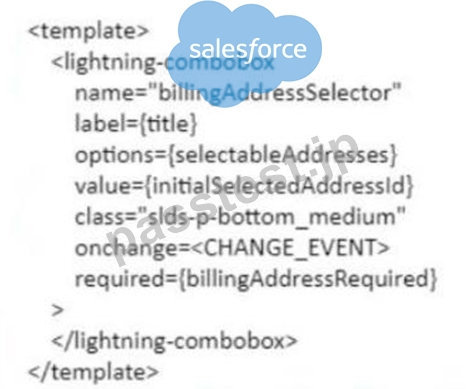
- A. {handleChange}
- B. {handleChange()}
- C. javascript:void(0);handleChange();
- D. {event:handleChange}
正解:A
解説:
To handle changes on the combobox, the developer should replace <CHANGE EVENT> with {handleChange}. The handleChange is a function that is defined in the JavaScript file of the Lightning web component and is invoked when the value of the combobox changes. The developer can use this function to perform custom logic or actions based on the selected value of the combobox, such as updating other components or properties, calling Apex methods or services, or firing events. The developer can use the onchange attribute to bind the handleChange function to the combobox element in the HTML file of the Lightning web component. The onchange attribute is an HTML attribute that specifies a function to be executed when the value of an element changes. {event:handleChange} is not a valid way to handle changes on the combobox, as it is not a valid syntax for binding a function to an element. javascript:void(0);handleChange(); is not a valid way either, as it is not a valid syntax for binding a function to an element. {handleChange()} is not a valid way either, as it is not a valid syntax for binding a function to an element. Salesforce Reference: Lightning Web Components Developer Guide: Handle Events, Lightning Web Components Developer Guide: Communicate with Properties, Lightning Web Components Developer Guide: lightning-combobox
質問 # 23
Which event should be triggered when user facing info, warning or error messages need to be displayed on a Visualforce page?
- A. pageMessage
- B. showMessage
- C. displayPageMessage
- D. displayMessage
正解:A
解説:
The event that should be triggered when user facing info, warning or error messages need to be displayed on a Visualforce page is pageMessage. This event is triggered by the displayPageMessage method of the CCRZ.util class, which is a utility class that provides various helper methods for common tasks. The event can be used to display a message on the page with a specified type, title, and text. For example, CCRZ.util.displayPageMessage('error', 'Oops!', 'Something went wrong.') will trigger the pageMessage event and display an error message on the page. Salesforce Reference: B2B Commerce and D2C Commerce Developer Guide, Events, Util Class
質問 # 24
Where are handlebar Templates defined in the Cloudcraze managed package?
- A. uiProperties file
- B. Page Settings configuration
- C. Configuration Setting configuration
- D. cc_hk_UserInterface extension
正解:A
質問 # 25
Which two statements are accurate about the Cart Item with a Type of Charge?
- A. It is created with the Cart Delivery Group Method after the freight integration
- B. It is linked directly to a Catalog Id
- C. It is linked directly to a Cart Id
- D. It is created with the Cart Delivery Group Method after the shipping integration
正解:B、C
解説:
Two statements that are accurate about the Cart Item with a Type of Charge are that it is linked directly to a Cart Id and that it is linked directly to a Catalog Id. A Cart Item with a Type of Charge is a special type of Cart Item that represents an additional charge or fee that is applied to a Cart, such as shipping, handling, or tax. A Cart Item with a Type of Charge is linked directly to a Cart Id, which means that it belongs to a specific Cart and can be retrieved or updated along with other Cart Items. A Cart Item with a Type of Charge is also linked directly to a Catalog Id, which means that it references a specific Catalog that contains the products and prices for the store. A Cart Item with a Type of Charge is not created with the Cart Delivery Group Method after the shipping integration or after the freight integration, as these are not related to the creation of Cart Items. The Cart Delivery Group Method is a method that determines how products are grouped into delivery groups based on their shipping methods and addresses. The shipping integration and the freight integration are integrations that calculate and apply shipping costs and freight charges to a Cart or an Order. Salesforce Reference: B2B Commerce Developer Guide: Cart Item Object, B2B Commerce Developer Guide: Shipping Integration, B2B Commerce Developer Guide: Freight Integration
質問 # 26
A developer is trying to troubleshoot why a field is not displaying on the Product Detail Page. What should be typed in the Developer Tools Console in the browser to view the fields available for the Product Detail Page?
- A. CCRZ.cartView
- B. CCRZ.productSearchView
- C. CCRZ.productDetailModel
- D. CCRZ.productDetailView
正解:C
質問 # 27
Which Global JavaScript Object should be extended when
writing custom Remote Actions?
- A. CCRZ.
- B. CCRZ.cc_CallContext
- C. CCRZ.cc
- D. CCRZ.RemoteInvocation
正解:C
解説:
The Global JavaScript Object that should be extended when writing custom Remote Actions is CCRZ.cc. This object contains all the Remote Actions that are defined in the cloudcraze managed package, which can be overridden or extended by subscriber code. The object also provides a mechanism for registering custom Remote Actions that can be invoked by the user interface components. For example, CCRZ.cc.customAction = function(params, callback){ // do something } will define a custom Remote Action named customAction that can be called by CCRZ.cc.customAction(params, callback). Salesforce Reference: B2B Commerce and D2C Commerce Developer Guide, Remote Actions
質問 # 28
Which out of the box Salesforce B2B Commerce page can give instructions to web crawlers from accessing specific Salesforce B2B Commerce pages?
- A. CCSiteIndex
- B. CCCat?SiteMap
- C. cc_RobotsTxT
- D. CCPage
正解:C
質問 # 29
A developer is trying to troubleshoot why a field is not displaying on the Product Detail Page. What should be typed in the Developer Tools Console in the browser to view the fields available for the Product Detail Page?
- A. CCRZ.cartView
- B. CCRZ.productSearchView
- C. CCRZ.productDetailModel
- D. CCRZ.productDetailView
正解:C
解説:
To view the fields available for the Product Detail Page, the developer should type CCRZ.productDetailModel in the Developer Tools Console in the browser. This will display the product detail model object, which contains the product data and attributes that are rendered on the page. The other options are either not valid or not relevant for the Product Detail Page.
質問 # 30
How does a project implement the process to persist payment information data in the Checkout flow for Salesforce B2B Commerce version 4.2 and beyond?
- A. Trigger a remote action when the process payment button is selected to capture the payment.
- B. Trigger the processPayment event and pass in the payment information object as an argument.
- C. Trigger a remote action to store the payment information in the URL query parameters.
- D. Trigger the externalprocessedPayment and pass in the payment information object as an argument.
正解:B
質問 # 31
Which three actions are applicable when modifying the number of steps required in the Salesforce Commerce Checkout flow? (3 answers)
- A. Perform a template override on the Checkout page.
- B. Add a page include to the checkout page.
- C. Set the value of the configuration setting defined as CO.useDef to TRUE
- D. Build and activate a new configuration cache setting via CC admin.
- E. Set the value of the configuration setting defined as CO.overrideFlow to TRUE.
正解:B、D、E
質問 # 32
Which cart item type is created with the Cart Delivery Group Method after the shipping integration?
- A. Surcharge
- B. Delivery
- C. Charge
- D. Shipping
正解:C
解説:
A cart item with a type of Charge is created with the Cart Delivery Group Method after the shipping integration. A shipping integration is an integration that calculates and applies shipping costs and options to a cart or an order based on various factors, such as product weight, dimensions, quantity, location, and carrier service level. A shipping integration can use either an external shipping service provider or custom Apex code to perform the shipping calculation. The Cart Delivery Group Method is a method that determines how products are grouped into delivery groups based on their shipping methods and addresses. A delivery group is a logical grouping of products that are shipped together using the same shipping method and address. After performing the shipping calculation for each delivery group, the shipping integration creates a cart item with a type of Charge and a charge type of Shipping for each delivery group. These cart items represent the shipping costs and options that are applied to each delivery group. A cart item with a type of Surcharge, Shipping, or Delivery does not exist or is not related to the shipping integration. Salesforce Reference: [B2B Commerce Developer Guide: Shipping Integration], [B2B Commerce Developer Guide: Cart Delivery Group Method]
質問 # 33
Which handlebars helper expression is used in Salesforce B2B Commerce pages and components to toggle the display of a block of markup?
- A. {{#ifSetting 'Page.cfg}} ... {{/ifSetting}}
- B. {{#ifConfig 'Field__c'}} ... {{/ifConfig}}
- C. {{#ifStoreSetting 'Field__c'}} ... {{/ifStoreSetting}}
- D. {{#ifDisplay 'Page.cfg'}} ... {{/ifDisplay}}
正解:D
質問 # 34
Numerous flags ... have a direct impact on the result set provided by the Global API's. What Global API Data-Sizing convention flag prevents an API request from propagating to further requests when provided as a Boolean parameter with a value of true?
- A. ccrz.ccAPISizing.ASSC
- B. ccrz.ccAPI.SZ_ASSC
- C. ccrz.ccAPI.SZ_REL
- D. ccrz.ccAPISizing.REL
正解:B
質問 # 35
A developer has the task to create custom Lightning web components (LWCs). Which two steps must a developer take when creating custom LWCs?
- A. Deploy a custom component.
- B. Authorize an org for an SFDX project.
- C. CloneaLWC.
- D. Create an Apex class.
正解:A、B
解説:
To create custom Lightning web components (LWCs), a developer must take two steps: authorize an org for an SFDX project and deploy a custom component. Authorizing an org for an SFDX project allows the developer to connect to a Salesforce org, such as a scratch org, a sandbox, or a production org, and use it as a development environment. Deploying a custom component allows the developer to push the LWC code from the local project to the org and make it available for use. Creating an Apex class is not a required step for creating custom LWCs, as not all LWCs need to use Apex. Cloning an LWC is not a required step either, as it is an optional way to create a new LWC based on an existing one. Salesforce Reference: Lightning Web Components Developer Guide: Authorize an Org for Development, Lightning Web Components Developer Guide: Deploy Your Component
質問 # 36
A developer has been working on the flow of an Inventory Class for checkout. The developer has handled all the error states and now needs to indicate that inventory is available for all items and amounts in the cart.
Which step should happen next?
- A. Return sfdc.checkout.lnventoryStatus.SUCCESS
- B. Return sfdc_checkout.lntegrationStatus.Status.SUCCESS
- C. Return TRUE
- D. Return sfdc.checkout.lnventoryStatus.Status.SUCCESS
正解:D
解説:
To indicate that inventory is available for all items and amounts in the cart, the developer should return sfdc.checkout.InventoryStatus.Status.SUCCESS. The sfdc.checkout.InventoryStatus.Status.SUCCESS is a constant value that represents a successful inventory status. It means that the inventory class has checked the availability of all the products in the cart and confirmed that they are in stock and can be fulfilled. The developer should use this value as the return value of the checkInventory method, which is a method that implements the sfdc.checkout.InventoryCheck interface. The checkInventory method is invoked during the checkout flow to validate the inventory availability of the products in the cart. Returning TRUE is not a valid way to indicate inventory availability, as it is not a valid inventory status value. Returning sfdc_checkout.IntegrationStatus.Status.SUCCESS is not a valid way either, as it is not an inventory status value, but rather an integration status value. Returning sfdc.checkout.InventoryStatus.SUCCESS is not a valid way either, as it is not a valid syntax for accessing the inventory status value. Salesforce Reference: B2B Commerce Developer Guide: Inventory Integration, B2B Commerce Developer Guide: Inventory Status Enum, B2B Commerce Developer Guide: Inventory Check Interface
質問 # 37
......
Salesforce B2B-Commerce-Developer試験は、多くの準備と献身が必要な挑戦的な試験です。この試験を試みる前に、Salesforceを使用してB2B Commerce Solutionsを設計および実装する際に実際的な経験を持つことが不可欠です。ただし、適切な準備と献身により、この試験に合格すると、Salesforceエコシステムでの機会の世界を開くことができます。
あなたを合格させるSalesforce試験にはB2B-Commerce-Developer試験問題集:https://www.passtest.jp/Salesforce/B2B-Commerce-Developer-shiken.html
検証済みB2B-Commerce-Developer豪華お試しセットリアル試験問題集PDF:https://drive.google.com/open?id=1jfeQAWgCIazKMrMH6aF7vPo4-QCZ28b5