

最新2025年09月28日リアルなNCP-DB試験問題集解答で有効なNCP-DB問題集PDF
Nutanix NCP-DB試験問題集でPDF問題とテストエンジン
質問 # 84
An administrator needs to roll back an Oracle patch on a database server VM using NDB. What is required for this action to be successful?
- A. The patch must have been applied using NDB.
- B. The patch must have been applied on Grid home only using NDB.
- C. The database must be in read-only mode.
- D. The database must be shut down.
正解:A
解説:
To roll back an Oracle patch on a database server VM using NDB, the patch must have been applied using NDB in the first place. This is because NDB maintains a patch inventory and history for each database server VM and database that it manages. NDB uses this information to determine which patches can be rolled back and how to revert the changes made by the patch. If the patch was applied outside of NDB, NDB would not have the patch information and would not be able to roll back the patch. Therefore, the patch must have been applied using NDB for the rollback action to be successful. The other options are not required for the rollback action. The database does not need to be shut down or in read-only mode, as NDB can perform the rollback operation online. The patch does not need to be applied on Grid home only, as NDB can roll back patches applied on both Grid home and Database home. References:
* Nutanix Certified Professional - Database Automation (NCP-DB) v6.5, Section 4 - Operate and Maintain an NDB Environment, Objective 4.4: Determine the correct method to apply Linux OS patches
* Nutanix Database Management & Automation (NDMA) Course, Module 5: Nutanix Database Service (NDB) Patching, Lesson 5.1: Patching Overview, Topic: Patching Concepts
* [Nutanix Database Service (NDB) User Guide], Chapter 7: Patching, Section: Rolling Back a Patch
質問 # 85
Refer to the exhibit.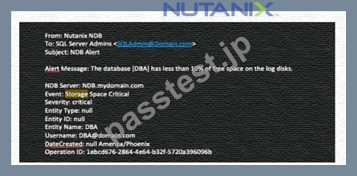
An administrator is receiving critical NDB email alerts regarding storage for the DBA database, which is a member of a database group.
How would the administrator remediate the issue within NDB?
- A. From the Database Summary page for the DBA database, use the Scale option to grow the storage accordingly.
- B. From the Alerts page, select the alert, choose Set Status to Resolved, and Scale the storage via the Resolve Now dialogue box.
- C. From Prism Central, add additional storage to the VM, then expand the log storage via the database tools.
- D. From the Databases page, select the Database group and Scale the storage from the Database Actions menu.
正解:A
解説:
The administrator can remediate the issue of critical storage alerts by scaling up the storage directly from the Database Summary page for that specific DBA database. This action allows for an increase in storage capacity to alleviate space constraints and prevent future critical alerts related to storage space1. The other options are not correct, as they either involve scaling the entire database group, which may not be necessary or desired, or require additional steps outside of NDB, which may not be feasible or efficient. References:
* 1: Nutanix Database Automation (NCP-DB) course, Module 2: Database Provisioning, Lesson 2.4:
Database Scaling, slide 5
質問 # 86
When registering a new Nutanix Cluster with Era, what component is installed on the target Nutanix cluster via the Register Nutanix Cluster workflow?
- A. API Server
- B. Era Sewer
- C. Repository Server
- D. Era Agent
正解:D
解説:
When registering a new Nutanix Cluster with Era, the Era Agent is installed on the target Nutanix cluster via the Register Nutanix Cluster workflow1. This agent is crucial for the functioning of the Nutanix Database Service (NDB) as it helps in managing and optimizing database workloads2. It also enables the application of procedural concepts to add Nutanix clusters to NDB2.
質問 # 87
An administrator needs to work with databases and time machines, but not database parameter profiles.
Which role satisfies this requirement?
- A. Database Administrator (DBA)
- B. super Administrator
- C. Infrastructure Administrator
- D. Database Infrastructure Administrator
正解:A
解説:
In the Nutanix Database Automation (NCP-DB) framework, the role that allows an administrator to work with databases and time machines, but not database parameter profiles, is the Database Administrator (DBA)
123. This role provides the necessary permissions to manage databases and time machines, which are essential components of the Nutanix Era solution. However, it does not grant access to database parameter profiles, which are typically managed by other roles45.
質問 # 88
An administrator needs to add a stretched VLAN across two clusters in NDB Which two prerequisites should be met prior to completing this action? (Choose two.)
- A. Nutanix Cluster Management must be enabled.
- B. VLAN must be IPAM.
- C. Both clusters must be registered in NDB.
- D. VLAN must be static.
正解:C、D
解説:
A stretched VLAN is a virtual network that spans across multiple Nutanix clusters and allows the communication between VMs on different clusters using the same subnet. A stretched VLAN can be used to provide high availability and load balancing for NDB components, such as HAProxy VMs, that require a virtual IP address (VIP) to beaccessible from any cluster. To add a stretched VLAN across two clusters in NDB, the administrator needs to meet two prerequisites: the VLAN must be static and both clusters must be registered in NDB. A static VLAN is a VLAN that is manually created and configured by the administrator, as opposed to an IPAM VLAN that is automatically created and managed by NDB. A static VLAN can be added to a stretched VLAN in NDB, while an IPAM VLAN cannot. Both clusters must be registered in NDB before adding a stretched VLAN, as NDB needs to have the information and access to the clusters and their networks.
The administrator can register the clusters in NDB using the Prism Element details, agent network configuration, and storage container information. The other option, Nutanix Cluster Management, is not a prerequisite for adding a stretched VLAN in NDB. Nutanix Cluster Management is a feature that allows the administrator to manage multiple Nutanix clusters from a single NDB UI, such as creating or deleting clusters, adding or removing nodes, or performing cluster operations. Nutanix Cluster Management is not required for adding a stretched VLAN, as the VLANs are created and configured in Prism Element, not in NDB. References:
* Nutanix Certified Professional - Database Automation (NCP-DB) v6.5, Section 2 - Deploy and Configure an NDB Solution, Objective 2.3: Configure NDB High Availability
* Nutanix Database Management & Automation (NDMA) Course, Module 3: Nutanix Database Service (NDB) Installation and Configuration, Lesson 3.3: Configuring NDB High Availability, Topic: NDB HA Architecture and Components
* Nutanix Database Service High Availability Deployment Overview, Section: HAProxy VMs and Stretched VLANs
* [Configuring a Virtual NIC to Operate in Access or Trunk Mode - Nutanix], Section: Creating a vNIC in Access or Trunk Mode
質問 # 89
As administrator has been asked to add a database to a PostgreSQL instance already managed by NDB.
Which task should be performed?
- A. Update a database clone to add a new DB.
- B. Register a new DB VM to add the DB.
- C. Provision a new DB server VM and add the new DB.
- D. Add a new database to a source DB.
正解:D
解説:
When an administrator is asked to add a database to a PostgreSQL instance already managed by NDB, the most appropriate task is to add a new database to the existing source database. In NDB, a PostgreSQL instance refers to a managed database server or cluster, and adding a new database involves creating it within the existing instance using NDB's database management capabilities. This can be done through the NDB GUI or CLI by selecting the source database and adding the new database, leveraging the current configuration and resources without requiring new VM provisioning.
* Option A (Add a new database to a source DB) is correct as it directly addresses adding a database to an existing managed instance.
* Option B (Register a new DB VM to add the DB) is incorrect because a new VM registration is unnecessary when the instance is already managed.
* Option C (Provision a new DB server VM and add the new DB) is incorrect because provisioning a new VM is overkill for adding a database to an existing instance.
* Option D (Update a database clone to add a new DB) is incorrect because clones are read-only copies, not suitable for adding new databases.
This approach ensures efficiency and leverages the existing NDB-managed infrastructure.
References
* Nutanix Database Service (NDB) User Guide, Chapter 4: Managing Database Engines, Section:
Managing Databases in an Instance
* Nutanix Certified Professional - Database Automation (NCP-DB) v6.5 Blueprint, Section 4: Manage Database Engines
質問 # 90
Which ports must be open between the NDB server and Controller VMs to facilitate iSCSI connections?
- A. 22 and 9440
- B. 3205 and 3260
- C. 80 and 443
- D. 5985 and 5986
正解:B
解説:
According to the Nutanix Database Automation (NCP-DB) course, the ports 3205 and 3260 are required for iSCSI connections between the NDB server and the Controller VMs1. Port 3205 is used for the NDB iSCSI initiator service, which initiates the iSCSI sessions and sends SCSI commands to the Controller VMs1. Port
3260 is used for the iSCSI target service, which listens for incoming iSCSI requests and provides access to the storage devices on the Controller VMs1. The other options are not related to iSCSI connections. Port 22 is used for SSH, port 9440 is used for Prism Central, port 80 is used for HTTP, port 443 is used for HTTPS, port
5985 is used for WinRM HTTP, and port 5986 is used for WinRM HTTPS2. References:
* 1: Nutanix Database Automation (NCP-DB) course, Module 2: Database Provisioning, Lesson 2.2:
Database Engine Installation, slide 13
* 2: Nutanix NCP-DB Certification Exam Sample Questions, Question 18, Answer
質問 # 91
Before registering a database server VM to NDB, what should an administrator use to verify all required software and configuration dependencies?
- A. Upgrade Software
- B. LCM
- C. Prerequisites script
- D. NCC
正解:C
解説:
Before registering a database server VM to NDB, an administrator must verify that all required software (e.g., database engine, OS dependencies) and configuration settings (e.g., WinRM for Windows, SSH for Linux) are in place. NDB provides a prerequisites script, which can be run on the target VM to check these dependencies automatically. This script ensures compatibility and readiness, reducing registration failures.
* Option A (LCM - Lifecycle Manager) is incorrect because LCM is used for cluster upgrades, not VM prerequisite checks.
* Option B (Upgrade Software) is incorrect as it applies to updating existing software, not initial dependency verification.
* Option C (Prerequisites script) is correct as it is the designated tool for pre-registration validation.
* Option D (NCC - Nutanix Cluster Check) is incorrect because NCC checks cluster health, not VM- specific software dependencies.
References
* Nutanix Database Service (NDB) User Guide, Chapter 2: Deploying and Configuring an NDB Solution, Section: Preparing Database Server VMs
* Nutanix Certified Professional - Database Automation (NCP-DB) v6.5 Blueprint, Section 2: Deploy and Configure an NDB Solution
質問 # 92
An administrator needs to patch an Oracle Database Server VM and must ensure Grid home is allocated sufficient storage space.
At a minimum, how much space must be available for Grid home prior to completing this task?
- A. 15GB
- B. 10GB
- C. 5 GB
- D. 20 GB
正解:B
解説:
When patching an Oracle Database Server VM, it's important to ensure that there is sufficient storage space allocated for the Grid home. A minimum of 10GB space is required for this purpose to accommodate the patching process without storage constraints.References:Nutanix Database Automation documentation, particularly in the sections discussing Oracle database server VM management and patching requirements.
質問 # 93
Which two ports can be used by external applications to make API calls to Era? (Choose two.)
- A. 0
- B. 1
- C. 2
- D. 3
正解:B、D
解説:
Nutanix Era is a database management system that provides API endpoints for automation and integration with external applications. These API calls are typically made over HTTPS for security, and the standard ports for HTTPS are 443 and 94401. Please note that the actual ports used can depend on the specific configuration of the Nutanix Era system. It's always a good idea to check the system's documentation or consult with the system administrator for the most accurate information.
質問 # 94
An administrator is interested in using profiles to simplify the database provisioning process. The profile needs to include information related to the SQL service startup account, and the NDB worker service account.
Which profile would help the administrator accomplish this task?
- A. Network
- B. Database Parameter
- C. Software
- D. Windows Domain
正解:D
解説:
The correct answer is A because the Windows Domain profile is the profile that includes information related to the SQL service startup account and the NDB worker service account. A Windows Domain profile is a collection of settings that define how NDB manages Windows-based database servers and databases. It contains the following information:
* The domain name and credentials to join the database server VMs to the domain
* The SQL service startup account and password to run the SQL Server service on the database server VMs
* The NDB worker service account and password to run the NDB Database Agent service on the database server VMs
* The SQL Server authentication mode to use for the databases
By using a Windows Domain profile, the administrator can simplify the database provisioning process by applying the same settings to multiple database server VMs and databases, without having to manually enter them each time. The other options are not correct because they describe different types of profiles that do not include information related to the SQL service startup account and the NDB worker service account. Option B is not correct because the Network profile is a profile that defines the network settings for the database server VMs, such as the IP address, subnet mask, gateway, DNS, and VLAN. Option C is not correct because the Database Parameter profile is a profile that defines the database parameters for the databases, such as the memory, CPU, storage, and performance settings. Option D is not correct because the Software profile is a profile that defines the software settings for the database server VMs and databases, such as the database engine version, edition, and features. References: Nutanix Database Management & Automation (NDMA) course, Nutanix Certified Professional - Database Automation (NCP-DB) certification, Nutanix NCP-DBCertification Exam Syllabus and Study Guide, Nutanix Database Services: Database modernization with Era - Now available
質問 # 95
A clone needs to be created on an existing database server, but there are no Authorized database servers defined to support the cloned database.
In which two ways can Database Server VMs be authorized during a Clone Create operation? (Choose two.)
- A. During the Clone creation process, click the plus icon to authorize one or more database server VMs.
- B. Within Time Machine, use the Actions menu and Authorize Database Server VMs to identify which database server VMs to authorize for clones.
- C. During the database server provisioning process, flag the database server to be authorized for supporting cloned databases.
- D. Within the Database Server VM Summary window, update the database sever to be authorized for supporting cloned databases.
正解:A、B
解説:
When creating a clone on an existing database server but no Authorized database servers are defined to support the cloned database, the administrator must authorize the necessary Database Server VMs. Two valid methods exist within NDB: (1) Using the Time Machine interface, the administrator can navigate to the Actions menu and select "Authorize Database Server VMs" to designate specific VMs for clone support, providing a proactive authorization step. (2) During the Clone creation process, the wizard includes an option (e.g., a plus icon) to authorize one or more database server VMs on the fly, streamlining the process if authorization is needed mid-operation.
* Option A (Within Time Machine, use the Actions menu and Authorize Database Server VMs to identify which database server VMs to authorize for clones) is correct as it is a dedicated authorization method in Time Machine.
* Option B (Within the Database Server VM Summary window, update the database server to be authorized for supporting cloned databases) is incorrect because the Summary window is for viewing, not authorizing, clone support.
* Option C (During the Clone creation process, click the plus icon to authorize one or more database server VMs) is correct as it allows real-time authorization during cloning.
* Option D (During the database server provisioning process, flag the database server to be authorized for supporting cloned databases) is incorrect because authorization is not typically set during initial provisioning but rather during clone operations.
These methods ensure the clone can be created on authorized servers.
References
* Nutanix Database Service (NDB) User Guide, Chapter 5: Configuring Time Machines, Section:
Authorizing Database Servers for Clones
* Nutanix Certified Professional - Database Automation (NCP-DB) v6.5 Blueprint, Section 5: Protect Databases Using Time Machine
質問 # 96
While using Time Machine (TM) to restore a source database, the option to restore data to Point in Time is not available. What should an administrator do to restore databases to Point in Time?
- A. Restore Source DB using a snapshot
- B. Create DB clone using a snapshot.
- C. Update TM SLA to BRASS or lower.
- D. Update TM SLA to BRONZE or higher.
正解:D
解説:
In Nutanix Database Service (NDB), the Time Machine (TM) feature allows restores, including Point-in-Time (PIT) restores, which require continuous log retention to replay transaction logs to a specific moment. If the option to restore data to a Point in Time is unavailable, it indicates that the current Time Machine Service Level Agreement (SLA) does not support continuous log retention. NDB SLAs are categorized (e.g., BRONZE, SILVER, GOLD), with BRONZE or higher levels required to enable PIT restore by including continuous log retention. The administrator must update the TM SLA to at least BRONZE to enable this feature, ensuring logs are retained for PIT operations.
* Option A (Restore Source DB using a snapshot) is incorrect because a snapshot-only restore does not support PIT; it restores to the snapshot time only.
* Option B (Update TM SLA to BRONZE or higher) is correct as it enables continuous log retention necessary for PIT restores.
* Option C (Create DB clone using a snapshot) is incorrect because cloning from a snapshot does not provide PIT capability without log retention.
* Option D (Update TM SLA to BRASS or lower) is incorrect because "BRASS" is not a valid SLA tier, and lowering the SLA would not enable PIT.
This adjustment ensures PIT restore functionality.
References
* Nutanix Database Service (NDB) User Guide, Chapter 5: Configuring Time Machines, Section:
Configuring SLAs for Point-in-Time Restore
* Nutanix Certified Professional - Database Automation (NCP-DB) v6.5 Blueprint, Section 5: Protect Databases Using Time Machine
質問 # 97
An administrator has been tasked with OS and database patching in a Nutanix NDB environment. The administrator wishes to automate these activities.
What should the administrator configure to accomplish this task?
- A. Pulse
- B. Maintenance Window
- C. SMTP Server
- D. Access Control
正解:B
解説:
To automate OS and database patching in a Nutanix NDB environment, the administrator should configure a Maintenance Window. A Maintenance Window in NDB allows the administrator to schedule automated patching tasks (e.g., OS updates and database software updates) during specified time periods, minimizing disruption to production workloads. This feature integrates with software profiles and can be set to run periodically or on-demand, ensuring patches are applied efficiently and consistently across the environment.
* Option A (Access Control) is incorrect because Access Control manages user permissions, not automation of patching.
* Option B (Pulse) is incorrect because Pulse is a monitoring tool, not a scheduling mechanism for patching.
* Option C (Maintenance Window) is correct as it provides the scheduling and automation framework for patching activities.
* Option D (SMTP Server) is incorrect because SMTP is for email notifications, not patching automation.
This configuration enhances operational efficiency and reliability.
References
* Nutanix Database Service (NDB) User Guide, Chapter 4: Managing Software Profiles, Section:
Scheduling Maintenance Windows
* Nutanix Certified Professional - Database Automation (NCP-DB) v6.5 Blueprint, Section 4: Manage Database Software Profiles
質問 # 98
Refer to the exhibit.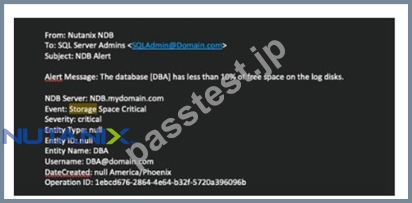
An administrator is receiving critical NDB email alerts regarding storage for the DBA database, which is a member of a database group.
How would the administrator remediate the issue within NDB?
- A. From the Database Summary page for the DBA database, use the Scale option to grow the storage accordingly.
- B. From the Alerts page, select the alert, choose Set Status to Resolved, and Scale the storage via the Resolve Now dialogue box.
- C. From Prism Central, add additional storage to the VM, then expand the log storage via the database tools.
- D. From the Databases page, select the Database group and Scale the storage from the Database Actions menu.
正解:A
解説:
The administrator can remediate the issue of critical storage alerts by scaling up the storage directly from the Database Summary page for that specific DBA database. This action allows for an increase in storage capacity to alleviate space constraints and prevent future critical alerts related to storage space1. The other options are not correct, as they either involve scaling the entire database group, which may not be necessary or desired, or require additional steps outside of NDB, which may not be feasible or efficient. References:
* 1: Nutanix Database Automation (NCP-DB) course, Module 2: Database Provisioning, Lesson 2.4:
Database Scaling, slide 5
質問 # 99
An administrator is experiencing issues with NDB and some of its operations. A case has been logged with Nutanix Support and a request has been made to gather a diagnostics bundle.
Where are two valid places to generate and download a diagnostics bundle? (Choose two.)
- A. NDB CLI
- B. Prism Central GUI
- C. Prism Element GUI
- D. NDB GUI
正解:A、D
解説:
When an administrator experiences issues with NDB and Nutanix Support requests a diagnostics bundle, it can be generated from two valid locations. The NDB GUI provides an option under the administration or support section to create and download the bundle, offering a user-friendly interface. Alternatively, the NDB CLI allows generation via specific commands (e.g., era diagnostics collect), providing a scriptable approach.
Both methods are supported for troubleshooting and support purposes.
* Option A (Prism Central GUI) is incorrect because diagnostics for NDB are managed within NDB interfaces, not Prism Central.
* Option B (Prism Element GUI) is incorrect as Prism Element focuses on cluster management, not NDB-specific diagnostics.
* Option C (NDB GUI) is correct as it supports bundle generation via the UI.
* Option D (NDB CLI) is correct as it supports bundle generation via command-line tools.
References
* Nutanix Database Service (NDB) User Guide, Chapter 6: Administering an NDB Environment, Section: Generating Diagnostics Bundle
* Nutanix Support & Insights, Knowledge Base Article: "Collecting NDB Diagnostics for Support"
* Nutanix Certified Professional - Database Automation (NCP-DB) v6.5 Blueprint, Section 6: Administer an NDB Environment
質問 # 100
Where would an administrator find the total space being used by all Era clones for a specific database?
- A. On the Database > Overview dashboard.
- B. Under the Capacity widget on the Database Server VMS > List database summary page.
- C. Under the Cloning widget on the Databases > Clones database summary page.
- D. On the Era Dashboard Database Summary Table under Clones.
正解:C
解説:
Nutanix Era leverages the Nutanix time-efficient snapshots to create the clones1. These database clones are highly space-efficient, consuming near-zero bytes by having only the further writes constituting to its size1.
Therefore, an administrator would find the total space being used by all Era clones for a specific database under the Cloning widget on the Databases > Clones database summary page. The other options do not specifically provide information about the total space used by all Era clones for a specific database. Therefore, the correct answer is A. Under the Cloning widget on the Databases > Clones database summary page.
質問 # 101
An administrator needs to deploy a cumulative update (CU) for SQL Server.
What steps would the administrator take to prepare this deployment with NDB?
- A. Apply the patch to the profile VM, then create a new Software Profile version using the profile VM as the source.
- B. Create a new Software Profile using the CU executable and publish that profile.
- C. Apply the patch to the profile VM, delete the existing Software Profile and create a new Software Profile using the profile VM as the source.
- D. Create a new Software Profile version using the CU executable and publish that version.
正解:A
解説:
The correct answer is C because it follows the recommended procedure for applying a CU to a SQL Server Software Profile in NDB. By applying the patch to the profile VM, the administrator ensures that the CU is compatible with the existing Software Profile settings and configuration. By creating a new Software Profile version, the administrator preserves the previous version of the Software Profile for rollback purposes and allows the new version to be tested and published. Option A is incorrect because it deletes the existing Software Profile, which may cause data loss and prevent rollback. Option B is incorrect because it does not apply the patch to the profile VM, which may result in errors or inconsistencies in the Software Profile.
Option D is incorrect because it creates a new Software Profile instead of a new version, which may cause confusion and duplication.
References: The following sources provide more information about the Software Profile management and patching in NDB:
* Nutanix Database Management & Automation (NDMA) course, Module 5: Patching Databases Using NDB, Lesson 5.2: Creating and Modifying Software Profiles
* Nutanix Certified Professional - Database Automation (NCP-DB) v6.5, Knowledge Objectives, Section
4 - Operate and Maintain an NDB Environment
* Nutanix Database Service (NDB) User Guide, Chapter 5: Patching Databases Using NDB, Section 5.2:
Creating and Modifying Software Profiles
* Nutanix Database Service (NDB) User Guide, Chapter 5: Patching Databases Using NDB, Section 5.3:
Testing and Publishing Database Patches
質問 # 102
Where would an administrator find the total space being used by all Era clones for a specific database?
- A. On the Database > Overview dashboard.
- B. Under the Capacity widget on the Database Server VMS > List database summary page.
- C. Under the Cloning widget on the Databases > Clones database summary page.
- D. On the Era Dashboard Database Summary Table under Clones.
正解:C
解説:
Nutanix Era leverages the Nutanix time-efficient snapshots to create the clones1. These database clones are highly space-efficient, consuming near-zero bytes by having only the further writes constituting to its size1.
Therefore, an administrator would find the total space being used by all Era clones for a specific database under the Cloning widget on the Databases > Clones database summary page. The other options do not specifically provide information about the total space used by all Era clones for a specific database. Therefore, the correct answer is A. Under the Cloning widget on the Databases > Clones database summary page.
質問 # 103
An administrator selected Bronze SLA for Era Time Machine during database registration.
Which two capabilities are supported by the Time Machine for this database? (Choose two,)
- A. Snapshots
- B. Log Catch up
- C. Cloning
- D. Provwonng
正解:A、B
解説:
The Nutanix Era Time Machine provides various capabilities depending on the Service Level Agreement (SLA) selected during database registration1. For a database with a Bronze SLA, the Time Machine supports both "Log Catch up" and "Snapshots"2. "Log Catch up" allows the Time Machine to keep up with the latest changes in the database by capturing log data2. "Snapshots" are point-in-time copies of the database that can be used for recovery or cloning2.
質問 # 104
Which two processes should an administrator take to create a software profile version for a newly-released Oracle ISc patch? (Choose two.)
- A. 1. Create new software profile version from the original software profile using the cloned VM where OPatchAuto was run successfully using Era Gul.
2. Mark the original patch profile as deprecated. - B. 1. Download the required patch from Microsoft Support.
2. Apply the patch to the Oracle Home/Grid Home on e cloned VM of the gold image using OPatchAuto utiliv.
3. Ensure success of patch application. - C. 1. Download the required patch from MyOracle Support
2. Apply the patch to the Oracle Home Grid Home on a cloned VM of the gold image using O PatchAuto
3. Ensure success of patch application - D. 1. Create new software profile version from the original software profile using the cloned VM where OPatchAuto was run successfully using Era Gul.
2. Mark the original patch profile as hidden.
正解:C、D
解説:
To create a software profile version for a newly-released Oracle ISc patch, an administrator should follow these steps:
* Download the required patch from MyOracle Support1. This is because Oracle patches are typically available from MyOracle Support, not Microsoft Support.
* Apply the patch to the Oracle Home/Grid Home on a cloned VM of the gold image using OPatchAuto1.
OPatchAuto is a utility provided by Oracle that automates the process of applying patches to a database.
* Ensure success of patch application1. It's important to verify that the patch has been applied successfully to avoid any issues down the line.
* Create a new software profile version from the original software profile using the cloned VM where OPatchAuto was run successfully using Era GUI1. This step is necessary to ensure that the new patch is included in the software profile.
* Mark the original patch profile as hidden1. This step is optional but can be useful for keeping the software profile clean and organized.
Please note that these answers are based on the information available as of my last update in 2021 and may need to be verified with the most recent Nutanix Database Automation (NCP-DB) documentation or resources.
質問 # 105
An administrator has been asked to provision a new Oracle single instance database, but cannot proceed with the first step of the wizard. Which statement best describes the current situation?
- A. Time Machine is not configured.
- B. A snapshot must be taken on the original DB.
- C. No remote clusters are configured.
- D. Software profile is missing.
正解:D
解説:
When an administrator cannot proceed with the first step of the wizard to provision a new Oracle single instance database in NDB, the most likely reason is that a software profile for Oracle is missing. NDB requires a software profile (which defines the database version, patches, and configuration) to provision a database instance. Without a profile created from a reference VM or uploaded manually, the wizard cannot proceed, as it relies on this profile to configure the instance correctly.
* Option A (Time Machine is not configured) is incorrect because Time Machine is optional for backups and not required for initial provisioning.
* Option B (Software profile is missing) is correct as it is a mandatory prerequisite for provisioning any database instance.
* Option C (No remote clusters are configured) is incorrect because remote clusters are relevant for multi-cluster setups, not single instance provisioning.
* Option D (A snapshot must be taken on the original DB) is incorrect because snapshots are for protection, not a prerequisite for provisioning.
The administrator must create or import a software profile to resolve this issue.
References
* Nutanix Database Service (NDB) User Guide, Chapter 4: Managing Software Profiles, Section:
Provisioning Databases
* Nutanix Support & Insights, Knowledge Base Article: "Troubleshooting Provisioning Failures in NDB"
* Nutanix Certified Professional - Database Automation (NCP-DB) v6.5 Blueprint, Section 4: Manage Database Software Profiles
質問 # 106
......
信頼できるNutanix Certified Professional (NCP) NCP-DB問題集PDF2025年09月28日最近更新された問題:https://www.passtest.jp/Nutanix/NCP-DB-shiken.html
最新NCP-DB試験問題集には合格保証付きます:https://drive.google.com/open?id=1cOcR9tN6W6CYxkDtM6FG0SdEaJK-EuS_