

[2024年最新] 高合格率な最新010-160テストノートと010-160高合格率な試験ガイドを試そう
010-160実際の問題アンサーPDFには100%カバーリアル試験問題
LPI 010-160 試験は、世界的に認められており、Linux管理における知識とスキルを証明する素晴らしい方法です。この認定は、特にIT業界でのキャリアを目指す人々にとって非常に価値があります。多くの企業がLinux管理に熟練した専門家を求めており、この認定はキャリアアップや異なるキャリアパスへの転換を目指す個人にとっても役立ちます。
質問 # 23
Which files are the source of the information in the following output? (Choose two.) uid=1000 (bob) gid=1000 (bob) groups=1000 (bob), 10 (wheel), 150 (wireshark), 989 (docker), 1001 (libvirt)
- A. /var/db/users
- B. /home/index
- C. /etc/passwd
- D. /etc/id
- E. /etc/group
正解:C、E
質問 # 24
Which command adds the new usertuxand creates the user's home directory with default configuration files?
- A. usercreate tux
- B. passwd -a tux
- C. defaultuser tux
- D. useradd -m tux
- E. useradd -o default tux
正解:D
解説:
Explanation
The useradd command in Linux is used to create new user accounts on the system1. The -m option tells the command to create the user's home directory as /home/username and copy the files from /etc/skel directory to the user's home directory2. The /etc/skel directory contains the default configuration files for new users3.
Therefore, the command useradd -m tux will add the new user tux and create the user's home directory with default configuration files. The other options are either invalid or do not create the user's home directory.
References:
* Linux Essentials Version 1.6 Objectives, Topic 1.4: Command Line Basics, Subtopic: Basic Shell Commands
* Linux Essentials Version 1.6 Exam Preparation Guide, Section 1.4: Command Line Basics, Page 16
* Linux useradd Command Tutorial for Beginners (15 Examples)
質問 # 25
Which of the followingoutputs could stem from the commandlast?
- A. Last login: Fri Mar 23 10:56:39 2018 from server.example.com
- B. root tty2 Wed May 17 21:11 - 21:11 (00:00)
- C. 1 ls
2 cat text.txt
3 logout - D. EXT4-fs (dm-7): mounted filesystem with ordered data mode. Opts: (null)
- E. Password for user last changed at Sat Mar 31 16:38:57 EST 2018
正解:B
質問 # 26
What is true about thedmesgcommand? (Choose two correct answers.)
- A. It sends messages to the command lines of all current user sessions.
- B. It displays the content of the Linux kernel's ring buffer.
- C. It immediately outputs all new messages written to the system journal.
- D. It might not display older information because it was overwritten by newer information.
- E. It traces the execution of a command and shows each step the program carries out.
正解:B、D
質問 # 27
What is true about the su command?
- A. It runs a shell or command as another user.
- B. It is the default shell of the root account.
- C. It changes the name of the main administrator account.
- D. It locks the root account in specific time frames.
- E. It can only be used by the user root.
正解:A
質問 # 28
What is the UID of the user root?
- A. 0
- B. 1
- C. 2
- D. 3
- E. 4
正解:A
解説:
Explanation
The UID of the user root is always 0 on Linux systems. This is because the kernel uses the UID 0 to check for the superuser privileges and grant access to all system resources. The name of the user account with UID 0 is usually root, but it can be changed or have aliases. However, some applications may expect the name root and not work properly with a different name. The UID 0 is reserved for the root user and cannot be assigned to any other user. The UID 0 is stored in the /etc/passwd file along with other user information. References:
* Linux Essentials Topic 104: The Linux Operating System, section 104.4: Runlevels and Boot Targets.
* Linux Essentials Topic 106: Security and File Permissions, section 106.1: Basic security and identifying user types.
* Linux Essentials Topic 106: Security and File Permissions, section 106.2: Creating users and groups.
質問 # 29
What is the preferred source for the installation of new applications in a Linux based operating system?
- A. The vendor's website
- B. A CD-ROM disk
- C. A retail store
- D. The vendor's version management system
- E. The distribution's package repository
正解:E
解説:
Explanation
The distribution's package repository is the preferred source for the installation of new applications in a Linux based operating system. A package repository is a collection of software packages that are maintained by the distribution and can be easily installed, updated, or removed using a package manager. Package repositories offer several advantages, such as:
* They ensure compatibility and stability with the system and other packages.
* They provide security updates and bug fixes for the packages.
* They reduce the risk of malware or corrupted files.
* They simplify the dependency management and configuration of the packages.
The other sources are not preferred because they may not offer these benefits and may cause problems with the system. The vendor's version management system, the vendor's website, or a CD-ROM disk may contain packages that are not compatible with the distribution or may conflict with other packages. A retail store may not have the latest or the most suitable packages for the system. References:
* Linux Essentials - Linux Professional Institute (LPI), section 1.3 Installing, Updating and Removing Software Packages
* LPI Linux Essentials Study Guide: Exam 010 v1.6, 3rd Edition, chapter 4 Working on the Command Line, section 4.2 Managing Software
* Table of Contents - Linux Professional Institute Certification Programs, section 1.3 Installing, Updating and Removing Software Packages
質問 # 30
Which of the following outputs comes from the commandfree?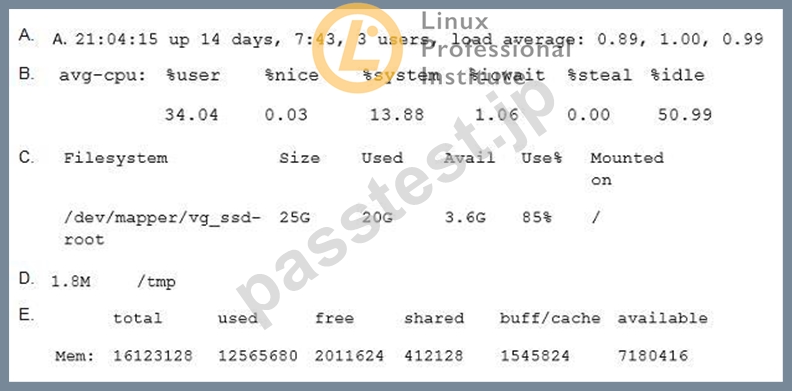
- A. Option C
- B. Option D
- C. Option B
- D. Option A
- E. Option E
正解:E
質問 # 31
Which of the following are typical services offered by public cloud providers? (Choose three correct answers.)
- A. Platform as a Service(PaaS)
- B. Infrastructure as a Service(IaaS)
- C. Internet as a Service(IaaS)
- D. Software as a Service (SaaS)
- E. Graphics as a Service (GaaS)
正解:A、B、D
解説:
Explanation
These are the three most common service models offered by public cloud providers12. They differ in the level of abstraction and control they provide to the customers.
* Platform as a Service (PaaS) is a service model where the public cloud provider offers a ready-to-use platform for developing, testing, and deploying applications. The provider manages the underlying infrastructure, such as servers, storage, network, and operating system, while the customer only needs to focus on the application code andconfiguration. Examples of PaaS include Google App Engine, IBM Cloud Foundry, and Microsoft Azure App Service12.
* Infrastructure as a Service (IaaS) is a service model where the public cloud provider offers access to fundamental compute, network, and storage resources on demand over the public Internet or through dedicated connections. The provider manages the physical hardware and virtualization layer, while the customer has full control over the configuration and management of the virtual machines, operating system, and applications. Examples of IaaS include Google Compute Engine, IBM Cloud Virtual Servers, and Microsoft Azure Virtual Machines12.
* Software as a Service (SaaS) is a service model where the public cloud provider offers ready-to-use software applications that run on the provider's infrastructure and are accessible through a web browser or a mobile app. The provider manages the entire software stack, including the infrastructure, platform, and application, while the customer only needs to pay for the usage or subscription of the service. Examples of SaaS include Google Workspace, IBM Watson, and Microsoft Office 36512.
References:
* What is Public Cloud | IBM
* What Is a Public Cloud? | Google Cloud
質問 # 32
What parameter of ls prints a recursive listing of a directory's content? (Specify ONLY the option name without any values or parameters.)
正解:
解説:
lsR
質問 # 33
Which of the following outputs comes from the command free?
- A.

- B.

- C.

- D.

- E.

正解:D
質問 # 34
Which of the following commands adds the directory /new/dir/ to the PATHenvironment variable?
- A. export PATH=/new/dir: $PATH
- B. export PATH=/new/dir: PATH
- C. export $PATH=/new/dir: $PATH
- D. $PATH=/new/dir: $PATH
- E. PATH=/new/dir: PATH
正解:A
解説:
Explanation/Reference:
質問 # 35
Which of the following examples shows the general structure of a for loop in a shell script?
- A. for file in *.txt do
echo $i done - B. for *.txt ( echo $i )
- C. for ls *.txt exec {} \;
- D. foreach @{file} { echo $i
} - E. for *.txt as file => echo $file
正解:A
解説:
Explanation
The general structure of a for loop in a shell script is as follows12:
for variable in list do commands done
The variable is the name of a loop counter or iterator that takes on the values of the items in the list. The list can be a sequence of words, numbers, filenames, or the output of a command. The commands are the body of the loop that are executed for each value of the variable. The do and done keywords mark the beginning and the end of the loop body.
The option C. for file in *.txt do echo $i done follows this structure, with the variable being file, the list being
*.txt (which matches all the files with the .txt extension in the current directory), and the command being echo
$i (which prints the value of the variable i, which is presumably set somewhere else in the script).
The other options are incorrect because:
* A. for *.txt as file => echo $file uses an invalid syntax for a for loop. The as keyword is not part of the shell script syntax, and the => symbol is not a valid operator. The correct way to write this loop would be:
for file in *.txt do echo $file done
* B. for *.txt ( echo $i ) uses an invalid syntax for a for loop. The parentheses are not part of the shell script syntax, and the loop body is missing the do and done keywords. The correct way to write this loop would be:
for i in *.txt do echo $i done
* D. for ls *.txt exec {} ; uses an invalid syntax for a for loop. The ls command is not a valid variable name, and the exec {} ; is not a valid command. This looks like a mix of a for loop and a find command.
The correct way to write this loop would be:
for file in *.txt do exec $file done
* E. foreach @{file} { echo $i } uses an invalid syntax for a for loop. The foreach keyword is not part of the shell script syntax, and the @{file} and { echo $i } are not valid expressions. This looks like a mix of a for loop and a Perl syntax. The correct way to write this loop would be:
for file in * do echo $file done
References:
* Looping Statements | Shell Script - GeeksforGeeks
* How do I write a 'for' loop in Bash? - Stack Overflow
質問 # 36
Which of the following tasks can the command passwd accomplish? (Choose two.)
- A. Change a user's username.
- B. Change a user's password.
- C. Create a new user group.
- D. Lock a user account.
- E. Create a new user account.
正解:D、E
質問 # 37
What is a Linux distribution?
- A. The Linux file system as seen from the root account after mounting all file systems.
- B. The set of rules which governs the distribution of Linux kernel source code.
- C. A bundling of the Linux kernel, system utilities and other software.
- D. A set of changes to Linux which enable Linux to run on another processor architecture.
- E. An operating system based on Linux but incompatible to the regular Linux kernel.
正解:C
解説:
Explanation
A Linux distribution is a collection of software that is based on the Linux kernel and can be installed on a computer or a device to create a functional operating system. A Linux distribution typically includes the Linux kernel, a set of system utilities and libraries, a graphical user interface (GUI), a package manager, and various applications and services. A Linux distribution may also include additional software or features that are specific to the distribution's goals, target audience, or philosophy. For example, some Linux distributions are designed for desktop users, while others are optimized for servers, embedded systems, or security. Some Linux distributions are based on other Linux distributions, while others are developed independently. Some Linux distributions are free and open source, while others are proprietary or commercial. Some Linux distributions are popular and widely used, while others are niche or experimental. Some examples of Linux distributions are Ubuntu, Fedora, Debian, Mint, Arch, and Red Hat. References:
* Linux Essentials Topic 101: System Architecture, section 101.1: Determine and configure hardware settings.
* Linux Essentials Topic 102: Linux Installation and Package Management, section 102.1: Design hard disk layout.
* Linux Essentials Topic 103: GNU and Unix Commands, section 103.1: Work on the command line.
* Linux Essentials Topic 104: The Linux Operating System, section 104.1: Boot the system.
* Linux Essentials Topic 105: The Power of the Command Line, section 105.1: Use text streams and filters.
* Linux Essentials Topic 106: Security and File Permissions, section 106.3: Modify file and directory permissions.
* What is a Linux distribution? - Linux.com
* Linux distribution - Wikipedia
* Best Linux Distributions For Everyone in 2023 - It's FOSS
質問 # 38
Which of the following directories must be mounted with read and write access if it resides on its own dedicated file system?
- A. /lib
- B. /etc
- C. /opt
- D. /usr
- E. /var
正解:E
質問 # 39
......
Lpi 010-160(Linux Essentials Certificate Exam、バージョン1.6)は、Linuxのキャリアを追求したい個人のための基礎レベルの認定試験です。この試験は、広範なトピックをカバーし、候補者の基本的なタスクを実行するためのコマンドラインインターフェイスの能力を評価します。この認定は国際的に認められており、IT業界で多くの仕事の機会を提供します。
010-160試験問題とアンサー:https://www.passtest.jp/Lpi/010-160-shiken.html
合格できる010-160試験情報と無料練習テスト:https://drive.google.com/open?id=1lxbFLOXtK1wmsPZHjp2E29rycAXZbnzl