

[2024年05月]更新のServiceNow CIS-Discovery日本語問題集合格率を上げるならCIS-Discovery日本語試験問題集
あなたのゴールを成し遂げるための問題集!あなたのCertified Implementation Specialist - Discovery (CIS-Discovery日本語版)の試験準備を合格するために実際のServiceNow CIS-Discovery日本語問題集をおすすめします
質問 # 10
検出プロセス中に、資産レコードが作成されるかどうかは何が決定されますか?
- A. モデル製品
- B. ECC キュー
- C. CMDB
- D. モデル カテゴリ
- E. 設定項目
正解:D
質問 # 11
Tomcat [cmdb_ci_app_server_tomcat] テーブルとアプリケーション サーバー [cdmb_ci_app_server] テーブルの関係を最もよく説明しているものは次のうちどれですか? (2つお選びください。)
- A. Tomcat テーブルはアプリケーション サーバー テーブルの親です
- B. Tomcat テーブルは Application Server テーブルの子です。
- C. Tomcat テーブルはアプリケーション サーバー テーブルを拡張します
- D. Tomcat はアプリケーション サーバー テーブルを拡張しません
正解:B、C
質問 # 12
アクティブな検出エラーと各エラーのヘルプ リンクを提供する選択肢はどれですか?
- A. 検出ダッシュボード
- B. 検出スケジュール
- C. MID サーバー ダッシュボード
- D. IP アドレス障害レポート
正解:A
解説:
The Discovery Dashboard provides a summary of the Discovery status, including the number of active discovery errors, the number of devices discovered, and the number of credentials used. Each error has a help link that provides more information about the cause and possible solutions.
References:
* Discovery Dashboard
* Discovery troubleshooting | Error messages
質問 # 13
次のパターン操作のクエリのターゲットはどれですか? (2つお選びください。)
- A. WMI クエリ
- B. テーブルを結合
- C. 解析変数
- D. プロセスの取得
正解:A、D
解説:
Pattern operations are the building blocks of patterns that define the logic and actions to perform on the target CIs. Some pattern operations query targets to retrieve information or execute commands, while others manipulate data or perform other tasks. WMI Query and Get Process are examples of pattern operations that query targets. WMI Query executes a Windows Management Instrumentation (WMI) query on a Windows target and stores the results in a variable. Get Process executes a command to list the processes running on a target and stores the results in a variable12.
References:
* Pattern operations - Product Documentation: Vancouver - ServiceNow
* Pattern operations - Product Documentation: San Diego - Now Support Portal
質問 # 14
水平パターンのパターン デザイナーの右端のセクションには何が表示されますか? (2つお選びください。)
- A. 操作
- B. CMDB ダッシュボード
- C. 一時変数
- D. CI 属性
正解:A、C
解説:
The Pattern Designer is a graphical tool that allows users to create and edit horizontal discovery patterns. The Pattern Designer has three main sections: the left section shows the CI type and the pattern type, the middle section shows the pattern steps and the flow diagram, and the far-right section shows the details of the selected step or operation. The far-right section can display the following tabs, depending on the type of step or operation selected12:
* Operations: This tab shows the list of available operations that can be added to the pattern, such as Execute Command, Parse File, Set Parameter Value, etc. Operations are the basic building blocks of a pattern that perform specific actions on the target device or the MID Server.
* CI Attributes: This tab shows the list of attributes that can be set or updated for the CI type of the pattern, such as name, serial number, manufacturer, etc. CI attributes are used to populate the CI record in the CMDB with the information collected by the pattern.
* Temporary Variables: This tab shows the list of temporary variables that can be created or used by the pattern, such as $result, $output, $user_var, etc. Temporary variables are used to store and manipulate data within the pattern, such as the output of a command, the value of a parameter, or the result of a calculation.
* CMDB Dashboard: This tab shows the CMDB dashboard that displays the CI record and its related lists, such as relationships, identification rules, sensors, etc. The CMDB dashboard is used to preview and verify the outcome of the pattern on the CI record in the CMDB.
References:
* 1: ServiceNow Discovery Documentation, Pattern Designer section
* 2: ServiceNow Discovery Overview, page 11
質問 # 15
MID サーバーが WinRM を使用してサーバーにアクセスできるようにするには、次のどれを構成する必要がありますか? (2つお選びください。)
- A. MID サーバー パラメーター WinRM を追加
- B. MID サーバーをサーバー上の WinRM グループ ポリシーに追加する必要があります
- C. JEA プロパティを True に設定
- D. MID サーバーは DNS の信頼できるソースとして構成する必要があります
正解:A、B
解説:
To allow a MID Server to access servers using WinRM, the following configurations are required:
* MID Servers need to be added to the WinRM Group policy on the Servers: This enables the servers to accept WinRM connections from the MID Servers and grant them the necessary permissions to execute commands and scripts1.
* MID Server Parameters Add WinRM: This enables the MID Server to use WinRM as a protocol for Discovery and Orchestration and specify the WinRM port, authentication method, and encryption settings2.
References:
* Configure Windows servers for WinRM
* MID Server Parameters Add WinRM
質問 # 16
水平検出パターンで使用されないものは次のうちどれですか?
- A. 識別セクション
- B. 操作
- C. 接続セクション
- D. 変数
正解:C
解説:
A horizontal discovery pattern is a sequence of operations that collects information about a specific type of configuration item (CI), such as an operating system, a database, or a web server1. A horizontal discovery pattern does not use the connectivity section, which is only used for the application pattern type2. The connectivity section defines how to connect to a CI and run commands on it3. A horizontal discovery pattern uses the following sections1:
* Variables: Defines the variables that store the data collected by the pattern and map them to the target table fields.
* Identification: Defines the criteria to identify a CI and update or create a record in the CMDB.
* Operations: Defines the actions to perform on the target CI, such as running commands, querying databases, or parsing files.
References: 1: ServiceNow Docs - Horizontal discovery patterns 2: ServiceNow Docs - Application pattern types 3: ServiceNow Docs - Connectivity section
質問 # 17
MID サーバーがインスタンスのバージョンを自動的に最新の状態に保つためにアクセスするには、次のどれが必要ですか?
- A. install.service-now.com
- B. docs.servicenow.com
- C. developer.service-now.com
- D. service-now.com
正解:A
質問 # 18
水平パターンのパターン デザイナーの右端のセクションには何が表示されますか? (2つお選びください。)
- A. 操作
- B. CMDB ダッシュボード
- C. CI 属性
- D. 一時変数
正解:A、B
質問 # 19
検出パターンでは、パターン デザイナーの CI 属性でどのタイプを使用できますか? (2つお選びください。)
- A. メインパターン CI タイプ
- B. 関連する CI タイプ
- C. グローバル CI タイプ
- D. すべての CI タイプ
正解:A、B
質問 # 20
複数の CI データ ソースがある場合、CI 属性を更新できるソースを決定するにはどの選択が最適ですか?
- A. データ証明書
- B. ビジネス ルール
- C. 調整ルール
- D. 変換マップ
正解:C
質問 # 21
新しい SNMP ネットワーク デバイスの検出中に、検出ステータスで「アクティブ、分類できませんでした」というエラーが発生する可能性がある選択はどれですか?
- A. MID サーバーとターゲット デバイス間の通信をブロックするファイアウォール。
- B. 新しいデバイス用に SNMP 分類を更新または作成する必要があります。
- C. SNMP のみの動作が設定されていません。
- D. SNMP 認証情報が正しくありません。
正解:B
解説:
In ServiceNow Discovery, when encountering the error 'Active, couldn't classify' during the discovery of a new SNMP network device, it typically indicates an issue with the classification process. Classification is a crucial initial step in the Discovery process, where the system determines the type of device it is interacting with. If an SNMP Classification rule for the new device type does not exist or needs updating, Discovery will be unable to classify and thus properly discover the device. Incorrect SNMP credentials or firewall issues usually result in different types of errors, such as authentication failures or no response from the device.
質問 # 22
デフォルトでは、水平検出パターンの変数として自動的に使用できるのは次のうちどれですか? (2つお選びください。)
- A. コンピューターシステム
- B. 検出パターン フォームの CI タイプ
- C. インフラストラクチャ システム
- D. windows_cmdb_ci
正解:A、B
質問 # 23
30 日以内に発見されない特定の CI を削除する方法はどれですか?
- A. サービスマッピング
- B. UI ポリシー
- C. データポリシー
- D. スケジュールされたジョブ
正解:C
質問 # 24 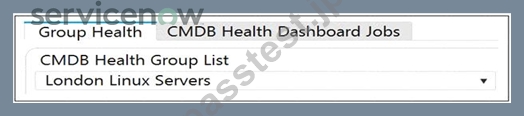
次の画像に基づいて、London Linux サーバーに関して正しいのは次の選択肢のうちどれですか?
- A. ダッシュボード グループ タイプの CMDB グループです。
- B. これは、ヘルス グループ タイプの CMDB グループです。
- C. デフォルトのグループ タイプの CMDB グループです。
- D. ロンドンのデータセンター グループです。
正解:B
解説:
London Linux Servers is a CMDB Group with Health Group type. A CMDB Group is a collection of configuration items (CIs) that share common characteristics or are related in some way1. A Health Group is a type of CMDB Group that is used to monitor and measure the health of a specific set of CIs based on predefined rules and metrics2. The image shows that London Linux Servers is selected from the CMDB Health Group List, which is a dropdown menu that displays all the Health Groups defined in the system3. The image also shows the Group Health tab, which displays the health scores and indicators for the selected Health Group.
References: 1: Create a CMDB group - ServiceNow 2: CMDB health groups - ServiceNow 3: CMDB health dashboard - ServiceNow : [View CMDB health scores - ServiceNow]
質問 # 25
検出に動作を使用する方法を最もよく表す選択肢はどれですか?
- A. CI の [動作] チェックボックス。
- B. 検出 IP 範囲の [動作] ドロップダウン メニュー。
- C. 検出スケジュールでの MID サーバーの選択方法。
- D. 検出ステータスの [動作] ドロップダウン メニュー。
正解:B
解説:
A Behavior is a set of rules that determines which MID Servers launch which types of probes during a Discovery1. It can be assigned to a Discovery IP Range, which is a range of IP addresses that Discovery scans for CIs2. By using the Behavior drop-down menu on a Discovery IP Range, one can control how Discovery behaves for each IP address in that range3. The other options are not related to using a Behavior for discovery. The MID Server selection method on a Discovery Schedule is a way to specify which MID Servers are eligible to run Discovery for a given schedule4. The Behavior drop-down menu on a Discovery Status is a way to filter the Discovery Status records by the Behavior used. The Behavior checkbox on a CI is a way to indicate whether the CI was discovered using a Behavior or not.
References: 1: Discovery behaviors 2: Discovery IP ranges 3: Assign a behavior to an IP range 4: MID Server selection method : Discovery Status : Behavior field on the cmdb_ci table
質問 # 26
ファイルベースの検出は、 の実行中にトリガーされます。
- A. パターンフェーズ
- B. 探索フェーズ
- C. 分類フェーズ
- D. 識別フェーズ
- E. スキャンフェーズ
正解:B
解説:
File-based Discovery is a process that helps identify what software is running on your Windows and UNIX servers and devices, even if there is no registration information available. File-based Discovery is triggered in the exploration phase of normal Discovery, after the target device has been classified and identified. File-based Discovery probes execute a scan searching for specific file extensions or file names in paths that you configure. The resulting file information is returned in the probe payload. The sensor attempts to match the discovered files with installed software, using the file name, size, and version returned by the probe.
References: File-based Discovery, File Based Discovery - Support and Troubleshooting
質問 # 27
......
正確でかつ完璧 アンサーはまるでリアル試験問題:https://www.passtest.jp/ServiceNow/CIS-Discovery-JPN-shiken.html