

[2025年更新]早速ゲットしてトップランクのSAP C-THR86-2411試験問題集
パスする秘訣はC-THR86-2411をゲットして認証された試験エンジンPDF
質問 # 33
What happens to compensation forms when the currency conversion table is updated during the planning period?
- A. In-progress forms are only affected when Update All Worksheets is run.
- B. Change is dynamic to in-progress forms.
- C. In-progress forms are NOT affected.
- D. Only completed forms are affected.
正解:B
解説:
When the currency conversion table is updated during a planning period, in-progress forms reflect these changes dynamically.
* Option C: "Change is dynamic to in-progress forms."
* In SAP SuccessFactors Compensation, currency conversion updates affect in-progress worksheets immediately and dynamically without the need for manual updates. This feature ensures accurate currency data throughout the planning period.
質問 # 34
What checks can you make with the Check tool? Note: There are 2 correct answers to this question.
- A. Reportable fields correctly configured
- B. Circular hierarchies for form creation
- C. Accuracy of formula calculations
- D. Custom validations correctly configured
正解:B、C
質問 # 35
What is the recommended leading practice workflow for a compensation template?
- A. Process Setup Manager Planning → Next Level Manager Review → Third Level Manager Review → Complete
- B. Manager Planning → Next Level Manager Review → HR Manager Planning → Complete
- C. Process Setup → Manager Planning → Next Level Manager Review → Final Review → Complete
- D. Manager Planning → Next Level Manager Review → Compensation Admin Review → HR Manager Planning → Complete
正解:C
質問 # 36
Your customer has part-time full-time employees. You notice that for part-time employees, their compa-ratio in EC is different than in Compensation. What do you configure in the system to have it calculate the correct compa-ratio take into account the FTE?
- A. Add values in the EC Pay Range object to align with each FTE.
- B. Set the XML attribute isActualSalary Imported to False in the compensation plan template ensure standard FTE field is used.
- C. Create a custom Amount column to store FTE rather than using the standard FTE column.
- D. Set the XML attribute isActualSalaryImported to True in the compensation plan template ensure standard FTE field is used.
正解:B
質問 # 37
Your customer has a compensation plan template with the functional currency USD. The manager's own currency is EUR. The manager's compensation worksheet contains employees who are paid in the following currencies: EUR, USD, CHF, GBP. Which view must you enable to make sure the manager can display the salary of all of their employees in GBP?
- A. The includeFunctionalCurrency view
- B. The includePlannerCurrency view
- C. The includeLocalCurrency view
- D. The includeAnyCurrency view
正解:C
質問 # 38
A customer is using the Standard Manager hierarchy would like the following approval process:
1.Planning Manager
2.Next Level Manager
3.Reward Team member who launched the forms How will you set this up in the Route Map?
- A. Employee Manager - User
- B. Manager - Manager's Manager - User
- C. Manager - Manager's Manager - Originator
- D. Employee Manager - Originator
正解:D
質問 # 39
Which of the following fields can be used to group budgets? Note: There are 2 correct answers to this question.
- A. Any custom, reportable, read-only String field
- B. Currency Code (localCurrencyCode)
- C. Performance Rating (pmRating)
- D. Pay Grade (payGrade)
正解:A、B
質問 # 40
Your client is using Salary Proration importing the Proration percentage rather than using Start End Dates. An employee is imported with a 50% proration. The merit guideline table for this employee would normally be 4-
6%.
The planner enters a $1,000 merit increase, which is within the displayed guidelines. Which of the following scenarios is accurate?
- A. Guideline is displayed as 4-6%
*Total Increase is $1,000 - B. Guideline is displayed as 2-3%
*Total Increase is $500 - C. Guideline is displayed as 2-3%
*Total Increase is $1,000 - D. Guideline is displayed as 4-6%
*Total Increase is $500
正解:B
解説:
When Salary Proration is used with a proration percentage (50% in this case) rather than dates, it affects both the guideline range and the total increase.
* Proration Impact on Guideline Range and Total Increase
* Guideline Adjustment: Since the proration is set to 50%, the guideline range (normally 4-6%) is adjusted by 50%, resulting in a prorated guideline of 2-3%.
* Total Increase Calculation: When the planner enters a $1,000 merit increase, the proration factor is applied, resulting in a final increase of $500 (50% of $1,000).
* Why Other Options Are Incorrect
* Options A and B show the original guideline (4-6%), which does not reflect the proration adjustment.
* Option D incorrectly calculates the total increase without applying the 50% proration.
* Reference Documentation
* SAP SuccessFactors Compensation Guide on Salary Proration and Merit Guidelines.
質問 # 41
A customer would like percentage fields to only show decimal places if they are available. For example, 40.00% should display as 40%, but if the Percentage calculation is 40.54%, they want to display the decimal places.
What number format should you use?
- A. defPercentFormat ###0##
- B. defPercentFormat ####.####
- C. defPercentFormat #,##0.00
- D. defAmountFormat #,##0##
正解:A
質問 # 42
How can the compRating field be used to enhance the compensation worksheet?
Note: There are 2 correct answers to this question.
- A. It allows for performance ratings to use a different rating scale.
- B. It allows for performance form rating overrides.
- C. It allows ratings to be entered directly on the planning worksheet for those employees who do NOT have a performance form.
- D. It allows a second rating field for guidelines.
正解:A、C
質問 # 43
A customer is using the following number format: ###0 Mode: Round down Multiple: 100. How will a value of 9575.50 be displayed?
- A. 0
- B. 1
- C. 2
- D. 3
正解:B
質問 # 44
In an EC-integrated implementation, which of the following EC elements can be used to map fields? Note: There are 3 correct answers to this question.
- A. Pay Components
- B. Time Off
- C. Biographical Information
- D. Background Elements
- E. MDF Objects
正解:A、C、E
質問 # 45
Your customer uses a look-up table to calculate custom budgets, as shown in the screenshot. The budget is based on an employee's country status. In the template, the country is defined with field ID customCountry the status is defined with field ID customStatus.
What is the correct syntax to calculate the adjustment budget?
- A. toNumber(lookup("2018_BudgetPool", custom Country,customStatus,1))"'curSalary
- B. toNumber(lookup("2018_BudgetPool", custom Country,customStatus,adjustment))"curSalary
- C. toNumber(lookup("2018_BudgetPool", custom Country.customStatus,2))"'curSalary
- D. toNumber(lookup("2018_BudgetPool,custom Country, customStatus, Adjustment))*curSalary
正解:A
解説:
In SAP SuccessFactors Compensation, using look-up tables in formulas is a common method to calculate budget adjustments based on multiple criteria like an employee's country and status. This question is about selecting the correct syntax for using a look-up table to calculate a custom budget based on these criteria. Let's break down the logic and syntax for why option A is correct.
* Look-up Table Functionality in Compensation TemplatesIn SuccessFactors Compensation, look-up tables are used to fetch values dynamically based on specific conditions. The lookup function in SAP allows fetching data from a pre-defined table by matching values from specified columns.
* Syntax and Parameters in the Lookup FunctionThe lookup function syntax in SAP SuccessFactors Compensation is generally:
plaintext
Copy code
lookup("<lookupTableName>", <lookupKey1>, <lookupKey2>, <columnIndex>)
* <lookupTableName>: Name of the look-up table (in this case, "2018_BudgetPool").
* <lookupKey1> and <lookupKey2>: The fields in the form template used to search in the look-up table. Here, the customCountry and customStatus fields are used to locate the relevant budget value.
* <columnIndex>: Specifies the index of the column to retrieve. In this scenario, "1" refers to the budget adjustment percentage in the look-up table.
* Correct Formula Explanation
* Option A: toNumber(lookup("2018_BudgetPool", customCountry, customStatus, 1)) * curSalary
* This option correctly uses the lookup function to locate the appropriate adjustment factor (e.
g., 1%) from the 2018_BudgetPool table based on the employee's country
(customCountry) and status (customStatus).
* The toNumber() function is applied to ensure the fetched value is numeric, allowing it to be used in multiplication.
* The formula then multiplies the adjustment factor by the current salary (curSalary) to calculate the adjustment budget.
* Why Other Options Are Incorrect
* Option B: toNumber(lookup("2018_BudgetPool, customCountry, customStatus, Adjustment)) * curSalary
* This option contains syntax errors, such as missing quotation marks around the table name, and "Adjustment" is not a parameter in this lookup. The syntax is incorrect for SuccessFactors' formula setup.
* Option C: toNumber(lookup("2018_BudgetPool", customCountry.customStatus, 2)) * curSalary
* Incorrect because customCountry.customStatus is treated as a single parameter, which is invalid. Each key (customCountry and customStatus) should be separated by a comma, not a period.
* Option D: toNumber(lookup("2018_BudgetPool", customCountry, customStatus, adjustment)) * curSalary
* This option misuses "adjustment" as a parameter in the lookup, which is not defined within the context of the table structure.
* Additional SAP SuccessFactors Compensation References
* SAP SuccessFactors Compensation Guide: Refer to SAP Help Portal's SuccessFactors Compensation Guide for syntax rules of lookup tables.
* Lookup Table Configuration: In the configuration, ensure that the look-up table (2018_BudgetPool) is correctly defined with customCountry and customStatus as keys, and that the adjustment percentage is in the correct column (column index 1 in this example).
The correct formula, Option A, follows SAP's syntax requirements and functional logic to retrieve the adjustment budget accurately.
質問 # 46
In provisioning for your customer's instance, you select the "Assign default required field values for new users if none specified" option. You want to import a compensation-specific user data file (UDF).
Which columns are required?
Note: There are 2 correct answers to this question.
- A. USERID
- B. USERNAME
- C. STATUS
- D. MANAGER
正解:A、C
解説:
When importing a compensation-specific User Data File (UDF) in SAP SuccessFactors Compensation, selecting "Assign default required field values for new users if none specified" in provisioning helps auto-fill necessary fields. However, certain fields must still be present for the import to function correctly:
* USERID: This column uniquely identifies each employee and is mandatory as it links users to their respective records.
* STATUS: This field indicates whether the user is active, inactive, or terminated, which is essential for proper processing in the compensation module. These fields are foundational to user records and are required for accurate data synchronization.References: SAP SuccessFactors Compensation Implementation Guide - Required Fields for User Data File Import.
質問 # 47
Your customer has the requirement where both sales non-sales employees are included on a single compensation template. However, only sales employees are eligible for a lump sum award.
How can you configure a single standard compensation statement template to ensure that just sales employees have a Lump Sum item displayed on their letter?
- A. You can include the Lump Sum item in the statement template set a condition on its display so that it will only be shown if it is greater than 0.
- B. You can hide the Lump Sum column on the compensation worksheet using Field-Based Permissions. If the column is hidden on the worksheet, it won't appear on the statement.
- C. You can include the Lump Sum item in the statement template put a disclaimer in the signature section alerting non-sales employees that that item pertains only to sales employees.
- D. You cannot do this with a single statement template; a second template must be created to include this item statement groups used to assign the templates appropriately.
正解:A
質問 # 48
Which of the following updates require worksheets to be relaunched?
Note: There are 2 correct answers to this question.
- A. Update a formula in a custom column.
- B. Modify the route map.
- C. Revise field-based permissions.
- D. Update lookup table contents.
正解:C、D
質問 # 49
Which of the following API types does SAP recommend to use to achieve clean core integrations? Note: There are 2 correct answers to this question.
- A. OData
- B. SOAP
- C. IDoc
- D. RFC
正解:A、B
質問 # 50
Which of the following can you use to explore released APIs?
- A. SAP Integration Suite
- B. SAP Application Interface Framework
- C. SAP Business Accelerator Hub
正解:C
解説:
SAP provides the SAP Business Accelerator Hub (formerly known as the SAP API Business Hub) as a comprehensive resource to explore released APIs for various SAP products, including SuccessFactors.
* SAP Business Accelerator Hub
* The Business Accelerator Hub hosts an extensive library of APIs, documentation, and use cases for SAP products. Users can explore OData, SOAP, and other available APIs specific to SAP SuccessFactors.
* Why Other Options Are Incorrect
* Option A (SAP Application Interface Framework) is mainly used for error handling and monitoring within on-premise SAP environments.
* Option B (SAP Integration Suite) is used for integration scenarios but does not provide a library to explore APIs; it's intended for creating and managing integrations.
* Reference Documentation
* SAP Help Portal and SAP Business Accelerator Hub on Exploring and Using APIs.
質問 # 51
A customer's salary process has a Final Review step at the end of the route map during which the reward team reviews the recommendations that have been made to ensure budget spend meets limits. The merit guideline is based upon performance rating, compa-ratio, two custom fields, Country Job Family. The customer wishes that the merit increase is reset to the default when the Country changes for an employee, but NOT when the Job Family changes. How can this requirement be met?
- A. Set the Force Default On Custom Column Change option within guidelines to Yes.
- B. Set the Force Default On Rating Change option within guidelines to Yes.
- C. Set the Force Default On Custom Column Change option within guidelines to Yes.
- D. Ensure the default value for all merit guidelines is non-zero.
正解:A
質問 # 52
What are the valid hierarchy types available when selecting the Method of Planner in Compensation? Note: There are 3 correct answers to this question.
- A. Compensation hierarchy (Second Manager)
- B. Standard Suite hierarchy (including Inactives)
- C. Rollup hierarchy (including Inactives)
- D. Standard Suite hierarchy
- E. HR Manager hierarchy
正解:A、C、D
質問 # 53
Your customer is based in the UK has a functional currency of GBP. However, they also have offices in the US (USD), France (EUR), Germany (EUR). They would like the budget displayed in local currency for all planners - for example, German planners see the budget in EUR, not GBP.
How can you best accomplish this?
Note: There are 2 correct answers to this question.
- A. Have four separate templates, one for each country.
- B. Disable Functional Currency mode.
- C. Use budget grouping group on the local currency code.
- D. Enable Planner Currency mode.
正解:C、D
質問 # 54
Your customer uses a look-up table to calculate custom budgets, as shown in the screenshot. The budget is based on an employee's country status. In the template, the country is defined with field ID customCountry the status is defined with field ID customStatus.
What is the correct syntax to calculate the adjustment budget?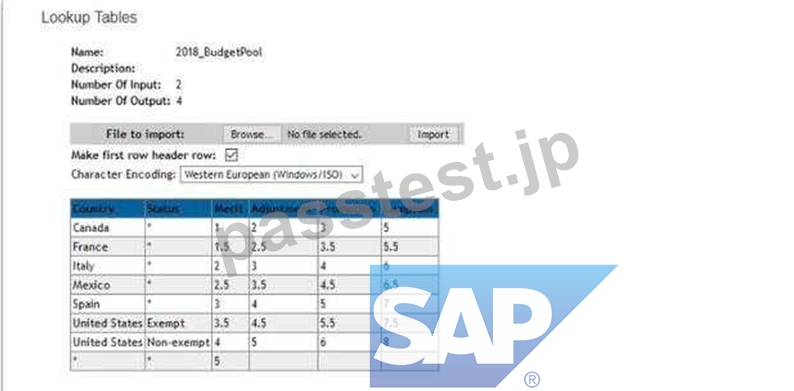
- A. toNumber(lookup("2018_BudgetPool", custom Country,customStatus,1))"'curSalary
- B. toNumber(lookup("2018_BudgetPool", custom Country,customStatus,adjustment))"curSalary
- C. toNumber(lookup("2018_BudgetPool", custom Country.customStatus,2))"'curSalary
- D. toNumber(lookup("2018_BudgetPool,custom Country, customStatus, Adjustment))*curSalary
正解:A
質問 # 55
What triggers can be used to force a planner to add comments without using custom validations? Note: There are 2 correct answers to this question.
- A. An employee is NOT given a raise, stock, or options at all.
- B. When an employee's raise exceeds the range penetration maximum.
- C. When an employee's final salary is below range penetration minimum.
- D. Any time an employee is given a raise, stock, or options.
正解:A、D
解説:
In SAP SuccessFactors Compensation, comments can be required to provide context or justification for certain compensation decisions, without the need for custom validations.
* Force Comments Based on Actions Taken or Not Taken
* Option A: When an employee is awarded a raise, stock, or options, SuccessFactors can be configured to prompt a mandatory comment. This is managed through standard settings without custom validation.
* Option C: Conversely, if an employee does not receive a raise, stock, or options, a forced comment rule can ensure planners justify this decision.
* Why Other Options Are Incorrect
* Options B and D are not standard triggers for forced comments in SAP SuccessFactors Compensation. These types of validations would typically require custom validation logic.
* Reference Documentation
* SAP SuccessFactors Compensation Guide on Standard Comment Rules and Force Comment Settings.
質問 # 56
......
C-THR86-2411試験問題は練習は2025年最新の82問題:https://www.passtest.jp/SAP/C-THR86-2411-shiken.html
C-THR86-2411試験問題集パスと最新テスト問題集:https://drive.google.com/open?id=1JCRrJDVKJYdo3_giHpPFyZPpRbg0wcEq