

Associate-Developer-Apache-Spark練習テスト問題は更新された179問題あります
Databricks Associate-Developer-Apache-Spark問題集で一発合格できる問題を試そう!
この試験は、Sparkの最新バージョンであるApache Spark 3.0に基づいています。Sparkアーキテクチャ、Spark SQL、DataFrames、Spark Streamingなど、幅広いトピックをカバーしています。試験には、候補者がSparkの知識を実際の問題に適用できる能力をテストする実践的なプロジェクトも含まれています。
質問 # 50
Which of the following code blocks returns a copy of DataFrame transactionsDf where the column storeId has been converted to string type?
- A. transactionsDf.withColumn("storeId", convert("storeId", "string"))
- B. transactionsDf.withColumn("storeId", convert("storeId").as("string"))
- C. transactionsDf.withColumn("storeId", col("storeId").convert("string"))
- D. transactionsDf.withColumn("storeId", col("storeId", "string"))
- E. transactionsDf.withColumn("storeId", col("storeId").cast("string"))
正解:E
解説:
Explanation
This question asks for your knowledge about the cast syntax. cast is a method of the Column class. It is worth noting that one could also convert a column type using the Column.astype() method, which is just an alias for cast.
Find more info in the documentation linked below.
More info: pyspark.sql.Column.cast - PySpark 3.1.2 documentation
Static notebook | Dynamic notebook: See test 2
質問 # 51
Which of the following code blocks adds a column predErrorSqrt to DataFrame transactionsDf that is the square root of column predError?
- A. transactionsDf.withColumn("predErrorSqrt", col("predError").sqrt())
- B. transactionsDf.withColumn("predErrorSqrt", sqrt(col("predError")))
- C. transactionsDf.select(sqrt(predError))
- D. transactionsDf.withColumn("predErrorSqrt", sqrt(predError))
- E. transactionsDf.select(sqrt("predError"))
正解:B
解説:
Explanation
transactionsDf.withColumn("predErrorSqrt", sqrt(col("predError")))
Correct. The DataFrame.withColumn() operator is used to add a new column to a DataFrame. It takes two arguments: The name of the new column (here: predErrorSqrt) and a Column expression as the new column. In PySpark, a Column expression means referring to a column using the col("predError") command or by other means, for example by transactionsDf.predError, or even just using the column name as a string, "predError".
The question asks for the square root. sqrt() is a function in pyspark.sql.functions and calculates the square root. It takes a value or a Column as an input. Here it is the predError column of DataFrame transactionsDf expressed through col("predError").
transactionsDf.withColumn("predErrorSqrt", sqrt(predError))
Incorrect. In this expression, sqrt(predError) is incorrect syntax. You cannot refer to predError in this way - to Spark it looks as if you are trying to refer to the non-existent Python variable predError.
You could pass transactionsDf.predError, col("predError") (as in the correct solution), or even just "predError" instead.
transactionsDf.select(sqrt(predError))
Wrong. Here, the explanation just above this one about how to refer to predError applies.
transactionsDf.select(sqrt("predError"))
No. While this is correct syntax, it will return a single-column DataFrame only containing a column showing the square root of column predError. However, the question asks for a column to be added to the original DataFrame transactionsDf.
transactionsDf.withColumn("predErrorSqrt", col("predError").sqrt())
No. The issue with this statement is that column col("predError") has no sqrt() method. sqrt() is a member of pyspark.sql.functions, but not of pyspark.sql.Column.
More info: pyspark.sql.DataFrame.withColumn - PySpark 3.1.2 documentation and pyspark.sql.functions.sqrt - PySpark 3.1.2 documentation Static notebook | Dynamic notebook: See test 2
質問 # 52
Which of the following code blocks returns all unique values of column storeId in DataFrame transactionsDf?
- A. transactionsDf.select("storeId").distinct()
(Correct) - B. transactionsDf.filter("storeId").distinct()
- C. transactionsDf.select(col("storeId").distinct())
- D. transactionsDf["storeId"].distinct()
- E. transactionsDf.distinct("storeId")
正解:A
解説:
Explanation
distinct() is a method of a DataFrame. Knowing this, or recognizing this from the documentation, is the key to solving this question.
More info: pyspark.sql.DataFrame.distinct - PySpark 3.1.2 documentation Static notebook | Dynamic notebook: See test 2
質問 # 53
The code block displayed below contains an error. The code block below is intended to add a column itemNameElements to DataFrame itemsDf that includes an array of all words in column itemName. Find the error.
Sample of DataFrame itemsDf:
1.+------+----------------------------------+-------------------+
2.|itemId|itemName |supplier |
3.+------+----------------------------------+-------------------+
4.|1 |Thick Coat for Walking in the Snow|Sports Company Inc.|
5.|2 |Elegant Outdoors Summer Dress |YetiX |
6.|3 |Outdoors Backpack |Sports Company Inc.|
7.+------+----------------------------------+-------------------+
Code block:
itemsDf.withColumnRenamed("itemNameElements", split("itemName"))
itemsDf.withColumnRenamed("itemNameElements", split("itemName"))
- A. All column names need to be wrapped in the col() operator.
- B. The expressions "itemNameElements" and split("itemName") need to be swapped.
- C. Operator withColumnRenamed needs to be replaced with operator withColumn and the split method needs to be replaced by the splitString method.
- D. Operator withColumnRenamed needs to be replaced with operator withColumn and a second argument "
" needs to be passed to the split method. - E. Operator withColumnRenamed needs to be replaced with operator withColumn and a second argument
"," needs to be passed to the split method.
正解:D
解説:
Explanation
Correct code block:
itemsDf.withColumn("itemNameElements", split("itemName"," "))
Output of code block:
+------+----------------------------------+-------------------+------------------------------------------+
|itemId|itemName |supplier |itemNameElements |
+------+----------------------------------+-------------------+------------------------------------------+
|1 |Thick Coat for Walking in the Snow|Sports Company Inc.|[Thick, Coat, for, Walking, in, the, Snow]|
|2 |Elegant Outdoors Summer Dress |YetiX |[Elegant, Outdoors, Summer, Dress] |
|3 |Outdoors Backpack |Sports Company Inc.|[Outdoors, Backpack] |
+------+----------------------------------+-------------------+------------------------------------------+ The key to solving this question is that the split method definitely needs a second argument here (also look at the link to the documentation below). Given the values in column itemName in DataFrame itemsDf, this should be a space character " ". This is the character we need to split the words in the column.
More info: pyspark.sql.functions.split - PySpark 3.1.1 documentation
Static notebook | Dynamic notebook: See test 1
質問 # 54
Which of the following code blocks returns about 150 randomly selected rows from the 1000-row DataFrame transactionsDf, assuming that any row can appear more than once in the returned DataFrame?
- A. transactionsDf.resample(0.15, False, 3142)
- B. transactionsDf.sample(0.15, False, 3142)
- C. transactionsDf.sample(0.15)
- D. transactionsDf.sample(True, 0.15, 8261)
- E. transactionsDf.sample(0.85, 8429)
正解:D
解説:
Explanation
Answering this question correctly depends on whether you understand the arguments to the DataFrame.sample() method (link to the documentation below). The arguments are as follows:
DataFrame.sample(withReplacement=None, fraction=None, seed=None).
The first argument withReplacement specified whether a row can be drawn from the DataFrame multiple times. By default, this option is disabled in Spark. But we have to enable it here, since the question asks for a row being able to appear more than once. So, we need to pass True for this argument.
About replacement: "Replacement" is easiest explained with the example of removing random items from a box. When you remove those "with replacement" it means that after you have taken an item out of the box, you put it back inside. So, essentially, if you would randomly take 10 items out of a box with 100 items, there is a chance you take the same item twice or more times. "Without replacement" means that you would not put the item back into the box after removing it. So, every time you remove an item from the box, there is one less item in the box and you can never take the same item twice.
The second argument to the withReplacement method is fraction. This referes to the fraction of items that should be returned. In the question we are asked for 150 out of 1000 items - a fraction of 0.15.
The last argument is a random seed. A random seed makes a randomized processed repeatable. This means that if you would re-run the same sample() operation with the same random seed, you would get the same rows returned from the sample() command. There is no behavior around the random seed specified in the question. The varying random seeds are only there to confuse you!
More info: pyspark.sql.DataFrame.sample - PySpark 3.1.1 documentation
Static notebook | Dynamic notebook: See test 1
質問 # 55
The code block shown below should return an exact copy of DataFrame transactionsDf that does not include rows in which values in column storeId have the value 25. Choose the answer that correctly fills the blanks in the code block to accomplish this.
- A. transactionsDf.filter(transactionsDf.storeId==25)
- B. transactionsDf.drop(transactionsDf.storeId==25)
- C. transactionsDf.remove(transactionsDf.storeId==25)
- D. transactionsDf.select(transactionsDf.storeId!=25)
- E. transactionsDf.where(transactionsDf.storeId!=25)
正解:E
解説:
Explanation
transactionsDf.where(transactionsDf.storeId!=25)
Correct. DataFrame.where() is an alias for the DataFrame.filter() method. Using this method, it is straightforward to filter out rows that do not have value 25 in column storeId.
transactionsDf.select(transactionsDf.storeId!=25)
Wrong. The select operator allows you to build DataFrames column-wise, but when using it as shown, it does not filter out rows.
transactionsDf.filter(transactionsDf.storeId==25)
Incorrect. Although the filter expression works for filtering rows, the == in the filtering condition is inappropriate. It should be != instead.
transactionsDf.drop(transactionsDf.storeId==25)
No. DataFrame.drop() is used to remove specific columns, but not rows, from the DataFrame.
transactionsDf.remove(transactionsDf.storeId==25)
False. There is no DataFrame.remove() operator in PySpark.
More info: pyspark.sql.DataFrame.where - PySpark 3.1.2 documentation
Static notebook | Dynamic notebook: See test 3
質問 # 56
The code block shown below should return a column that indicates through boolean variables whether rows in DataFrame transactionsDf have values greater or equal to 20 and smaller or equal to
30 in column storeId and have the value 2 in column productId. Choose the answer that correctly fills the blanks in the code block to accomplish this.
transactionsDf.__1__((__2__.__3__) __4__ (__5__))
- A. 1. select
2. col("storeId")
3. between(20, 30)
4. and
5. col("productId")==2 - B. 1. select
2. col("storeId")
3. between(20, 30)
4. &
5. col("productId")==2 - C. 1. where
2. col("storeId")
3. geq(20).leq(30)
4. &
5. col("productId")==2 - D. 1. select
2. col("storeId")
3. between(20, 30)
4. &&
5. col("productId")=2 - E. 1. select
2. "storeId"
3. between(20, 30)
4. &&
5. col("productId")==2
正解:D
解説:
Explanation
Correct code block:
transactionsDf.select((col("storeId").between(20, 30)) & (col("productId")==2)) Although this question may make you think that it asks for a filter or where statement, it does not. It asks explicity to return a column with booleans - this should point you to the select statement.
Another trick here is the rarely used between() method. It exists and resolves to ((storeId >= 20) AND (storeId
<= 30)) in SQL. geq() and leq() do not exist.
Another riddle here is how to chain the two conditions. The only valid answer here is &. Operators like && or and are not valid. Other boolean operators that would be valid in Spark are | and.
Static notebook | Dynamic notebook: See test 1
質問 # 57
The code block displayed below contains an error. The code block should create DataFrame itemsAttributesDf which has columns itemId and attribute and lists every attribute from the attributes column in DataFrame itemsDf next to the itemId of the respective row in itemsDf. Find the error.
A sample of DataFrame itemsDf is below.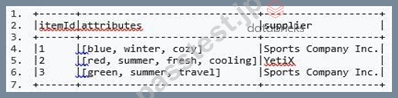
Code block:
itemsAttributesDf = itemsDf.explode("attributes").alias("attribute").select("attribute", "itemId")
- A. Since itemId is the index, it does not need to be an argument to the select() method.
- B. The alias() method needs to be called after the select() method.
- C. The split() method should be used inside the select() method instead of the explode() method.
- D. The explode() method expects a Column object rather than a string.
- E. explode() is not a method of DataFrame. explode() should be used inside the select() method instead.
正解:E
解説:
The correct code block looks like this:
Then, the first couple of rows of itemAttributesDf look like this: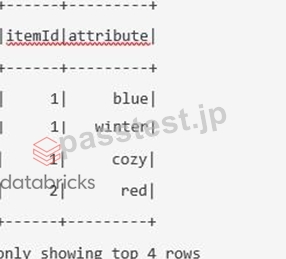
explode() is not a method of DataFrame. explode() should be used inside the select() method instead.
This is correct.
The split() method should be used inside the select() method instead of the explode() method.
No, the split() method is used to split strings into parts. However, column attributs is an array of strings. In this case, the explode() method is appropriate.
Since itemId is the index, it does not need to be an argument to the select() method.
No, itemId still needs to be selected, whether it is used as an index or not.
The explode() method expects a Column object rather than a string.
No, a string works just fine here. This being said, there are some valid alternatives to passing in a string:
The alias() method needs to be called after the select() method.
No.
More info: pyspark.sql.functions.explode - PySpark 3.1.1 documentation (https://bit.ly/2QUZI1J) Static notebook | Dynamic notebook: See test 1 (https://flrs.github.io/spark_practice_tests_code/#1/22.html ,
https://bit.ly/sparkpracticeexams_import_instructions)
質問 # 58
Which of the following code blocks silently writes DataFrame itemsDf in avro format to location fileLocation if a file does not yet exist at that location?
- A. spark.DataFrameWriter(itemsDf).format("avro").write(fileLocation)
- B. itemsDf.write.avro(fileLocation)
- C. itemsDf.write.format("avro").mode("errorifexists").save(fileLocation)
- D. itemsDf.write.format("avro").mode("ignore").save(fileLocation)
- E. itemsDf.save.format("avro").mode("ignore").write(fileLocation)
正解:B
解説:
Explanation
The trick in this question is knowing the "modes" of the DataFrameWriter. Mode ignore will ignore if a file already exists and not replace that file, but also not throw an error. Mode errorifexists will throw an error, and is the default mode of the DataFrameWriter. The question NO:
explicitly calls for the DataFrame to be "silently" written if it does not exist, so you need to specify mode("ignore") here to avoid having Spark communicate any error to you if the file already exists.
The `overwrite' mode would not be right here, since, although it would be silent, it would overwrite the already-existing file. This is not what the question asks for.
It is worth noting that the option starting with spark.DataFrameWriter(itemsDf) cannot work, since spark references the SparkSession object, but that object does not provide the DataFrameWriter.
As you can see in the documentation (below), DataFrameWriter is part of PySpark's SQL API, but not of its SparkSession API.
More info:
DataFrameWriter: pyspark.sql.DataFrameWriter.save - PySpark 3.1.1 documentation SparkSession API: Spark SQL - PySpark 3.1.1 documentation Static notebook | Dynamic notebook: See test 1
質問 # 59
Which of the following code blocks creates a new one-column, two-row DataFrame dfDates with column date of type timestamp?
- A. 1.dfDates = spark.createDataFrame(["23/01/2022 11:28:12","24/01/2022 10:58:34"], ["date"])
2.dfDates = dfDates.withColumnRenamed("date", to_datetime("date", "yyyy-MM-dd HH:mm:ss")) - B. 1.dfDates = spark.createDataFrame([("23/01/2022 11:28:12",),("24/01/2022 10:58:34",)], ["date"])
2.dfDates = dfDates.withColumn("date", to_timestamp("date", "dd/MM/yyyy HH:mm:ss")) - C. 1.dfDates = spark.createDataFrame(["23/01/2022 11:28:12","24/01/2022 10:58:34"], ["date"])
2.dfDates = dfDates.withColumn("date", to_timestamp("dd/MM/yyyy HH:mm:ss", "date")) - D. 1.dfDates = spark.createDataFrame([("23/01/2022 11:28:12",),("24/01/2022 10:58:34",)], ["date"])
2.dfDates = dfDates.withColumnRenamed("date", to_timestamp("date", "yyyy-MM-dd HH:mm:ss")) - E. 1.dfDates = spark.createDataFrame([("23/01/2022 11:28:12",),("24/01/2022 10:58:34",)], ["date"])
正解:B
解説:
Explanation
This question is tricky. Two things are important to know here:
First, the syntax for createDataFrame: Here you need a list of tuples, like so: [(1,), (2,)]. To define a tuple in Python, if you just have a single item in it, it is important to put a comma after the item so that Python interprets it as a tuple and not just a normal parenthesis.
Second, you should understand the to_timestamp syntax. You can find out more about it in the documentation linked below.
For good measure, let's examine in detail why the incorrect options are wrong:
dfDates = spark.createDataFrame([("23/01/2022 11:28:12",),("24/01/2022 10:58:34",)], ["date"]) This code snippet does everything the question asks for - except that the data type of the date column is a string and not a timestamp. When no schema is specified, Spark sets the string data type as default.
dfDates = spark.createDataFrame(["23/01/2022 11:28:12","24/01/2022 10:58:34"], ["date"]) dfDates = dfDates.withColumn("date", to_timestamp("dd/MM/yyyy HH:mm:ss", "date")) In the first row of this command, Spark throws the following error: TypeError: Can not infer schema for type:
<class 'str'>. This is because Spark expects to find row information, but instead finds strings. This is why you need to specify the data as tuples. Fortunately, the Spark documentation (linked below) shows a number of examples for creating DataFrames that should help you get on the right track here.
dfDates = spark.createDataFrame([("23/01/2022 11:28:12",),("24/01/2022 10:58:34",)], ["date"]) dfDates = dfDates.withColumnRenamed("date", to_timestamp("date", "yyyy-MM-dd HH:mm:ss")) The issue with this answer is that the operator withColumnRenamed is used. This operator simply renames a column, but it has no power to modify its actual content. This is why withColumn should be used instead. In addition, the date format yyyy-MM-dd HH:mm:ss does not reflect the format of the actual timestamp: "23/01/2022 11:28:12".
dfDates = spark.createDataFrame(["23/01/2022 11:28:12","24/01/2022 10:58:34"], ["date"]) dfDates = dfDates.withColumnRenamed("date", to_datetime("date", "yyyy-MM-dd HH:mm:ss")) Here, withColumnRenamed is used instead of withColumn (see above). In addition, the rows are not expressed correctly - they should be written as tuples, using parentheses. Finally, even the date format is off here (see above).
More info: pyspark.sql.functions.to_timestamp - PySpark 3.1.2 documentation and pyspark.sql.SparkSession.createDataFrame - PySpark 3.1.1 documentation Static notebook | Dynamic notebook: See test 2
質問 # 60
Which of the following code blocks reorders the values inside the arrays in column attributes of DataFrame itemsDf from last to first one in the alphabet?
1.+------+-----------------------------+-------------------+
2.|itemId|attributes |supplier |
3.+------+-----------------------------+-------------------+
4.|1 |[blue, winter, cozy] |Sports Company Inc.|
5.|2 |[red, summer, fresh, cooling]|YetiX |
6.|3 |[green, summer, travel] |Sports Company Inc.|
7.+------+-----------------------------+-------------------+
- A. itemsDf.withColumn('attributes', sort(col('attributes'), asc=False))
- B. itemsDf.select(sort_array("attributes"))
- C. itemsDf.withColumn('attributes', sort_array(col('attributes').desc()))
- D. itemsDf.withColumn('attributes', sort_array(desc('attributes')))
- E. itemsDf.withColumn("attributes", sort_array("attributes", asc=False))
正解:E
解説:
Explanation
Output of correct code block:
+------+-----------------------------+-------------------+
|itemId|attributes |supplier |
+------+-----------------------------+-------------------+
|1 |[winter, cozy, blue] |Sports Company Inc.|
|2 |[summer, red, fresh, cooling]|YetiX |
|3 |[travel, summer, green] |Sports Company Inc.|
+------+-----------------------------+-------------------+
It can be confusing to differentiate between the different sorting functions in PySpark. In this case, a particularity about sort_array has to be considered: The sort direction is given by the second argument, not by the desc method. Luckily, this is documented in the documentation (link below). Also, for solving this question you need to understand the difference between sort and sort_array. With sort, you cannot sort values in arrays. Also, sort is a method of DataFrame, while sort_array is a method of pyspark.sql.functions.
More info: pyspark.sql.functions.sort_array - PySpark 3.1.2 documentation Static notebook | Dynamic notebook: See test 2
質問 # 61
Which of the following code blocks reads in the parquet file stored at location filePath, given that all columns in the parquet file contain only whole numbers and are stored in the most appropriate format for this kind of data?
- A. 1.spark.read.schema([
2. StructField("transactionId", IntegerType(), True),
3. StructField("predError", IntegerType(), True)
4. ]).load(filePath, format="parquet") - B. 1.spark.read.schema(
2. StructType([
3. StructField("transactionId", StringType(), True),
4. StructField("predError", IntegerType(), True)]
5. )).parquet(filePath) - C. 1.spark.read.schema(
2. StructType([
3. StructField("transactionId", IntegerType(), True),
4. StructField("predError", IntegerType(), True)]
5. )).format("parquet").load(filePath) - D. 1.spark.read.schema([
2. StructField("transactionId", NumberType(), True),
3. StructField("predError", IntegerType(), True)
4. ]).load(filePath) - E. 1.spark.read.schema(
2. StructType(
3. StructField("transactionId", IntegerType(), True),
4. StructField("predError", IntegerType(), True)
5. )).load(filePath)
正解:C
解説:
Explanation
The schema passed into schema should be of type StructType or a string, so all entries in which a list is passed are incorrect.
In addition, since all numbers are whole numbers, the IntegerType() data type is the correct option here.
NumberType() is not a valid data type and StringType() would fail, since the parquet file is stored in the "most appropriate format for this kind of data", meaning that it is most likely an IntegerType, and Spark does not convert data types if a schema is provided.
Also note that StructType accepts only a single argument (a list of StructFields). So, passing multiple arguments is invalid.
Finally, Spark needs to know which format the file is in. However, all of the options listed are valid here, since Spark assumes parquet as a default when no file format is specifically passed.
More info: pyspark.sql.DataFrameReader.schema - PySpark 3.1.2 documentation and StructType - PySpark 3.1.2 documentation
質問 # 62
The code block shown below should write DataFrame transactionsDf as a parquet file to path storeDir, using brotli compression and replacing any previously existing file. Choose the answer that correctly fills the blanks in the code block to accomplish this.
transactionsDf.__1__.format("parquet").__2__(__3__).option(__4__, "brotli").__5__(storeDir)
- A. 1. save
2. mode
3. "replace"
4. "compression"
5. path - B. 1. store
2. with
3. "replacement"
4. "compression"
5. path - C. 1. save
2. mode
3. "ignore"
4. "compression"
5. path - D. 1. write
2. mode
3. "overwrite"
4. compression
5. parquet - E. 1. write
2. mode
3. "overwrite"
4. "compression"
5. save
(Correct)
正解:A
解説:
Explanation
Correct code block:
transactionsDf.write.format("parquet").mode("overwrite").option("compression", "snappy").save(storeDir) Solving this question requires you to know how to access the DataFrameWriter (link below) from the DataFrame API - through DataFrame.write.
Another nuance here is about knowing the different modes available for writing parquet files that determine Spark's behavior when dealing with existing files. These, together with the compression options are explained in the DataFrameWriter.parquet documentation linked below.
Finally, bracket __5__ poses a certain challenge. You need to know which command you can use to pass down the file path to the DataFrameWriter. Both save and parquet are valid options here.
More info:
- DataFrame.write: pyspark.sql.DataFrame.write - PySpark 3.1.1 documentation
- DataFrameWriter.parquet: pyspark.sql.DataFrameWriter.parquet - PySpark 3.1.1 documentation Static notebook | Dynamic notebook: See test 1
質問 # 63
The code block shown below should return a DataFrame with two columns, itemId and col. In this DataFrame, for each element in column attributes of DataFrame itemDf there should be a separate row in which the column itemId contains the associated itemId from DataFrame itemsDf. The new DataFrame should only contain rows for rows in DataFrame itemsDf in which the column attributes contains the element cozy.
A sample of DataFrame itemsDf is below.
Code block:
itemsDf.__1__(__2__).__3__(__4__, __5__(__6__))
- A. 1. filter
2. "array_contains(attributes, 'cozy')"
3. select
4. "itemId"
5. explode
6. "attributes" - B. 1. filter
2. "array_contains(attributes, 'cozy')"
3. select
4. "itemId"
5. map
6. "attributes" - C. 1. where
2. "array_contains(attributes, 'cozy')"
3. select
4. itemId
5. explode
6. attributes - D. 1. filter
2. "array_contains(attributes, cozy)"
3. select
4. "itemId"
5. explode
6. "attributes" - E. 1. filter
2. array_contains("cozy")
3. select
4. "itemId"
5. explode
6. "attributes"
正解:A
解説:
Explanation
The correct code block is:
itemsDf.filter("array_contains(attributes, 'cozy')").select("itemId", explode("attributes")) The key here is understanding how to use array_contains(). You can either use it as an expression in a string, or you can import it from pyspark.sql.functions. In that case, the following would also work:
itemsDf.filter(array_contains("attributes", "cozy")).select("itemId", explode("attributes")) Static notebook | Dynamic notebook: See test 1 (https://flrs.github.io/spark_practice_tests_code/#1/29.html ,
https://bit.ly/sparkpracticeexams_import_instructions)
質問 # 64
Which of the following code blocks reads in the JSON file stored at filePath, enforcing the schema expressed in JSON format in variable json_schema, shown in the code block below?
Code block:
1.json_schema = """
2.{"type": "struct",
3. "fields": [
4. {
5. "name": "itemId",
6. "type": "integer",
7. "nullable": true,
8. "metadata": {}
9. },
10. {
11. "name": "supplier",
12. "type": "string",
13. "nullable": true,
14. "metadata": {}
15. }
16. ]
17.}
18."""
- A. spark.read.json(filePath, schema=schema_of_json(json_schema))
- B. spark.read.json(filePath, schema=spark.read.json(json_schema))
- C. spark.read.schema(json_schema).json(filePath)
1.schema = StructType.fromJson(json.loads(json_schema))
2.spark.read.json(filePath, schema=schema) - D. spark.read.json(filePath, schema=json_schema)
正解:C
解説:
Explanation
Spark provides a way to digest JSON-formatted strings as schema. However, it is not trivial to use. Although slightly above exam difficulty, this question is beneficial to your exam preparation, since it helps you to familiarize yourself with the concept of enforcing schemas on data you are reading in - a topic within the scope of the exam.
The first answer that jumps out here is the one that uses spark.read.schema instead of spark.read.json. Looking at the documentation of spark.read.schema (linked below), we notice that the operator expects types pyspark.sql.types.StructType or str as its first argument. While variable json_schema is a string, the documentation states that the str should be "a DDL-formatted string (For example col0 INT, col1 DOUBLE)". Variable json_schema does not contain a string in this type of format, so this answer option must be wrong.
With four potentially correct answers to go, we now look at the schema parameter of spark.read.json() (documentation linked below). Here, too, the schema parameter expects an input of type pyspark.sql.types.StructType or "a DDL-formatted string (For example col0 INT, col1 DOUBLE)". We already know that json_schema does not follow this format, so we should focus on how we can transform json_schema into pyspark.sql.types.StructType. Hereby, we also eliminate the option where schema=json_schema.
The option that includes schema=spark.read.json(json_schema) is also a wrong pick, since spark.read.json returns a DataFrame, and not a pyspark.sql.types.StructType type.
Ruling out the option which includes schema_of_json(json_schema) is rather difficult. The operator's documentation (linked below) states that it "[p]arses a JSON string and infers its schema in DDL format". This use case is slightly different from the case at hand: json_schema already is a schema definition, it does not make sense to "infer" a schema from it. In the documentation you can see an example use case which helps you understand the difference better. Here, you pass string '{a: 1}' to schema_of_json() and the method infers a DDL-format schema STRUCT<a: BIGINT> from it.
In our case, we may end up with the output schema of schema_of_json() describing the schema of the JSON schema, instead of using the schema itself. This is not the right answer option.
Now you may consider looking at the StructType.fromJson() method. It returns a variable of type StructType - exactly the type which the schema parameter of spark.read.json expects.
Although we could have looked at the correct answer option earlier, this explanation is kept as exhaustive as necessary to teach you how to systematically eliminate wrong answer options.
More info:
- pyspark.sql.DataFrameReader.schema - PySpark 3.1.2 documentation
- pyspark.sql.DataFrameReader.json - PySpark 3.1.2 documentation
- pyspark.sql.functions.schema_of_json - PySpark 3.1.2 documentation
Static notebook | Dynamic notebook: See test 3
質問 # 65
The code block shown below should add a column itemNameBetweenSeparators to DataFrame itemsDf. The column should contain arrays of maximum 4 strings. The arrays should be composed of the values in column itemsDf which are separated at - or whitespace characters. Choose the answer that correctly fills the blanks in the code block to accomplish this.
Sample of DataFrame itemsDf:
1.+------+----------------------------------+-------------------+
2.|itemId|itemName |supplier |
3.+------+----------------------------------+-------------------+
4.|1 |Thick Coat for Walking in the Snow|Sports Company Inc.|
5.|2 |Elegant Outdoors Summer Dress |YetiX |
6.|3 |Outdoors Backpack |Sports Company Inc.|
7.+------+----------------------------------+-------------------+
Code block:
itemsDf.__1__(__2__, __3__(__4__, "[\s\-]", __5__))
- A. 1. withColumn
2. itemNameBetweenSeparators
3. str_split
4. "itemName"
5. 5 - B. 1. withColumn
2. "itemNameBetweenSeparators"
3. split
4. "itemName"
5. 4
(Correct) - C. 1. withColumn
2. "itemNameBetweenSeparators"
3. split
4. "itemName"
5. 5 - D. 1. withColumnRenamed
2. "itemNameBetweenSeparators"
3. split
4. "itemName"
5. 4 - E. 1. withColumnRenamed
2. "itemName"
3. split
4. "itemNameBetweenSeparators"
5. 4
正解:B
解説:
Explanation
This question deals with the parameters of Spark's split operator for strings.
To solve this question, you first need to understand the difference between DataFrame.withColumn() and DataFrame.withColumnRenamed(). The correct option here is DataFrame.withColumn() since, according to the question, we want to add a column and not rename an existing column. This leaves you with only 3 answers to consider.
The second gap should be filled with the name of the new column to be added to the DataFrame. One of the remaining answers states the column name as itemNameBetweenSeparators, while the other two state it as "itemNameBetweenSeparators". The correct option here is
"itemNameBetweenSeparators", since the other option would let Python try to interpret itemNameBetweenSeparators as the name of a variable, which we have not defined. This leaves you with 2 answers to consider.
The decision boils down to how to fill gap 5. Either with 4 or with 5. The question asks for arrays of maximum four strings. The code in gap 5 relates to the limit parameter of Spark's split operator (see documentation linked below). The documentation states that "the resulting array's length will not be more than limit", meaning that we should pick the answer option with 4 as the code in the fifth gap here.
On a side note: One answer option includes a function str_split. This function does not exist in pySpark.
More info: pyspark.sql.functions.split - PySpark 3.1.2 documentation
Static notebook | Dynamic notebook: See test 3
質問 # 66
Which of the following code blocks performs a join in which the small DataFrame transactionsDf is sent to all executors where it is joined with DataFrame itemsDf on columns storeId and itemId, respectively?
- A. itemsDf.join(broadcast(transactionsDf), itemsDf.itemId == transactionsDf.storeId)
- B. itemsDf.join(transactionsDf, broadcast(itemsDf.itemId == transactionsDf.storeId))
- C. itemsDf.join(transactionsDf, itemsDf.itemId == transactionsDf.storeId, "broadcast")
- D. itemsDf.join(transactionsDf, itemsDf.itemId == transactionsDf.storeId, "right_outer")
- E. itemsDf.merge(transactionsDf, "itemsDf.itemId == transactionsDf.storeId", "broadcast")
正解:A
解説:
Explanation
The issue with all answers that have "broadcast" as very last argument is that "broadcast" is not a valid join type. While the entry with "right_outer" is a valid statement, it is not a broadcast join. The item where broadcast() is wrapped around the equality condition is not valid code in Spark. broadcast() needs to be wrapped around the name of the small DataFrame that should be broadcast.
More info: Learning Spark, 2nd Edition, Chapter 7
Static notebook | Dynamic notebook: See test 1
tion and explanation?
質問 # 67
......
Databricks Associate-Developer-Apache-Spark試験問題集で[2023年最新] 練習有効な試験問題集解答:https://www.passtest.jp/Databricks/Associate-Developer-Apache-Spark-shiken.html
Associate-Developer-Apache-Spark問題集を掴み取れ![最新2023]Databricks試験が合格できます:https://drive.google.com/open?id=1m57W5t3NZrPTp2fFrOLlrHEMG5s-8gyZ