

AZ-140日本語試験正確な問題集、学習ノートと理論 [2025年01月]
100%高得点合格保証AZ-140日本語無制限192解答
質問 # 39
Azure Virtual Desktop デプロイを含む Azure サブスクリプションがあります。デプロイメントには 25 のセッション ホストが含まれます。
次の表に示すように、2 つのストレージ アカウントを作成します。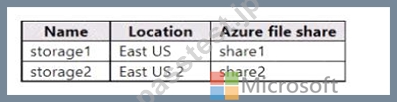
ストレージ アカウントには、Azure Virtual Desktop のユーザー プロファイル データが保存されます。
クラウド キャッシュを使用する FSLogix ユーザー プロファイル コンテナーをデプロイする予定です。
セッション ホストごとに FSLogix レジストリ設定を構成する必要があります。
レジストリ設定はどのように完了すればよいでしょうか? 回答するには、回答領域で適切なオプションを選択してください。
注: 正しく選択するたびに 1 ポイントの価値があります。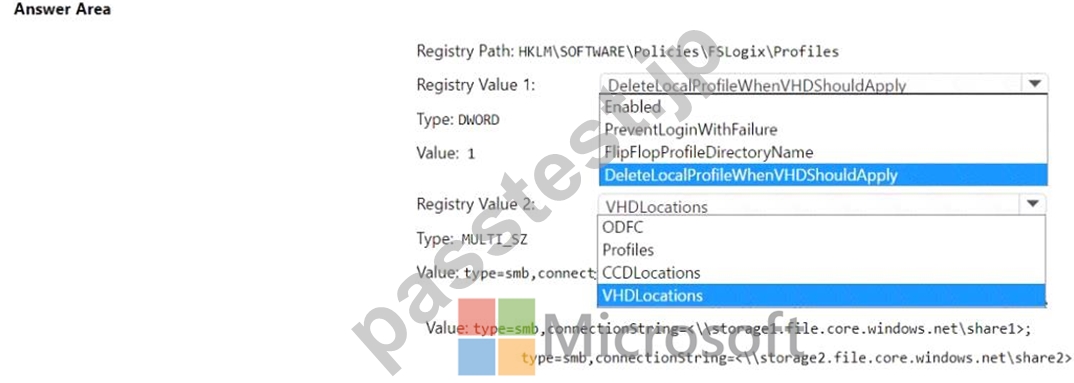
正解:
解説: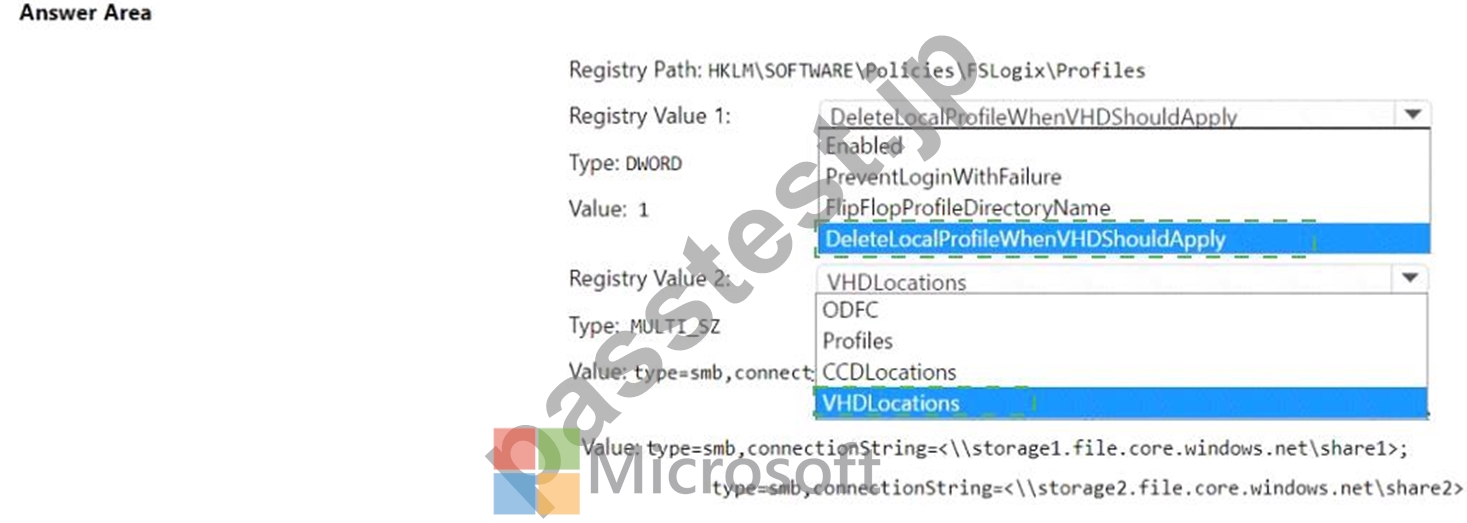
Explanation: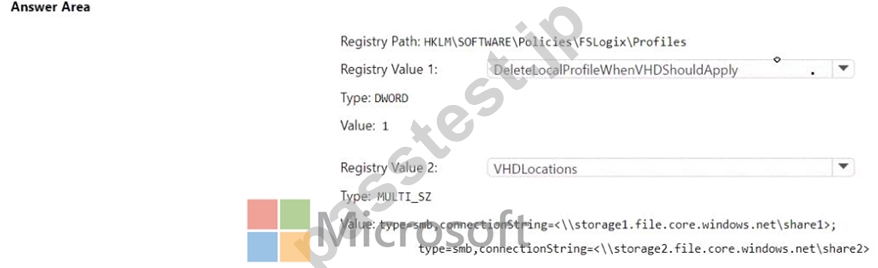
質問 # 40
Windows 10Enterpriseマルチセッションを実行するVM1という名前のAzure仮想マシンがあります。
言語パックをVM1に追加し、Windows VirtualDesktopホストプール用にVM1のカスタムイメージを作成することを計画しています。
カスタムイメージを使用してセッションホストをデプロイするときに、最新のアプリが追加の言語パックを使用できることを確認する必要があります。
どのコマンドを最初に実行する必要がありますか?回答するには、回答領域で適切なオプションを選択します。
注:正しい選択はそれぞれ1ポイントの価値があります。
正解:
解説:
Explanation
Reference:
https://docs.microsoft.com/en-us/troubleshoot/windows-server/deployment/issues-appx-cleanup-maintenance-tas
https://docs.microsoft.com/en-us/powershell/module/scheduledtasks/disable-scheduledtask?view=windowsserve
質問 # 41
次の表に示すデバイスがあります。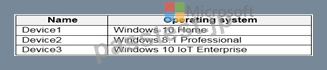
仮想化されたアプリを削除するためのクライアントアクセス用にWindowsVirtualDesktopを展開することを計画しています。
リモートデスクトップクライアントをサポートするデバイスはどれですか?
- A. Device1、Device2、およびDevice3
- B. Device1とDevice3のみ
- C. Device1とDevice2のみ
- D. デバイス1のみ
正解:B
解説:
Reference:
https://docs.microsoft.com/en-us/windows-server/remote/remote-desktop-services/clients/windowsdesktop Applies to: Windows 10, Windows 10 IoT Enterprise, and Windows 7 You can use the Remote Desktop client for Windows Desktop to access Windows apps and desktops remotely from a different Windows device.
The new Remote Desktop client (MSRDC) supports Windows 10, Windows 10 IoT Enterprise, and Windows
7 client devices:
Windows 64-bit
Windows 32-bit
Windows ARM64
質問 # 42
Pool1という名前のWindowsVirtualDesktopホストプールを展開します。
FSLogixプロファイルコンテナーをprofilesという名前の共有に格納するstore1という名前のAzureStorageアカウントがあります。
セッションホストのストレージコンテナへのパスを構成する必要があります。
どのパスを使用する必要がありますか?
- A. \\ store1.file.core.windows.net \ profiles
- B. https://store1.blob.core.windows.net/profiles
- C. https://store1.file.core.windows.net/profiles
- D. \\ store1.blob.core.windows.net \ profiles
正解:A
解説:
https://docs.microsoft.com/en-us/azure/virtual-desktop/store-fslogix-profile Azure offers multiple storage solutions that you can use to store your FSLogix profile container. We recommend storing FSLogix profile containers on Azure Files for most of our customers.
質問 # 43
Windows VirtualDesktopを展開する予定です。
ユーザーは、次の表に示すデバイスを持っています。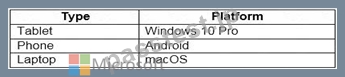
ユーザーは、リモートデスクトップクライアントアプリとリモートデスクトップWebクライアントを使用して、どのデバイスタイプからWindows仮想デスクトップリソースに接続できますか?回答するには、回答領域で適切なオプションを選択します。
注:正しい選択はそれぞれ1ポイントの価値があります。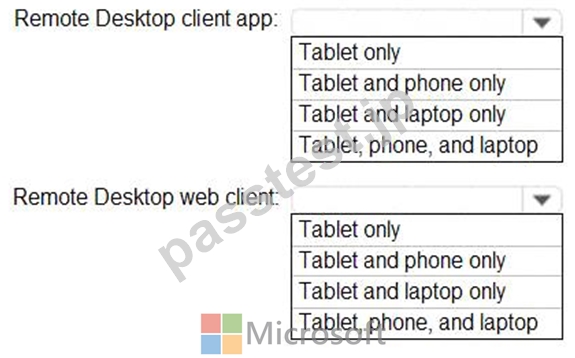
正解:
解説: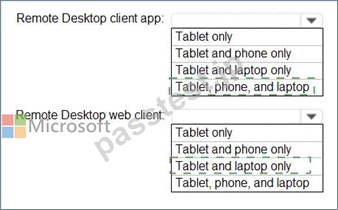
Explanation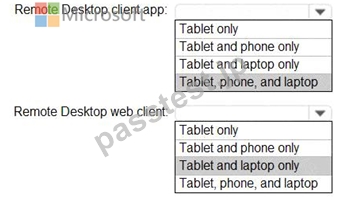
Reference:
https://docs.microsoft.com/en-us/azure/virtual-desktop/connect-web
https://docs.microsoft.com/en-us/azure/virtual-desktop/connect-android
https://docs.microsoft.com/en-us/azure/virtual-desktop/connect-macos
質問 # 44
Azure VirtualDesktopの展開を設計しています。
ユーザーが常駐する場所と計画された展開の間のネットワーク遅延を特定します。
ホストプールをデプロイするのに最適なAzureリージョンを特定するには、何を使用する必要がありますか?
- A. Azure Traffic Manager
- B. Azure Virtual Desktop Experience Estimator
- C. Azure VirtualDesktop用のAzureモニター
- D. Azure Advisor
正解:B
解説:
Reference:
https://azure.microsoft.com/en-gb/services/virtual-desktop/assessment/
質問 # 45
最大セッション制限が15のWindowsVirtualDesktopホストプールがあります。切断されたセッションはすぐにサインアウトされます。
次の展示では、ホストプールのセッションホストを示しています。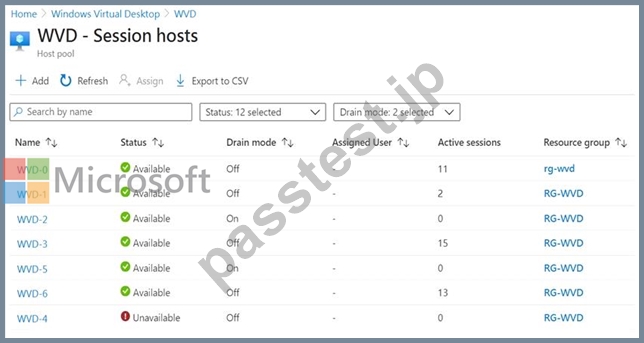
ドロップダウンメニューを使用して、図に示されている情報に基づいて各ステートメントを完了する回答の選択肢を選択します。
注:正しい選択はそれぞれ1ポイントの価値があります。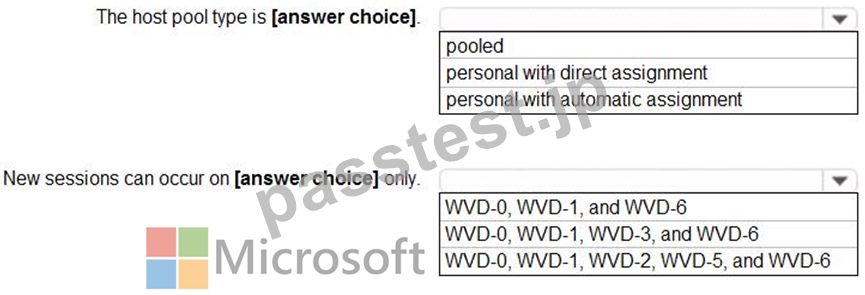
正解:
解説: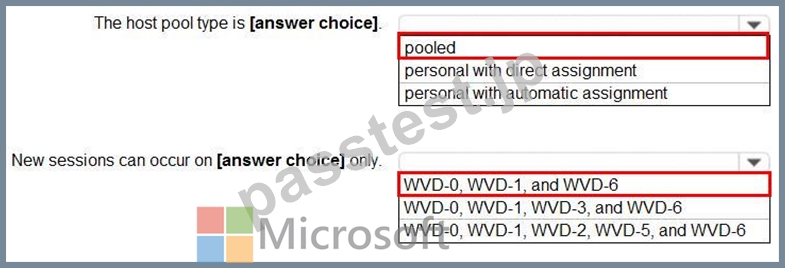
Reference:
https://docs.microsoft.com/en-us/azure/virtual-desktop/set-up-scaling-script
質問 # 46
次の表に示すユーザーが含まれる Subscription1 という名前の Azure サブスクリプションがあります。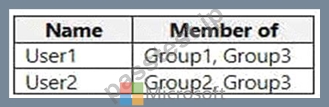
Subscription1 には、次の表に示す Azure Virtual Desktop ホスト プールが含まれています。
Subscription1 には、次の表に示す Azure Virtual Desktop アプリケーション グループが含まれています。
次の表に示す役割の割り当てを実行します。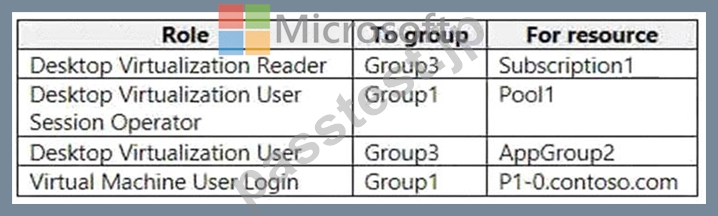
次の各ステートメントについて、そのステートメントが true の場合は [はい] を選択します。それ以外の場合は、「いいえ」を選択します。
注: 正しく選択するたびに 1 ポイントの価値があります。
ホットエリア: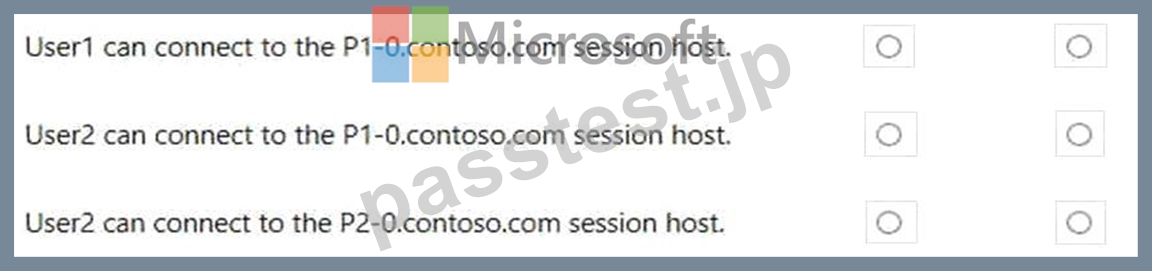
正解:
解説: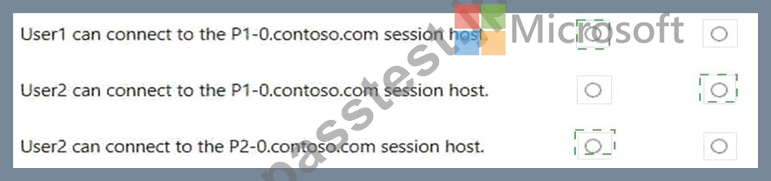
Explanation
Yes, No, Yes
質問 # 47
認証要件を満たすには、条件付きアクセスポリシーを構成する必要があります。
ポリシー構成に何を含める必要がありますか?回答するには、回答領域で適切なオプションを選択します。
注正しい選択はそれぞれ1ポイントの価値があります。
正解:
解説:
質問 # 48
次の表に示すリソースを含む Azure サブスクリプションがあります。
ユーザーが FSLogix プロファイルに保存されたファイルを復元できることを確認する必要があります。
あなたは何をするべきか?
- A. Azure ポータルの CPool1 ブレードから、新しいボリュームを作成します。
- B. Azure ポータルから、Azure Backup コンテナーとバックアップ ポリシーを作成します。
- C. Azure ポータルの Volume1 ブレードから、スナップショット ポリシーを作成します。
- D. Azure ポータルから、Recovery Services コンテナーとバックアップ ポリシーを作成します。
正解:D
解説:
From the docs: Azure Files Premium tier integrates with Azure Backup and is supported in conjunction with FSLogix. Azure NetApp Files offers a similar snapshot mechanism to make copies of your FSLogix profile containers. https://learn.microsoft.com/en-us/azure/architecture/example-scenario/wvd/windows-virtual-desktop-fslogix#backup-and-restore
質問 # 49
Windows VirtualDesktopを展開しています。
多くのユーザーは、リモートデスクトップモバイルアプリがインストールされているiOSデバイスを持っています。
フィードURLを手動で入力する代わりに、ユーザーが電子メール検出を使用してフィードURLに接続できることを確認する必要があります。
_msradc DNSレコードをどのように構成する必要がありますか?回答するには、回答領域で適切なオプションを選択します。
注:正しい選択はそれぞれ1ポイントの価値があります。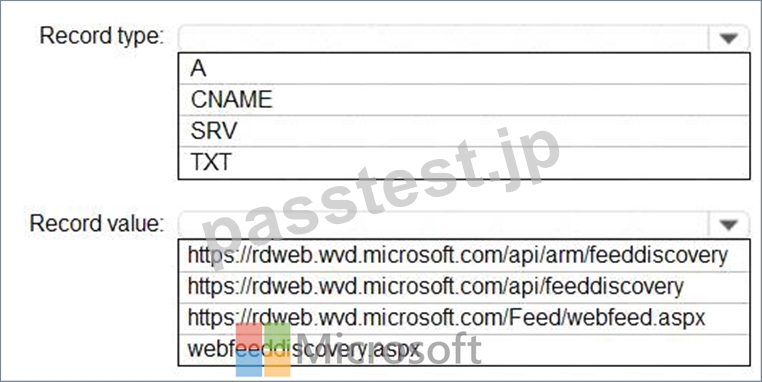
正解:
解説: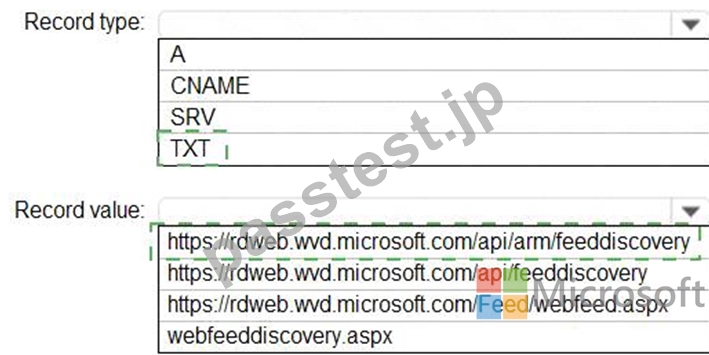
Explanation
1. TXT
2. https://rdweb.wvd.microsoft.com/api/arm/feeddiscovery
Set up email discovery to subscribe to your RDS feed
https://docs.microsoft.com/en-us/windows-server/remote/remote-desktop-services/rds-email-discovery
https://docs.microsoft.com/nl-nl/learn/modules/m365-deploy-wvd/2-deployment-overview
質問 # 50
米国東部のAzureリージョンにAzureVirtualDesktopホストプールがあります。
ホストプールがUSWestAzureリージョンにフェールオーバーできることを確認する必要があります。
あなたは最初に何をすべきですか?
- A. 新しいホストプールを作成します。
- B. RecoveryServicesボールトを作成します。
- C. 地理的冗長ストレージ(GRS)を使用するAzureStorageアカウントを作成します。
- D. 各セッションホストの仮想マシンスナップショットを作成します。
正解:B
解説:
Reference:
https://docs.microsoft.com/en-us/azure/site-recovery/azure-to-azure-tutorial-enable-replication
質問 # 51
Pool1という名前のAzureVirtual Desktopホストプールと、storage1という名前のAzureStorageアカウントがあります。
Pool1とstorage1は同じAzureリージョンにあります。
ピーク時のセッションホストの現在のネットワーク使用率は95%です。
Pool1に接続するユーザーには、storage1に保管されているFSLogixプロファイルコンテナーを使用することを計画しています。
プロファイルのロードおよび更新時のネットワーク遅延を最小限に抑えるために、セッションホストとストレージ1を構成する必要があります。
あなたは何をするべきか?回答するには、回答領域で適切なオプションを選択します。
注:正しい選択はそれぞれ1ポイントの価値があります。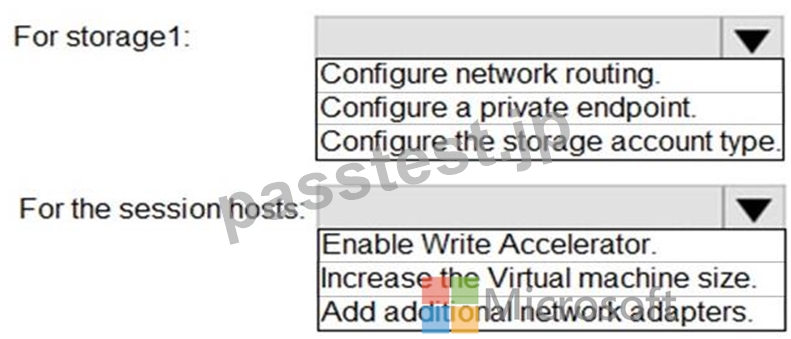
正解:
解説: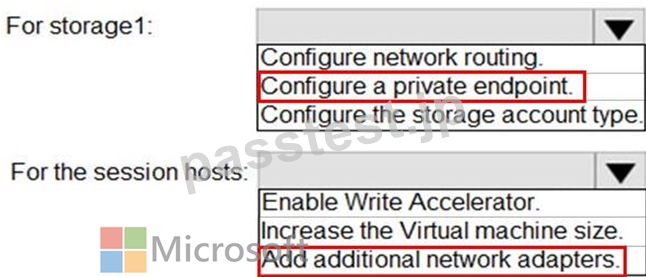
Reference:
https://docs.microsoft.com/en-us/azure/architecture/example-scenario/wvd/windows-virtual-desktop-fslogix
質問 # 52
Azure サブスクリプションをお持ちです。
単一のホスト プールに Windows 10 マルチセッション ホストを含む Azure Virtual Desktop ソリューションをデプロイすることを計画しています。このソリューションには、次の表に示す要件があります。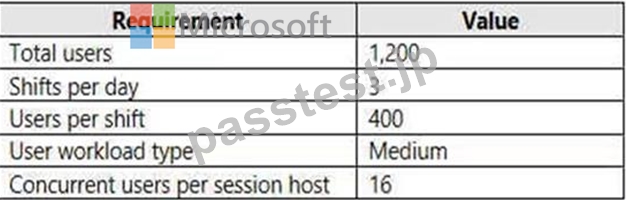
ホスト プールのセッション ホストを構成する必要があります。ソリューションではコストを最小限に抑える必要があります。
ホスト プールにはいくつのセッション ホストが含まれるべきですか?また、各セッション ホストにはいくつの vCPU が必要ですか?
回答するには、回答領域で適切なオプションを選択してください。
注: 正しく選択するたびに 1 ポイントの価値があります。
ホットエリア: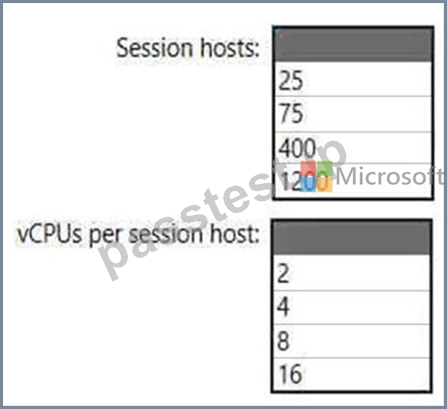
正解:
解説: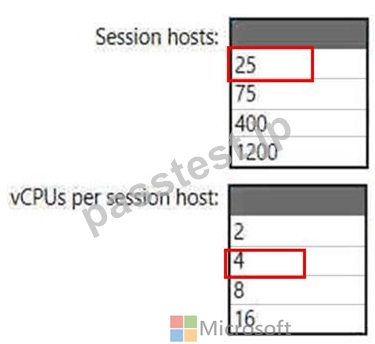
Topic 1, Litware, Inc
Overview
This is a case study. Case studies are not timed separately. You can use as much exam time as you would like to complete each case. However, there may be additional case studies and sections on this exam. You must manage your time to ensure that you are able to complete all questions included on this exam in the time provided.
To answer the questions included in a case study, you will need to reference information that is provided in the case study. Case studies might contain exhibits and other resources that provide more information about the scenario that is described in the case study. Each question is independent of the other questions in this case study.
At the end of this case study, a review screen will appear. This screen allows you to review your answers and to make changes before you move to the next section of the exam. After you begin a new section, you cannot return to this section.
To start the case study
To display the first question in this case study, click the Next button. Use the buttons in the left pane to explore the content of the case study before you answer the questions. Clicking these buttons displays information such as business requirements, existing environment, and problem statements. If the case study has an All Information tab, note that the information displayed is identical to the information displayed on the subsequent tabs. When you are ready to answer a question, click the Question button to return to the question.
Overview
Litware, Inc. is a pharmaceutical company that has a main office in Boston, United States, and a remote office in Chennai, India.
Existing Environment. Identity Environment
The network contains an on-premises Active Directory domain named litware.com that syncs to an Azure Active Directory (Azure AD) tenant named litware.com.
The Azure AD tenant contains the users shown in the following table.
All users are registered for Azure Multi-Factor Authentication (MFA).
Existing Environment. Cloud Services
Litware has a Microsoft 365 E5 subscription associated to the Azure AD tenant. All users are assigned Microsoft 365 Enterprise E5 licenses.
Litware has an Azure subscription associated to the Azure AD tenant. The subscription contains the resources shown in the following table.
Litware uses custom virtual machine images and custom scripts to automatically provision Azure virtual machines and join the virtual machines to the on-premises Active Directory domain.
Network and DNS
The offices connect to each other by using a WAN link. Each office connects directly to the internet.
All DNS queries for internet hosts are resolved by using DNS servers in the Boston office, which point to root servers on the internet. The Chennai office has caching-only DNS servers that forward queries to the DNS servers in the Boston office.
Requirements. Planned Changes
Litware plans to implement the following changes:
Deploy Windows Virtual Desktop environments to the East US Azure region for the users in the Boston office and to the South India Azure region for the users in the Chennai office.
Implement FSLogix profile containers.
Optimize the custom virtual machine images for the Windows Virtual Desktop session hosts.
Use PowerShell to automate the addition of virtual machines to the Windows Virtual Desktop host pools.
Requirements. Performance Requirements
Litware identifies the following performance requirements:
Minimize network latency of the Windows Virtual Desktop connections from the Boston and Chennai offices.
Minimize latency of the Windows Virtual Desktop host authentication in each Azure region.
Minimize how long it takes to sign in to the Windows Virtual Desktop session hosts.
Requirements. Authentication Requirements
Litware identifies the following authentication requirements:
Enforce Azure MFA when accessing Windows Virtual Desktop apps.
Force users to reauthenticate if their Windows Virtual Desktop session lasts more than eight hours.
Requirements. Security Requirements
Litware identifies the following security requirements:
Explicitly allow traffic between the Windows Virtual Desktop session hosts and Microsoft 365.
Explicitly allow traffic between the Windows Virtual Desktop session hosts and the Windows Virtual Desktop infrastructure.
Use built-in groups for delegation.
Delegate the management of app groups to CloudAdmin1, including the ability to publish app groups to users and user groups.
Grant Admin1 permissions to manage workspaces, including listing which apps are assigned to the app groups.
Minimize administrative effort to manage network security.
Use the principle of least privilege.
Requirements. Deployment Requirements
Litware identifies the following deployment requirements:
Use PowerShell to generate the token used to add the virtual machines as session hosts to a Windows Virtual Desktop host pool.
Minimize how long it takes to provision the Windows Virtual Desktop session hosts based on the custom virtual machine images.
Whenever possible, preinstall agents and apps in the custom virtual machine images.
質問 # 53
次の表に示すユーザーが含まれる Subscription1 という名前の Azure サブスクリプションがあります。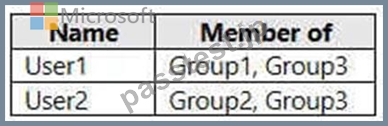
Subscription1 には、次の表に示す Azure Virtual Desktop ホスト プールが含まれています。
Subscription1 には、次の表に示す Azure Virtual Desktop アプリケーション グループが含まれています。
次の表に示す役割の割り当てを実行します。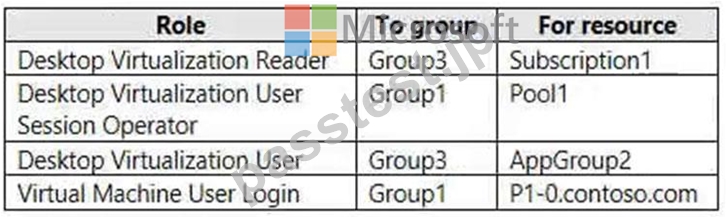
次の各ステートメントについて、そのステートメントが true の場合は [はい] を選択します。それ以外の場合は、「いいえ」を選択します。
注: 正しく選択するたびに 1 ポイントの価値があります。
ホットエリア: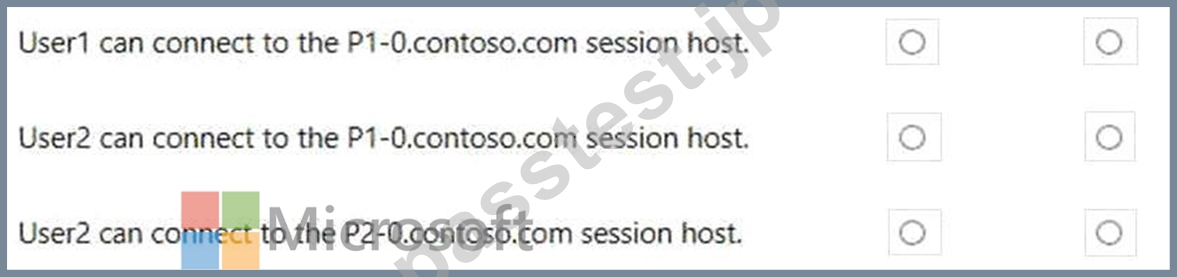
正解:
解説: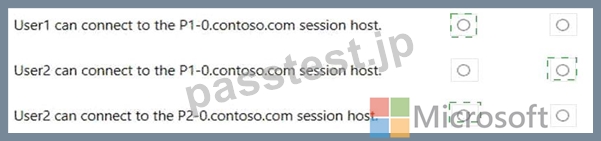
Explanation
Yes, No, Yes
質問 # 54
Azure Virtual Desktop デプロイがあります。
セッション ホストは、contoso.com という名前のオンプレミスの Active Directory ドメインに参加します。
ユーザーセッションを 3 時間に制限する必要があります。
何を設定すればよいでしょうか?
- A. ワークスペースのプロパティ
- B. ホスト プールの RDP プロパティ
- C. contoso.com のグループ ポリシー オブジェクト (GPO)。
- D. ジャストインタイム (JIT) VM アクセス
正解:C
質問 # 55
......
AZ-140日本語問題集PDF、AZ-140日本語最速合格したいなら:https://www.passtest.jp/Microsoft/AZ-140J-shiken.html