

2025年04月 Adobe AD0-E903認定リアル2025年最新の模擬試験合格させます
AD0-E903試験問題と有効なAD0-E903問題集でPDF
Adobe AD0-E903 認定試験の出題範囲:
| トピック | 出題範囲 |
|---|---|
| トピック 1 |
|
| トピック 2 |
|
| トピック 3 |
|
質問 # 17
A task was originally planned with a 10-day duration and 40 planned hours. The client needs it done in 3 days.
What task setting needs to change to allow 4 users to complete this in less than 3 days?
- A. Change the Task Duration Type to Effort Driven
- B. Change the Task Constraint to Fixed Dates
- C. Change the Task Constraint to As Soon As Possible
- D. Change the Task Duration Type to Calculated Work
正解:D
解説:
When reducing the task duration and distributing the work among multiple users, changing the Task Duration Type to "Calculated Work" allows Workfront to automatically adjust the duration based on the number of assignees (in this case, 4 users). This will enable the task to be completed within the new shorter timeframe without adjusting the total planned hours.
質問 # 18
Given this information regarding a Task:
* Planned Start Date: May 14
* Actual Start Date: May 14
* Planned Completion Date: May 20
* Projected Completion Date: May 22
* Percent Complete: 50%
* Duration: 5 Days
* Planned Hours: 8 Hours
* Status: In Progress
If today's date were May 19, what would be the Task's progress status?
- A. On Time
- B. At Risk
- C. Behind
正解:B
解説:
In Workfront, when the projected completion date exceeds the planned completion date and the task is only 50% complete by May 19, it is automatically flagged as "At Risk." This alerts the project manager that the task is not progressing according to the original plan, potentially causing delays in the project timeline.
質問 # 19
All of the tasks on a project show as 100% complete, but when the Project Owner tries to update the status of the project to Complete, the Owner receives an error that reads "Project cannot be marked Complete if there are open issues and tasks that are not complete." How can the Project Owner determine which tasks are incomplete?
- A. There are incomplete issue predecessors that need to be resolved. The Project Owner can navigate to the project issues section in the left navigation pane to see the incomplete items.
- B. The task status needs to be updated to Done even though the percent complete is at 100%. The Project Owner could filter the project task list for incomplete tasks and check the task status to determine which tasks are not complete.
- C. There are incomplete approval workflows on one or more tasks. The Project Owner could filter the project task list for incomplete tasks and check the task status to determine which tasks are not complete.
正解:B
解説:
Even if the task shows 100% complete, the Status of the task may still be listed as something other than "Done." Workfront requires that both the Status and the Percent Complete indicate the task is fully completed before the project can be marked as complete. The Project Owner can filter for tasks that are not marked as "Done" and update their statuses accordingly.
質問 # 20
Which project elements can be used to measure a project's adherence to its original schedule?
- A. Workload balancer data, planned completion dates, and expenses
- B. Project baselines, planned completion dates, and actual completion dates
- C. Number of tasks, actual completion dates, and project status
正解:B
解説:
To measure a project's adherence to its original schedule, the most critical elements are Project Baselines, Planned Completion Dates, and Actual Completion Dates. The baseline captures the original planned schedule, while the planned and actual completion dates provide the data to compare the project's progress against the initial schedule. This comparison helps project managers identify any deviations from the original plan and assess the project's performance.
質問 # 21
The art director is reviewing and approving a proof and has requested that they only get email notifications for a new proof or version. What Email alert option should be assigned to them on the workflow?
- A. Decisions and Notify recipients about this proof is not selected
- B. Decisions and Notify recipients about this proof is selected
- C. Disabled and Notify recipients about this proof is not selected
- D. Disabled and Notify recipients about this proof is selected
正解:D
解説:
For the art director to only receive email notifications about new proofs or versions, the option "Disabled and Notify recipients about this proof is selected" is the correct choice. This ensures that they are not inundated with notifications about every comment or decision made but are alerted when a new proof or version is uploaded for review.
This approach optimizes the notification settings based on the user's request, providing a more focused and less overwhelming email experience, which is often crucial for roles such as creative directors who manage multiple proofs and versions.
質問 # 22
An organization has created unique data fields relevant to their projects. Starting by navigating from a project's landing page, where is this data found?
- A. Project Details > Overview
- B. Project Details > Custom Forms
- C. Business Case > Project Info
正解:C
解説:
In Workfront, custom data fields created for projects are typically found within the "Business Case" section, specifically under "Project Info." This area houses key project information and unique custom fields that are relevant to the project's setup. The "Project Details" section is more focused on task-related information and the overall summary of the project.
質問 # 23
What occurs when an individual enters a new commit date that is after the original planned date of a task?
- A. The assignee of any task that has the original task set as a predecessor is notified.
- B. The Project Owner is notified whether this change will impact the Project Timeline.
- C. The Planned Completion Date of the task automatically changes to match the new Commit Date.
正解:C
解説:
When a user updates the Commit Date to a date later than the original planned date in Adobe Workfront, the Planned Completion Date of the task is automatically updated to reflect the new commit date. This feature ensures that the timeline is adjusted based on the most current commitment by the task assignee, which can then impact downstream tasks and the overall project schedule.
This change streamlines project planning and helps keep task dependencies aligned with realistic completion expectations.
質問 # 24
How is the primary assignee of a task determined?
- A. By the user on a task that has a primary job role.
- B. By the user that is assigned first to a task.
- C. By the Home Team assigned to a task.
正解:B
解説:
In Adobe Workfront, when multiple users are assigned to a task, the system designates the user who was assigned first as the primary assignee. This is the user responsible for driving the task to completion, and their name will appear in the primary assignee field. This approach ensures clear accountability within teams.
質問 # 25
A project manager is asked to provide a list of all projects the Marketing Group is working on for Acme Company.
What steps should the project manager take to create a custom Workfront report with this information?
- A. Visit the Reports page, create a new Project report, and add filters for Owner ID and Project Status.
- B. Visit the Reports page, create a new Project report, and add filters for Company ID and Owner ID.
- C. Visit the Reports page, create a new Project report, and add filters for Company ID and Group ID.
正解:C
解説:
To provide a list of all projects for a specific company (Acme) and group (Marketing), the correct approach is to filter by both Company ID and Group ID in the custom project report. This allows the project manager to isolate projects related to Acme Company that the Marketing Group is responsible for.
質問 # 26
A company has decided that all projects for the year need to be created from templates and staffed in the following quarter. The projects will need to remain in a backlog until the team has capacity to work on them. There has been confusion previously because the team used Planning status for all work not started.
What should the project manager do to help the team see the difference between work in the backlog versus work that is now being planned?
- A. Load the project template once the team has bandwidth to start on the project.
- B. Create projects but leave the roles in place without assigning users.
- C. Create a custom status for Backlog to use prior to using the Planning status.
正解:C
解説:
In Workfront, creating a custom status specifically for "Backlog" allows the team to differentiate between work that is pending capacity and work that is actively being planned. This prevents confusion and allows for better project tracking, ensuring that tasks move smoothly from backlog to the planning phase when appropriate.
質問 # 27
A company expects managers to complete a Workfront Business Case and submit it to the Project Sponsor for approval before a project enters Planning status.
What Workfront process will effectively facilitate the Project Sponsor review?
- A. Project Approval Process
- B. Project Submission Process
- C. Request Submission Process
- D. Request Approval Process
正解:C
解説:
In Workfront, the "Request Submission Process" is used when a formal submission is required for review before the project proceeds to the planning phase. This process ensures that all necessary documentation, such as the business case, is completed and submitted to the sponsor for approval, streamlining the review process.
質問 # 28
A system administrator has created a Marketing Request Queue that routes to the marketing team. This team needs to manage various incoming requests from the organization through emails, instant messaging, and conversations. Team members receive request notifications in their emails but are still having difficulties monitoring and prioritizing incoming requests.
Which reports would be helpful to have on a dashboard for the marketing team to manage incoming work requests?
- A. Three reports showing the priority and entry date of each request, i.e., one that shows requests in a New status, one that shows requests in an In Progress status, and one that shows recently completed requests.
- B. Four reports showing the entry date of each request, i.e., one that shows requests in a New status, one that shows requests in an In Progress status, a third report that shows recently completed requests, and a fourth report that shows the schedule assigned to each team member.
- C. Two reports showing the priority and actual completion date of each request, i.e., one that shows active requests and another that shows recently completed requests.
正解:A
解説:
To help the marketing team manage incoming work requests, the most effective reports would focus on the priority and entry date of requests. These reports would allow the team to quickly view what requests are new, in progress, or completed, enabling them to prioritize work accordingly. A report that tracks the "entry date" helps in monitoring how long a request has been waiting, while status-based reports help in identifying the current stage of each request.
質問 # 29
The marketing team should begin working on a task on September 23, complete it within 2 weeks and take approximately 10 hours over that time span to execute the deliverable.
Which task settings need to be configured to meet these requirements?
- A. The Task Constraint should be set to Start Date of September 23 with Planned Hours set to 10 hours and Issue Duration set to 2 weeks.
- B. The Task Constraint should be set to Must Start On with Planned Hours set to 10 hours and Duration set to 2 weeks.
- C. The Task Constraint should be set to Must Start On with Planned Time set to 2 weeks and Duration set to 10 hours.
正解:B
解説:
In Workfront, setting the correct task constraint and planned hours ensures that the task starts on the intended date (September 23) and allows the team to track the time allocated (10 hours) over a 2-week duration. "Must Start On" ensures the task begins exactly on the planned start date.
質問 # 30
A creative team accesses their assigned work in a My Tasks list report. The team would like to easily see any New tasks highlighted for visibility. How can the project manager accommodate the team's request?
- A. Create a grouping for task Progress Status and use a custom color pie chart for visibility.
- B. Create a Filter that uses conditional formatting to display New tasks only.
- C. Schedule a daily automatic report delivery of the New tasks in the report to the team.
- D. Create a View that uses Column Rules to format the New tasks for visibility.
正解:D
解説:
To meet the team's request for highlighting new tasks, the most effective solution is to create a View that uses Column Rules. These rules allow for conditional formatting based on task criteria, such as highlighting new tasks in a specific color for easy identification. This approach enhances visibility without requiring the creation of filters or new reports, and it makes it easier for users to see relevant tasks within their existing task lists.
質問 # 31
Which element is defined as a reportable variable determined by the relationship between the planned, projected, and estimated dates of the project?
- A. Status
- B. Progress Status
- C. Condition
正解:C
解説:
In Adobe Workfront, Condition is the reportable variable that is determined by the relationship between the Planned, Projected, and Estimated Dates. The Condition field reflects whether a project is On Target, At Risk, or In Trouble based on how its actual progress aligns with the planned schedule and dates. It allows project managers and stakeholders to quickly assess the health of the project.
質問 # 32
What are two characteristics of a Group in Workfront? (Choose two.)
- A. A user can be assigned as Group Administrator of a Group.
- B. A Group assignment is not required for a user.
- C. A Group can be associated with a Company or a Project.
- D. A Group can be tagged in an Update thread communication.
正解:A、C
解説:
Groups in Adobe Workfront serve as organizational entities that can be associated with specific Companies or Projects to manage workflows or permissions more effectively. Additionally, each Group can have a Group Administrator assigned, who is responsible for managing the group's settings, permissions, and workflows. These roles and associations help in structuring how work and permissions are allocated across different teams or departments.
質問 # 33
When a project owner grants Contribute access on a project to a user with the same access level as the project owner, what can that user do?
- A. Add tasks
- B. Attach a template to the project
- C. Add a custom form
正解:C
解説:
In Workfront, users with "Contribute" access are typically able to modify and interact with content but are not allowed to perform higher-level administrative tasks like attaching templates or adding tasks. Adding a custom form is within the scope of what a user with Contribute access can do, as it involves adding data input fields to an existing project.
質問 # 34
Taking into consideration any applied task constraints, a project manager needs to know the date that a task is likely to be finished based upon the current progress of the task and its predecessors. Which date type should the project manager utilize?
- A. Planned Date
- B. Estimated Date
- C. Projected Date
正解:C
解説:
The Projected Date in Adobe Workfront is dynamically calculated based on the progress of the task, any task constraints, and its dependencies. This date provides a more accurate reflection of when a task is likely to be completed, considering the current progress and any updates to predecessor tasks. On the other hand, the Planned Date refers to the originally scheduled completion date, and the Estimated Date is not manually entered but inferred from system calculations.
質問 # 35
Refer to the exhibit.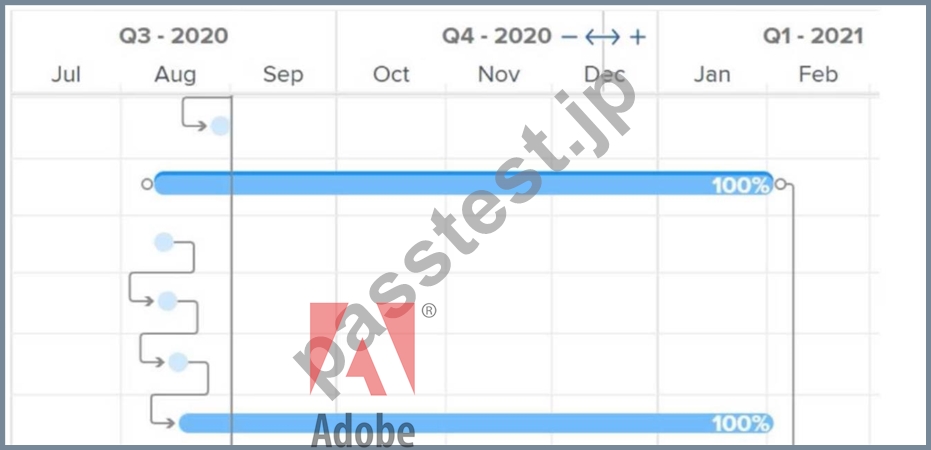
What do the connector lines between tasks in a Gantt chart represent?
- A. Multiple assignments
- B. Predecessor relationship
- C. Critical path
正解:B
解説:
In Workfront, the connector lines in a Gantt chart represent the predecessor relationships between tasks. These lines show how one task depends on another, indicating the order in which tasks need to be completed. This helps project managers visualize task dependencies and how changes in one task can affect others in the timeline.
質問 # 36
A project manager has been asked to work on a cross-departmental company-wide initiative. There will be many individuals assigned to each task.
What should the project manager ask users to do when it comes to completing tasks?
- A. Mark the task as "Done with my part."
- B. Make an update and tag the project manager.
- C. Users do not need to complete tasks when multiple users are assigned.
正解:A
解説:
In scenarios where multiple individuals are assigned to a task, Workfront allows each user to mark the task as "Done with my part" to signify their portion of the task is complete. This ensures that progress is tracked for each user, and the task is only marked as complete when all assigned users have finished their work.
質問 # 37
A project manager checks an Incomplete Tasks report and notices that several tasks are listed even though the items are marked as 100% complete. What column can the project manager add to the view to understand why those tasks are included in the report?
- A. Actual Completion Date
- B. Progress Status
- C. Status
正解:C
解説:
Even though tasks may be marked as 100% complete, their Status may still be listed as incomplete in reports if the task's status has not been updated to "Completed." The Status column provides insight into the current state of the task, which helps identify if the task is still listed as "In Progress" or another incomplete status despite being marked as fully complete. Adding this column clarifies why the task appears in the Incomplete Tasks Report.
質問 # 38
What item, when shared with a user, can never give that user inherited permission to a project?
- A. Report
- B. Task
- C. Portfolio
正解:A
解説:
Adobe Workfront, permissions can be inherited through various objects like projects, portfolios, or tasks when shared with users. However, when sharing a report, the permissions do not cascade to related items like projects or tasks within that report. This is because reports are generated views and do not directly control object-level permissions. A report can be shared to allow a user to see data within the report, but it will not grant them inherited permissions to the underlying projects or tasks displayed in that report.
質問 # 39
A project manager has been asked to create a report showing the planned completion date for all the project manager's projects. The report must show results in a calendar view and all entries should be purple. What steps should the project manager take to create this view?
- A. Visit the Calendars page and create a new calendar. In the filter, update the date field to Planned Dates and update the Project Owner ID field with the project manager's name. Set the color to purple.
- B. Visit the Reports page and create a new report. In the filter, update the project Owner ID field with the project manager's name and set the Color ID field to purple. Add a column for Planned Completion Date and set the default view to "Calendar View."
- C. Visit the Reports page and create a new calendar. In the filter, update the Project Owner ID field with the project manager's name and set the Color ID field to purple. Add a column for Planned Completion Date.
正解:B
解説:
To create a report that meets the specifications, the project manager should create a new report from the Reports page, filter by Project Owner ID, and add a column for Planned Completion Date. Setting the default view to Calendar View and using the Color ID field to assign the color purple ensures that all the manager's projects are visible in the desired format and color.
質問 # 40
What parent object can have child objects?
- A. Project
- B. Portfolio
- C. Issue
正解:B
解説:
In Workfront, a "Portfolio" is a parent object that can contain multiple programs and projects. Each Portfolio can have a hierarchy of child objects such as programs, which further break down into projects. A project, while it contains tasks and issues, is considered a child within the larger hierarchy of a portfolio. Issues, on the other hand, are typically linked to tasks or projects but are not used as parent objects. This hierarchy enables Workfront users to organize and manage their work across various levels.
質問 # 41
A copywriter wants to see his incomplete tasks for projects to which he is assigned.
Which steps should the project manager take to create a custom Workfront report with this information?
- A. Visit the Reports page, create a new Project report, add filters for Project Status > Equal > Current and Project Owner ID > Equal > [User Name]
- B. Visit the Reports page, create a new Task report, add filters for Task Status > Not Equal > Complete and Assignment Users Name > Equal > [User Name]
- C. Visit the Reports page, create a new Task report, and add the filter Task > Assigned To Role ID > Equal > Copywriter and Task Status > Not Equal > Complete
正解:B
解説:
To filter tasks that are incomplete and assigned to a specific user, the correct approach is to create a Task report, then filter by Task Status that is "Not Equal" to Complete. Additionally, the Assignment filter should include the user's name to ensure only tasks assigned to the specified copywriter are shown.
質問 # 42
......
AD0-E903問題集を無料PDFゲットせよ最近更新された問題:https://www.passtest.jp/Adobe/AD0-E903-shiken.html
AD0-E903ブレーン問題集で学習ガイドには試験合格するための秘訣:https://drive.google.com/open?id=1HttVmadthFyQ_hycjN3nnPx-PECiV5S8