

合格させるUiPath UiPath-ASAPv1試験には練習テスト問題集豪華お試しセット
2024年最新の有効なUiPath-ASAPv1テスト解答とUiPath試験PDF問題を試そう
質問 # 21
According to the solution design principles, what does 'Maintainability' primary focus on when designing an RPA solution?
- A. Create a clear code structure in accordance with development standards.
- B. Adhering to meaning names for workflow file: activities arguments, and variables.
- C. Ensuring exception handling and error reporting are comprehensive.
- D. Prioritizing complex configurations and dependencies for flexibility.
正解:A
解説:
Maintainability is one of the solution design principles that aims to ensure that the automation solution can be easily modified, updated, and repaired in the future. One of the key aspects of maintainability is to create a clear code structure in accordance with development standards, such as the UiPath Robotic Enterprise Framework, the UiPath Automation Implementation Methodology, and the UiPath Development Guidelines.
A clear code structure helps to improve the readability, reusability, and scalability of the automation solution, as well as to reduce the complexity, duplication, and technical debt. A clear code structure also facilitates the testing, debugging, and documentation of the automation solution, as well as the knowledge transfer and collaboration among the development team. (https://docs.uipath.com/studio/docs/automation-best-practices) References:
Automation Best Practices - UiPath Studio
UiPath Robotic Enterprise Framework Template
UiPath Automation Implementation Methodology
UiPath Development Guidelines
質問 # 22
What is the best practice for naming activities in a workflow to facilitate easier debugging?
- A. Retain default activity names as they efficiently describe the actions.
- B. Assign description and unique names to activities based on their function.
- C. Use a combination of generic and specific names for different activities.
- D. Reuse the same activity names throughout the workflow for consistency.
正解:B
解説:
The best practice for naming activities in a workflow is to assign description and unique names to activities based on their function. This helps to facilitate easier debugging, as it makes the workflow more readable, understandable, and maintainable. It also helps to identify the purpose and scope of each activity, and to avoid confusion or ambiguity when multiple activities of the same type are used in the workflow. For example, instead of using the default name "Type Into" for an activity that types a password into a login field, a better name would be "Type Password". Similarly, instead of using the default name "Click" for an activity that clicks a submit button, a better name would be "Click Submit".
References:
Studio - Naming Rules - UiPath Documentation Portal
Naming Rules and Best Practices - Studio - UiPath Community Forum
Variables, arguments and workflows naming - best practice - Help - UiPath Community Forum
質問 # 23
What is the UiPath Document Understanding (DU) Process template purpose role?
- A. To allow deploying a new Document Understanding process as an Unattended implementation already tailored to your business use case Further development is optional and only required when the business presents additional requirements. The testing debugging and scaling are easy and the template is bum with the community's best practices in mmd.
- B. To allow deploying a new Document Understanding process as an Attended implementation already tailored to your business use case making the lasting debugging and scaling easy and following the community best practices II also makes development optional the template being ready for production deployment out of the box (needed only when the business comes with extraordinary requirements)
- C. To allow one generic implementation to address all business needs without further development testing and debugging The DU template can be deployed immediately used as is without any performance concerns and following the best practices pertaining to RPA Document Understanding Orchestration Processes and Long-running workflows.
- D. To allow a seamless start for any new Document Understanding process that is suitable for all use cases, production-ready has a common architecture tor both Attended and Unattended implementations makes development lasting deployment debugging, and scaling easy and follows the best practices pertaining to RPA Document Understanding Orchestration Processes and Long-running workflows
正解:D
解説:
The UiPath Document Understanding Process template is a fully functional UiPath Studio project template based on a document processing flowchart. Its aim is to offer a Document Understanding tool at hand that is easy to use and easy to execute for any developer who wants to start working either on a simple demo or on large-scale implementation. The process provides logging, exception handling, retry mechanisms, and all the methods that should be used in a Document Understanding workflow, out of the box. The process is preconfigured with a series of basic document types in a taxonomy, a classifier configured to distinguish between these classes, and extractors to showcase how to use the Data Extraction capabilities of the framework. It is meant to be used as a best practice example that can be adapted to your needs while displaying how to configure each of its components. The workflow has an architecture decoupled from other connected automations: it does not matter where the files to be processed are coming from or what triggers the execution, this is the responsibility of an upstream process; it does not matter where the extracted information should be used, this is the responsibility of a downstream process. The architecture is common for both attended robots and unattended robots running Document Understanding and having human-in-the-loop validation via Action Center. Items are not processed in bulk. Instead, there is one job for each input file.
Indeed, a dispatcher is required every time but this flexible approach makes it simpler to get started, to develop, debug, and scale Document Understanding processes. The process supports Visual Basic flavored projects. The default dependencies in a Document Understanding Process are:
UiPath.DocumentUnderstanding.ML.Activities, UiPath.Excel.Activities, UiPath.IntelligentOCR.Activities, UiPath.PDF.Activities, UiPath.System.Activities, and UiPath.UIAutomation.Activities. (123) References:
1: Document Understanding Process: Studio Template - UiPath
2: Document Understanding Process: Studio Template
3: Activities - About Document Understanding Process: Studio Template - UiPath
質問 # 24
What is the purpose of ''The automation Runbook'' document?
- A. Contains the project's detailed steps and timeline.
- B. Consolidates the project conclusion for the automation.
- C. Is a deliverable created by the Client SME for the final business users.
- D. Is used by the support team to learn more about automation.
正解:D
質問 # 25
Which are the main elements revolving around UiPath Automation Hub?
- A. Collect employee desktop data, Construct process maps, and Orchestrate your processes
- B. Automation ideas, Reusable components, Automation, Users, Roles, and Collaborator roles.
- C. Digitization, Capture traces of the tasks and Automations, Reduce the time spend on understanding the process before building automations.
- D. Identify Automation opportunities, Development of the automation, and Streamline communications access the teams.
正解:B
解説:
UiPath Automation Hub is a cloud-based platform that enables organizations to discover, prioritize, and deliver automation solutions at scale. It provides a centralized place to manage the entire automation lifecycle, from ideation to deployment and maintenance. The main elements revolving around UiPath Automation Hub are:
Automation ideas: These are the suggestions for automation opportunities submitted by employees, managers, or the Center of Excellence (CoE). Automation ideas can be created, reviewed, assessed, approved, and tracked in Automation Hub.
Reusable components: These are the building blocks of automation solutions that can be shared and reused across different projects and processes. Reusable components include custom activities, snippets, workflow templates, connectors, dashboards, machine learning models, and solutions. Automation Hub allows users to upload, download, rate, and comment on reusable components.
Automation: This is the final output of the automation development process, which consists of a UiPath project that automates a specific process or task. Automation Hub allows users to monitor the status, progress, and performance of automation projects and solutions.
Users: These are the people who use Automation Hub to submit, review, assess, approve, develop, or consume automation ideas and components. Users can have different roles and permissions depending on their function and responsibility in the automation journey.
Roles: These are the predefined sets of permissions that determine what actions users can perform in Automation Hub. Roles include Admin, CoE, Manager, Citizen Developer, RPA Developer, Business Analyst, and Automation User.
Collaborator roles: These are the additional roles that users can have for a specific automation idea or component. Collaborator roles include Idea Owner, Idea Reviewer, Idea Approver, Component Owner, Component Reviewer, Component Approver, Automation Owner, Automation Reviewer, and Automation Approver.
References:
Automation Hub - UiPath Documentation Portal
Automation Hub 2022.4 release - partnerportal.uipath.com
UiPath Automation Hub Deep Dive - UiPath Academy
The Lifecycle of an Automation Idea in UiPath Automation Hub - UiPath Academy
質問 # 26
Why we stability and standardization crucial factors when assessing the technical feasibility of process automaton?
- A. To facilitate easier development and maintenance of the automation solution
- B. To assess the level of collaboration required within the learn
- C. To evaluate the accuracy of process documentation
- D. To improve the user interface of the automaton protect
正解:A
解説:
Stability and standardization are important factors to consider when assessing the technical feasibility of process automation, because they affect how easy or difficult it is to develop and maintain the automation solution. A stable and standardized process has fewer exceptions, variations, and changes, which means it can be automated more reliably and efficiently. A process that is unstable or non-standardized may require more complex logic, exception handling, and frequent updates, which can increase the development time and cost, as well as the maintenance effort and risk. Therefore, stability and standardization are indicators of how suitable a process is for automation and how likely it is to deliver the expected benefits.
(https://docs.uipath.com/automation-hub/docs/technical-feasibility)
References:
UiPath Automation Hub - Technical Feasibility
UiPath Academy - RPA Solution Architecture Fundamentals
UiPath Certified Professional Automation Solution Architect
質問 # 27
In the license estimation process, what might indicate the need for additional licenses during the process design stage?
- A. Number of UiPath Studio project created
- B. Number of Data Service entities used.
- C. Low runtime, low volume, and medium-high SLA
- D. High runtime, high volume, and low SLA.
正解:D
解説:
This answer is correct because high runtime, high volume, and low SLA indicate that the automation process is complex, frequent, and critical, which requires more resources and licenses to execute and manage. For example, more unattended robots may be needed to run the process without human intervention, more Orchestrator tenants may be needed to isolate and scale the process across different environments, and more Studio licenses may be needed to design and test the process12 References:
Automation Pricing - Complete UiPath Enterprise Solution | UiPath
UiPath Pricing 2024: Its 3 RPA Pricing Models, Clearly Explained
質問 # 28
According to the '' process automation visibility criteria'', which tasks are most suitable for automation?
- A. Tasks involving creative problem-solving.
- B. Tasks relying on manual user input.
- C. Rule-based and repetitive tasks.
- D. Tasks requiring consultant human intervention
正解:C
解説:
According to the process automation visibility criteria, the tasks that are most suitable for automation are those that are rule-based and repetitive. Rule-based tasks are those that follow a clear and consistent logic that can be programmed without human judgment. Repetitive tasks are those that are performed frequently and in large volumes, and do not vary much in their execution. These tasks are ideal for automation because they can be easily standardized, optimized, and scaled by software robots, while reducing human errors, costs, and efforts.
References:
Are all processes are suitable for RPA, so how to identify the right processes for Robotic Process Automation Determining What Business Processes To Automate How To Choose Which Processes To Automate With RPA
質問 # 29
Given the blowing diagram how on the process be optimized from the steps perspective?
- A. Navigate to the User Profile directly after the login
- B. Do not send a confirmation email as part of this process
- C. Read the email as a first step and open CRM and tog in only if there's an email.
- D. Log out from CRM before login so the environment is ready lot automation
正解:C
解説:
The process shown in the diagram can be optimized by reading the email as the first step and opening CRM and logging in only if there's an email. This way, the process can avoid unnecessary steps and save time and resources. If there is no email, the process can end without opening CRM. If there is an email, the process can extract the user information from the email and use it to log in to CRM and navigate to the user profile. This can also reduce the risk of errors and exceptions due to invalid or missing user information. Reading the email as the first step can also help the process to prioritize the emails based on their importance or urgency and handle them accordingly. References:
UiPath Process Mining: Use process monitoring and optimization to propel RPA Optimizing Processes with UiPath Process Mining Optimization maximum utilisation - UiPath Community Forum
質問 # 30
What is the benefit of assigning folders to be assets sheet in the 'Config.xlsx'' of an RPA project?
- A. Ease of use when you have more than 10 assets
- B. Maintainability
- C. Ease of deployment to production environment.
- D. Added security layer of developer mistakes
正解:B
解説:
The Config.xlsx file is a data file that stores the settings, constants, and assets for an RPA project. It is used to make the project more configurable, reusable, and maintainable2. By assigning folders to the assets sheet in the Config.xlsx file, you can easily manage the assets for different environments, such as development, testing, and production. You can also change the asset values without modifying the code, which reduces the risk of errors and increases the efficiency of the development process3.
References:
1: UiPath ReFramework Configuration File (Config.xlsx) Question - YouTube
2: How to create Config File and How to Use it in UiPath? - UiPath Community Forum
3: UiPath Variables - Get variable's value from a string - UiPath Community Forum
質問 # 31
What are the two main delivery options for the UiPath Platform?
- A. UiPath Automaton Cloud and UiPath Automaton Suite
- B. UiPath Automaton Studio and UiPath Automation Hub
- C. UiPath Automaton Enterprise and UiPath Automaton Express
- D. UiPath Automaton Web and UiPath Automaton Desktop
正解:A
解説:
UiPath offers two main delivery options for the UiPath Platform, which are designed to provide customers with flexibility and choice on how to deploy and manage their automation solutions. These options are:
UiPath Automation Cloud: This is a cloud-based service that provides the complete UiPath Platform as a software as a service (SaaS) offering. Customers can access all the UiPath products and services from a single web portal, without having to worry about infrastructure, maintenance, or updates. UiPath Automation Cloud is scalable, secure, and compliant with various standards and regulations.
UiPath Automation Suite: This is a self-hosted solution that delivers the same cloud-native platform architecture and functionality as UiPath Automation Cloud, but on-premises or in a public cloud of the customer's choice. Customers can install and configure UiPath Automation Suite on Linux-based hardware or virtual machines, and benefit from the containerized and microservices-based design, the unified user experience, and the platform services. UiPath Automation Suite also includes tools for managing and monitoring the Kubernetes and Linux infrastructure, as well as periodic updates for the entire package.
References: Overview - Product Differences - UiPath, Delivering Cloud Native Infrastructure On-Premises | UiPath, Overview - Platform Guidelines for Partners - UiPath.
質問 # 32
How can defects be created in Tests Manager?
- A. Defects are automatically created when a test case execution fails
- B. Click the "Click Defect'' button on the Dashboard page.
- C. From test case logs in the test Results page.
- D. Defects cannot be created in Test manager
正解:C
解説:
According to the UiPath documentation, you can create defects in Test Manager by analyzing the test execution results. You can access the test case logs from the test Results page and click on the Create Defect button. This will open a dialog box where you can enter the defect details and link it to an external tool, such as Jira1.
References:
Test Suite - Test Results
Issue with Creating Defect in Test Manager
Test Suite - Troubleshooting
質問 # 33
In UiPath action central, what happens once an action is generated for a user?
- A. The process will end successfully.
- B. The action will be display in the action page with the unassigned status.
- C. The action will be added into the Orchestrator queue of the process.
- D. A processes that was previously defined will start on a different machine.
正解:B
解説:
According to the UiPath documentation, an action is generated when a process reaches a point where human intervention is required. The action is then sent to the Action Center, where it can be viewed and managed by users. The action will have the status of Unassigned until it is assigned to a specific user, either manually or automatically1. The process will remain in a suspended state until the action is completed by the user2.
References:
Action Center - About Actions
Action Center - Managing Actions
質問 # 34
Invoices from various clients require processing Why would the "Unique Key" properly be used in the Orchestrator Queue configuration?
- A. To uniquely identify the queue in Orchestrator
- B. To display processed invoices in a report
- C. To prioritize the processing of specific queue items over others
- D. To ensure that each invoice is only processed once and to ovoid duplication
正解:D
解説:
The Unique Key property in the Orchestrator Queue configuration allows you to specify whether the queue items should have unique references or not. A reference is a string value that can be used to identify a queue item. If the Unique Key property is set to Yes, then Orchestrator checks if the reference of the new queue item already exists in the queue, and rejects the item if it does. This way, you can prevent adding duplicate items to the queue and ensure that each invoice is processed only once. If the Unique Key property is set to No, then Orchestrator does not perform this check and allows adding items with the same reference to the queue. This option can be useful if you want to process the same invoice multiple times for different purposes or scenarios. References: Managing Queues in Orchestrator - UiPath Documentation Portal, Managing Queues in Orchestrator - UiPath Documentation Portal, Orchestrator Queue - "unique reference" is enforced - Help - UiPath Community Forum
質問 # 35
What are the benefits of having the UiPath Document Understanding Process templates as part of an End-to-end Business Process (Upstream Automation > DU Process > Downstream Automation), and enabling the one-job-Per-File approach?
- A. Having the one-job-Per-File approach simplifies the End-to-End Business process tasking out the need for having a Dispatcher in place for running any DU Process. This simplifies the overall architecture and reduces the time needed to bring the implementation into production.
- B. There is no real benefit but it offers a better separation between the existing UiPath Frameworks based on their purpose or area of expertise, it is always nice to have a dedicated tool for a specific task rather than having to reorganize a generic tool to fit your needs.
- C. This approach simplifies the way a DU Process is being implemented, without any effect on the license consumption or development time.
- D. It prevents external issues from impacting the DU Process and unneeded license consumption due to re-execution. At the same time, it offers a better overview of the workload and robot utilization and it is easier to scale.
正解:D
解説:
This answer is correct because the one-job-per-file approach is a recommended architecture for Document Understanding processes that allows for processing each document as a separate job, regardless of the source or the trigger. This approach has several benefits, such as:
It simplifies the development, debugging, and deployment of the DU Process, as it does not require any looping logic or complex exception handling.
It enables the use of Orchestrator queues to store and manage the documents to be processed, which provides better visibility, tracking, and reporting of the process status and performance.
It reduces the license consumption and re-execution costs, as each document is processed only once and any errors or exceptions are handled at the individual document level, without affecting the rest of the documents.
It supports both attended and unattended scenarios, as well as human-in-the-loop validation via Action Center, using the same workflows and logic.
It allows for easy scaling and load balancing of the process, as multiple robots can process documents in parallel from the same queue, without any conflicts or dependencies12 References:
RPA Framework for Document Understanding - UiPath Community Forum
The Business Process for Document Understanding - UiPath Studio Template Explained
質問 # 36
Which trigger should be used for ''E3L''?
- A.

- B.

- C.

- D.

正解:D
解説:
References:
Orchestrator - Queue Triggers
Orchestrator - UI Automation Triggers
Orchestrator - Form Triggers
Orchestrator - Event Triggers
質問 # 37
When elements of UiPath Automaton Platform are best suited for managing long-running activities in RPA projects?
- A. Libraries assets triggers
- B. Tenants packages webhooks
- C. Folders, entities permissions
- D. Queues tasks jobs
正解:C
解説:
Folders, entities and permissions are the elements of UiPath Automation Platform that are best suited for managing long-running activities in RPA projects. Folders enable the organization and isolation of data, processes, queues, and other resources within a tenant. Entities are custom data structures that can store information related to long-running workflows, such as invoices, orders, or contracts. Permissions control the access and actions that users and robots can perform on folders, entities, and other resources.
References:
Folders
Entities
Permissions
質問 # 38
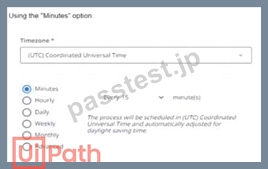
How can a process be scheduled to start every 15 minutes between 07:00 AM and 06:59 PM from Monday To Friday?
- A.

- B.

- C.

- D.
正解:B
解説:
Option D is the correct answer because it shows the scheduling option using the "Advanced" option. This option allows the user to specify a cron expression that defines the exact time and frequency of the process execution. The cron expression for this scenario is 0 0/15 7-18 ? * MON-FRI *, which means the process will run every 15 minutes starting at 0 minutes past the hour, from 7 AM to 6 PM, on every weekday. The other options are incorrect because they do not match the required schedule. Option A uses the "Hourly" option, which will run the process every hour at 15 minutes past the hour, not every 15 minutes. Option B uses the
"Daily" option, which will run the process once a day at 15 minutes past 7 AM, not every 15 minutes. Option C uses the "Weekly" option, which will run the process once a week on Monday at 15 minutes past 7 AM, not every 15 minutes. References: UiPath Automation Solution Architect Learning Plan, Module 5:
Operationalization1; UiPath Automation Suite - Scheduling Processes2; UiPath Academy - Roles of a Solution Architect in Automation, RPA Setting3.
質問 # 39
......
トップクラスUiPath UiPath-ASAPv1オンライン問題集:https://www.passtest.jp/UiPath/UiPath-ASAPv1-shiken.html
無料UiPath UiPath-ASAPv1試験問題と解答トレーニングを提供しています:https://drive.google.com/open?id=1txElZaGXC69fER7YoKDtaSnvjfI3SKIC