

PAM-DEF認証試験の問題集解答を提供しています [2025年03月]
更新されたPAM-DEF試験練習テスト問題
CyberArk PAM-DEF試験は、特権アカウントのセキュリティを確保し、機密データが不正アクセスから保護されるようにする責任を負うITプロフェッショナルに最適です。この試験は、特に、セキュリティ管理者、システムエンジニア、およびITマネージャーが、組織内でPAMソリューションを実装および管理することに関与している場合に関連します。この認証を取得することで、プロフェッショナルはPAMソリューションにおける専門知識を証明し、サイバーセキュリティの急速に成長する分野でのキャリアの展望を向上させることができます。
PAM-DEF認定試験は、Cyberarkの認定プログラムの一部であり、さまざまなレベルの専門知識と経験に関するさまざまな認定を提供しています。 PAM-DEF試験は、CyberARK PAMソリューションを扱う最低2年の経験を持つ専門家向けに設計されています。認定は2年間有効であり、再構成試験に合格することで更新できます。
質問 # 54
A user requested access to view a password secured by dual-control and is unsure who to contact to expedite the approval process. The Vault Admin has been asked to look at the account and identify who can approve their request.
What is the correct location to identify users or groups who can approve?
- A. PrivateArk > Admin Tools > Users and Groups > Auditors (Group Membership)
- B. PVWA> Policies > Access Control (Safes) > Safe Members > Workflow > Authorize Password Requests
- C. PVWA> Account List > Edit > Show Advanced Settings > Dual Control > Direct Managers
- D. PVWA> Administration > Platform Configuration > Edit Platform > UI & Workflow > Dual Control> Approvers
正解:B
解説:
Explanation
In CyberArk's Privileged Access Management (PAM), the correct location to identify users or groups who can approve a dual-control request is within the Password Vault Web Access (PVWA). Specifically, you would navigate to the 'Policies' section, then to 'Access Control (Safes)', and within a safe, you would go to
'Safe Members'. Here, under the 'Workflow' tab, there is an option to 'Authorize Password Requests'. This is where the Vault Admin can identify which users or groups are authorized to approve requests for viewing passwords secured by dual-control.
References: The information is based on the best practices and guidelines provided in the CyberArk Defender PAM course and learning resources, which include the official CyberArk documentation and study guides.
質問 # 55
It is possible to control the hours of the day during which a user may log into the vault.
- A. TRUE
- B. FALSE
正解:A
質問 # 56
What is the purpose of the Immediate Interval setting in a CPM policy?
- A. To control how often the CPM looks for User Initiated CPM work.
- B. To Control the maximum amount of time the CPM will wait for a password change to complete.
- C. To control how often the CPM rests between password changes.
- D. To control how often the CPM looks for System Initiated CPM work.
正解:A
解説:
Explanation
The Immediate Interval setting in a CPM policy is used to control how often the CPM looks for User Initiated CPM work, such as manual password changes, retrievals, or requests. The Immediate Interval setting defines the frequency, in minutes, that the CPM will check the accounts that are associated with the policy and perform the actions that were initiated by the users. For example, if the Immediate Interval is set to 2, the CPM will check the accounts every 2 minutes and change, retrieve, or authorize the passwords according to the user requests. The Immediate Interval setting does not affect System Initiated CPM work, such as password changes, verifications, or reconciliations that are triggered by the policy settings, such as Expiration Period or One Time Password. These actions are controlled by the Interval setting in the CPM policy. The Immediate Interval setting also does not control how often the CPM rests between password changes or the maximum amount of time the CPM will wait for a password change to complete. These parameters are configured in the CPM.ini file, which is stored in the root folder of the <CPM username> Safe. References:
* [Defender PAM eLearning Course], Module 5: Password Management, Lesson 5.1: CPM Policies, Slide
9: CPM Policy Settings
* [Defender PAM Sample Items Study Guide], Question 6: CPM Policy Settings
* [CyberArk Documentation Portal], CyberArk Privileged Access Security Implementation Guide, Chapter 5: Managing Passwords, Section: CPM Policy Settings, Subsection: Immediate Interval
質問 # 57
You have associated a logon account to one your UNIX cool accounts in the vault. When attempting to
[b]change [/b] the root account's password the CPM will.....
- A. Log in to the system as root, then change root's password
- B. Log in to the system as the logon account, run the su command to log in as root, and then change root's password.
- C. None of these
- D. Log in to the system as the logon account, then change roofs password
正解:B
質問 # 58
It is possible to leverage DNA to provide discovery functions that are not available with auto-detection.
- A. TRUE
- B. FALS
正解:A
質問 # 59
In order to connect to a target device through PSM, the account credentials used for the connection must be stored in the vault?
- A. True.
- B. False. Because the user can also enter credentials manually using Secure Connect.
- C. False. Because if credentials are not stored in the vault, the PSM will log into the target device as PSM Connect.
- D. False. Because if credentials are not stored in the vault, the PSM will prompt for credentials.
正解:D
質問 # 60
Which of the following files must be created or configured m order to run Password Upload Utility? Select all that apply.
- A. A comma delimited upload file
- B. Vault.ini
- C. PACli.ini
- D. conf.ini
正解:A、B、D
質問 # 61
In the screenshot displayed, you just configured the usage in CyberArk and want to update its password.
What is the least intrusive way to accomplish this?
- A. Use the "change" button on the usage's details page.
- B. Use the "reconcile" button on the parent account's details page.
- C. Use the "sync" button on the usage's details page.
- D. Use the "change" button on the parent account's details page.
正解:C
解説:
Explanation
A usage is a configuration that allows CyberArk to manage passwords for files, such as XML or INI files, that are stored on remote machines. A usage is associated with a parent account, which is the account that has access to the file. To update the password of a usage, the least intrusive way is to use the "sync" button on the usage's details page. This will synchronize the password value between the Vault and the file, without changing the actual password. The "change" button will initiate a password change process by the CPM, which will generate a new random password for the usage and the file. The "reconcile" button will initiate a password reconcile process by the CPM, which will use a reconcile account to reset the password of the usage and the file to the value stored in the Vault. References: Usages, Manage passwords for usages
質問 # 62
Match each automatic remediation to the correct PTA security event.
正解:
解説: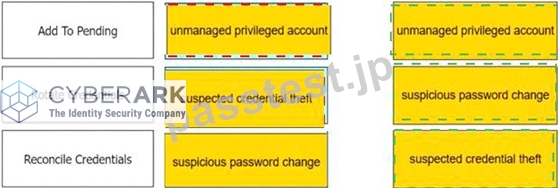

質問 # 63
DRAG DROP
Match the built-in Vault User with the correct definition.
正解:
解説:
質問 # 64
You are creating a shared safe for the help desk.
What must be considered regarding the naming convention?
- A. Ensure your naming convention is no longer than 20 characters.
- B. Combine environments, owners and platforms to minimize the total number of safes created.
- C. Safe owners should determine the safe name to enable them to easily remember it.
- D. The use of these characters V:*<>".| is not allowed.
正解:D
解説:
Explanation
When creating a shared safe for the help desk in CyberArk's Privileged Access Management (PAM), it is important to adhere to the naming conventions set forth by CyberArk. One of the key considerations is that certain characters are not permitted in the safe name. Specifically, the characters V:*<>".| are not allowed in the naming of safes. This is to ensure compatibility and prevent issues with the file system or the CyberArk application itself, as these characters may interfere with normal operations or be reserved for specific functions within the operating system or the application.
References: The information regarding safe naming conventions is based on CyberArk's best practices and guidelines, which are detailed in the official CyberArk documentation and study guides. It is important to consult the CyberArk Defender PAM resources and documents to ensure compliance with these standards
質問 # 65
You are onboarding an account that is not supported out of the box.
What should you do first to obtain a platform to import?
- A. Search common community portals like stackoverflow, reddit, github for an existing platform.
- B. From the platforms page, uncheck the "Hide non-supported platforms" checkbox and see if a platform meeting your needs appears.
- C. Visit the CyberArk marketplace and search for a platform that meets your needs.
- D. Create a service ticket in the customer portal explaining the requirements of the custom platform.
正解:C
質問 # 66
Which permissions are needed for the Active Directory user required by the Windows Discovery process?
- A. Domain Admin
- B. LDAP Admin
- C. Read
- D. Read/Write
正解:C
解説:
Explanation
The Active Directory user required by the Windows Discovery process needs to have Read permissions in the OU to scan and all sub-OUs1. This allows the Discovery process to scan predefined machines for new and modified accounts and their dependencies without requiring elevated privileges such as Domain Admin or LDAP Admin rights. The Read permission is sufficient for the Discovery process to retrieve the necessary information about the accounts that should be onboarded into the Vault.
References:
* CyberArk's official documentation on managing discovery processes outlines the permissions required for the Discovery process, including the need for Read permissions for the Active Directory user performing the discovery1.
* Additional details on the required credentials for scanning and the Discovery process can be found in the supported target machines section of CyberArk's documentation2.
質問 # 67
What is required to manage loosely connected devices?
- A. EPM
- B. PTA
- C. PSM for SSH
- D. PSM
正解:A
解説:
Explanation
To manage loosely connected devices, which are not always connected to the network, CyberArk uses the Endpoint Privilege Manager (EPM). EPM is capable of rotating credentials of accounts on Windows and macOS devices that are loosely connected to the enterprise network. It operates over the internet and can communicate with the corporate PVWA to retrieve the new password and change it on the device1.
References: The information provided is based on general knowledge of CyberArk PAM best practices and the management of loosely connected devices as outlined in CyberArk's official documentation1.
質問 # 68
Which parameter controls how often the CPM looks for accounts that need to be changed from recently completed Dual control requests.
- A. ImmediateInterval
- B. The CPM does not change the password under this circumstance
- C. HeadStartInterval
- D. Interval
正解:D
解説:
Explanation
This parameter controls how often the CPM looks for accounts that need to be changed from recently completed Dual control requests. It is set in the Master Policy under the Dual Control section. The value of this parameter determines the frequency of the CPM's verification process for accounts that have been accessed by users who have received confirmation from authorized Safe owners. The CPM will change the password of these accounts according to the value of this parameter. References:
* Dual Control - CyberArk
* Dual control in V10 Interface - docs.cyberark.com
* PAM-DEF CyberArk Defender - PAM Questions and Answers - Marks4sure
質問 # 69
Arrange the steps to restore a Vault using PARestore for a Backup in the correct sequence.
正解:
解説:
Explanation
BackupFilesDeletion=No
PARestore vault.ini operator /FullVaultRestore
CAVaultManager RecoverBackupFiles
CAVaultManager RestoreDB
BackupFilesDeletion=Yes,24,1,5,7d
https://docs.cyberark.com/Product-Doc/OnlineHelp/PAS/Latest/en/Content/PASIMP/Restoring-Safes-or-the-Vau
質問 # 70
What is the purpose of the CyberArk Event Notification Engine service?
- A. It sends email messages from the Vault
- B. It makes Vault data available to components
- C. It processes audit report messages
- D. It sends email messages from the Central Policy Manager (CPM)
正解:A
解説:
Explanation
The purpose of the CyberArk Event Notification Engine service is to send email notifications about Privileged Access Security solution activities automatically to predefined users. It is installed automatically as part of the Vault server installation as a service. The Event Notification Engine (ENE) can be configured to send email notifications for various events, such as password changes, password verifications, account onboarding, account deletion, audit reports, alerts, and more. The ENE can also support encrypted and authenticated email notifications, as well as high availability implementations1. References:
* Event Notification Engine - CyberArk, section "Event Notification Engine"
質問 # 71
What can you do to ensure each component server is operational?
- A. Ping each component server to ensure connectivity.
- B. Install the Vault Server interface on a remote machine to avoid interactive logon to the Vault OS and review the ITALog.log through the Vault Server interface.
- C. Logon to PVWA with v10 UI, navigate to Healthcheck, and validate each component server is connected to the Vault.
- D. Use the PrivateArk client to connect to the Vault server and validate all the services are running.
正解:C
質問 # 72
PTA can automatically suspend sessions if suspicious activities are detected in a privileged session, but only if the session is made via the CyberArk PSM.
- A. True
- B. False, the PTA can suspend sessions whether the session is made via the PSM or not
正解:B
質問 # 73
You need to recover an account localadmin02 for target server 10.0.123.73 stored in Safe Team1.
What do you need to recover and decrypt the object? (Choose three.)
- A. Vault data
- B. Recovery Private Key
- C. Master Password
- D. Recover.exe
- E. Server Key
- F. Recovery Public Key
正解:A、B、D
解説:
Explanation
To recover and decrypt an account that is stored in a Safe, you need the following items:
* Recovery Private Key: This is a key that is used to decrypt the data stored in the Vault. It is located on the Master CD, which is a physical CD that contains the Private Recovery Key, a file named RecPrv.key.
* Recover.exe: This is a utility that is used to recover information from a Safe's external files in case of loss or corruption of that Safe. The files are decrypted and saved as readable files. The utility can be run from the command line or the graphical user interface.
* Vault data: This is the data that is stored in the Vault, such as accounts, safes, platforms, policies, users, groups, and audit records. The Vault data is encrypted using the Recovery Public Key, which is a key that is used to encrypt the data stored in the Vault. The Vault data can be recovered from the Vault server disk drive or from a backup file.
References: Recover, Server keys, Export Vault Information
質問 # 74
You receive this error:
"Error in changepass to user domain\user on domain server(\domain.(winRc=5) Access is denied." Which root cause should you investigate?
- A. The CPM service is disabled and will need to be restarted.
- B. The account does not have sufficient permissions to change its own password.
- C. The domain controller is unreachable.
- D. The password has been changed recently and minimum password age is preventing the change.
正解:B
解説:
Explanation
The error message "Error in changepass to user domain\user on domain server(\domain.(winRc=5) Access is denied" suggests that the account attempting to change the password does not have the necessary permissions to do so. This could be due to several reasons, such as the account not being part of the appropriate group with password change privileges, or specific restrictions set on the account that prevent password changes. It's important to verify the account's permissions and ensure it has the ability to change its own password within the domain.
References: The conclusion is based on common issues encountered in CyberArk's Privileged Access Management (PAM) when managing account passwords and the associated error codes. The CyberArk documentation and community discussions provide insights into troubleshooting such errors, where insufficient permissions are a frequent cause
質問 # 75
The vault supports Subnet Based Access Control.
- A. TRUE
- B. FALSE
正解:A
解説:
Explanation
According to the web page in the edge browser, the vault supports Subnet Based Access Control. This is a feature that allows you to restrict access to a key vault to a specified virtual network and subnet. You can also use firewall settings to deny internet traffic and allow only specific IP addresses. This way, you can enhance the security and privacy of your key vault data12
質問 # 76
What is the name of the Platform parameters that controls how long a password will stay valid when One Time Passwords are enabled via the Master Policy?
- A. Immediate Interval
- B. Min Validity Period
- C. Interval
- D. Timeout
正解:B
解説:
Explanation
Min Validity Period -The number of minutes to wait from the last retrieval of the password until it is replaced.
This gives the user a minimum period to be able to use the password before it is replaced. Use -1 to ignore this property. This parameter is also used to release exclusive accounts automatically Interval -" The number of minutes that the Central Policy Manager waits between running periodic searches for the platform. Note: It is recommended to leave the default value of 1440. If a change/verify policy has been configured, the Central Policy Manager will automatically align the periodic searches with the start of the defined timeframes."
質問 # 77
......
検証済みのPAM-DEF問題集と解答を使って100%一発合格保証で更新された問題集:https://drive.google.com/open?id=1-i9YrF0-7yoTHKDTjv0fTHfa_8b5VKYV
合格させるCyberArk Defender PAM-DEF試験には240問があります:https://www.passtest.jp/CyberArk/PAM-DEF-shiken.html