

最適なNCP-MCI-6.5試験準備問題集でNutanix NCP-MCI-6.5問題集PDFを試そう![2024]
Nutanix NCP-MCI-6.5試験受験生を確実にパスさせるNCP-MCI-6.5学習問題集
質問 # 50
A VM in a 12-node Nutanix cluster is hosting an application that has specific Physical GPU requirements.
Only three nodes in the cluster meet this requirement.
The administrator wants to allow a general workload to be distributed across all nodes in the cluster and must make sure that the node hosting the VM meets its requirements.
How should the administrator perform this task?
- A. Configure VM-Host affinity for the nodes that meet the application's GPU requirement.
- B. Over-Provision the application VM with additional virtual GPUs.
- C. Create a sperate three-node cluster using the nodes that meet the requirement.
- D. Configure anti-affinity rules between the application VM and the other VMs running on the cluster.
正解:A
解説:
Configure VM-Host affinity for the nodes that meet the application's GPU requirement. This is because VM-Host affinity allows the administrator to specify which nodes a VM can run on or must not run on1. By creating a VM-Host affinity rule that binds the application VM to the three nodes that have the physical GPU, the administrator can ensure that the VM will always run on a node that meets its requirement, regardless of any HA or migration events. This also allows the other nodes in the cluster to host other VMs without any restrictions.
質問 # 51
During an AHV upgrade, an administrator finds that a critical VM was powered off rather than migration to another host.
Which scenario explains this behavior?
- A. The VM was marked as an agent VM.
- B. NO AHV hosts were able to be scheduled.
- C. The VM OS hung during migration.
- D. The VM was on the same host as the acropolis leader.
正解:A
解説:
An agent VM is a special type of VM that is used for running services or applications that are not affected by high availability (HA) events or host maintenance. An agent VM is never migrated to any other host in the cluster. If an HA event occurs or the host is put in maintenance mode, agent VMs are powered off and are powered on on the same host once that host returns to a normal state. This behavior is different from regular VMs, which are migrated to another host in the cluster if possible, or restarted on the same host if not possible1.
Therefore, during an AHV upgrade, an administrator may find that a critical VM was powered off rather than migrated to another host if the VM was marked as an agent VM. This can be done either from the Prism web console by selecting the Use this VM as an agent VM option in the Update VM dialog box, or from the aCLI by using the vm.create or vm.update commands with the agent_vm=true parameter2. To avoid this situation, the administrator should ensure that any critical VMs are not marked as agent VMs before starting the AHV upgrade.
質問 # 52
Which inefficient VM Profile can be used to identify a VM that consumes too many resources and causes other VMs to starve?
- A. Constrained VM
- B. Over-provisioned VM
- C. Inactive VM
- D. Bully VM
正解:D
解説:
A bully VM is a VM that consumes too many resources and causes other VMs to starve. A bully VM can affect the performance and availability of other VMs on the same host or cluster by hogging CPU, memory, disk, or network resources. A bully VM can be identified by using the VM Profile feature in Prism Central2. The VM Profile feature analyzes the resource utilization of each VM and assigns it a profile based on its efficiency and impact on other VMs. The profiles are as follows3:
Efficient: The VM is well-provisioned and has optimal resource utilization.
Over-provisioned: The VM has more resources than it needs and has low resource utilization.
Constrained: The VM has less resources than it needs and has high resource utilization.
Inactive: The VM has no resource utilization and is idle or powered off.
Bully: The VM has high resource utilization and causes contention for other VMs.
To identify a bully VM, the administrator can use Prism Central to view the VM Profile dashboard and filter by profile type. The dashboard shows the number of VMs in each profile type, as well as their resource consumption and efficiency score. The administrator can also drill down into each VM to see its detailed metrics and recommendations for optimization.
質問 # 53
An administrator is tasked with configuring networking on an AHV cluster and needs to optimize for maximum single VM throughput.
Which bond mode should the administrator select?
- A. Active-Backup
- B. Active-Active
- C. No Uplink Bond
- D. Active-Active with Mac pinning
正解:B
質問 # 54
Refer to exhibit:
An administrator needs to update some images that were previously uploaded to their Nutanix cluster, while logged into Prism Element when trying to update the images, the update icon is not enabled.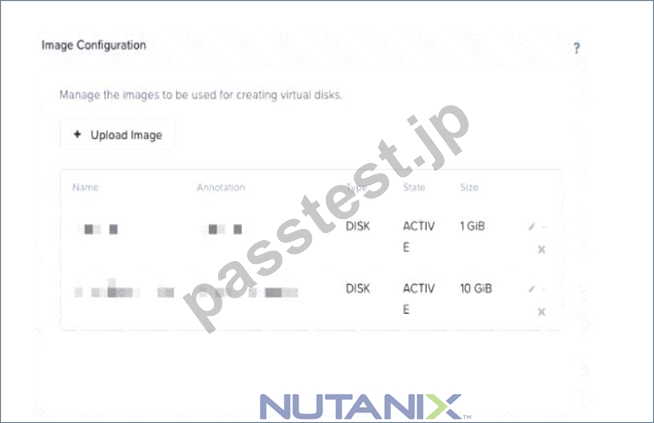
What could be the cause for this behavior?
- A. RBAC is configured and the administrator's user doesn't have the right privileges.
- B. Images are corrupted and must be re-uploaded.
- C. Images were imported into Prism Central.
- D. The files were ISO but were uploaded as disk images hence cannot be used or edited.
正解:C
解説:
According to Nutanix Support & Insights1, image create, update, and delete (CUD) behavior depends on whether a cluster (also known as Prism Element) is registered to Prism Central. Images created on a Prism Element reside on Prism Element and can be managed from Prism Element. For better centralized management, you can migrate images manually to Prism Central by using the image import feature.
質問 # 55
Which method can be used to migrate a VM configured for UEFI-boot from a Nutanix Hyper-V cluster to AHV?
- A. Storage vMotion
- B. Live Migration
- C. Nutanix Move
- D. Cloud Connect
正解:C
質問 # 56
What is the expected operation during node addition when the new node has a different AOS version?
- A. The addition fails and forces the administrator to image using standalone Foundation.
- B. The node is automatically re-imaged using the software currently running in the cluster.
- C. The node is added and a separate upgrade operation must be performed.
- D. The entire cluster is upgraded to the latest one-click release.
正解:A
質問 # 57
How should an administrator configure a custom alert for a specific VM in Prism?
- A. Modify the alerts to add a new custom alert policy.
- B. Modify VM settings to add the custom alert.
- C. Modify node settings to add the custom alert.
- D. Modify an existing alert to only alert on the specific VM.
正解:A
解説:
https://portal.nutanix.com/page/documents/details/?targetId=Prism-Central-Guide-Prism-v510:mul-alert-policies
質問 # 58
Which three cluster operations require an administrator to reclaim licenses?(Choose three)
- A. Destroy a cluster.
- B. Upgrade a cluster
- C. Move Nodes between clusters.
- D. Remove a Node from a cluster
- E. Migrate a cluster
正解:A、C、D
解説:
Explanation
https://portal.nutanix.com/page/documents/details/?targetId=Web_Console_Guide-Prism_v4_7:lic_licensing_ma Reclaiming Licenses (Including License Renewal) You can reclaim and optionally re-apply licenses for nodes in your clusters:
* You must reclaim licenses when you plan to destroy a cluster. First reclaim the licenses, then destroy the cluster. You do not need to reclaim Starter licenses. These licenses are automatically applied whenever you create a cluster, including after you have destroyed a cluster.
* Return licenses to your inventory when you remove one or more nodes from a cluster. Also, if you move nodes from one cluster to another, first reclaim the licenses, move the nodes, then re-apply the licenses.
* You can reclaim licenses for nodes in your clusters in cases where you want to make modifications or downgrade licenses. For example, applying an Ultimate license to all nodes in a cluster where some nodes are currently licensed as Pro and some nodes are licensed as Ultimate. You might also want to transition nodes from Ultimate to Pro licensing.
* You must reclaim licenses when you renew licenses. First reclaim the expired licenses, then apply new licenses.
質問 # 59
Which AOS process determine if an I/O from a user will be written to OpLog or to an Extent Store?
- A. Cassandara
- B. Curtor
- C. Zeus
- D. Stargate
正解:D
解説:
Stargate is the AOS process that handles all I/O operations for the cluster. It is responsible for determining whether an I/O from a user will be written to the OpLog or to the Extent Store, based on the type and size of the I/O. Stargate also performs data tiering, compression, deduplication, and erasure coding1. Stargate runs on every CVM and communicates with other Stargates to ensure data locality and redundancy2.
質問 # 60
Refer to Exhibit.
An administrator increases the cluster RF to 3. The containers are not modified.
What will the new values in the data resiliency dashboard be for FAILURES TOLERABLE for the Zookeeper and Extent Groups components?
- A. Zookeeper = 2 and Extent Groups = 2
- B. Zookeeper = 2 and Extent Groups = 1
- C. Zookeeper = 1 and Extent Groups = 2
- D. Zookeeper = 1 and Extent Groups = 1
正解:B
質問 # 61
Refer to the exhibit.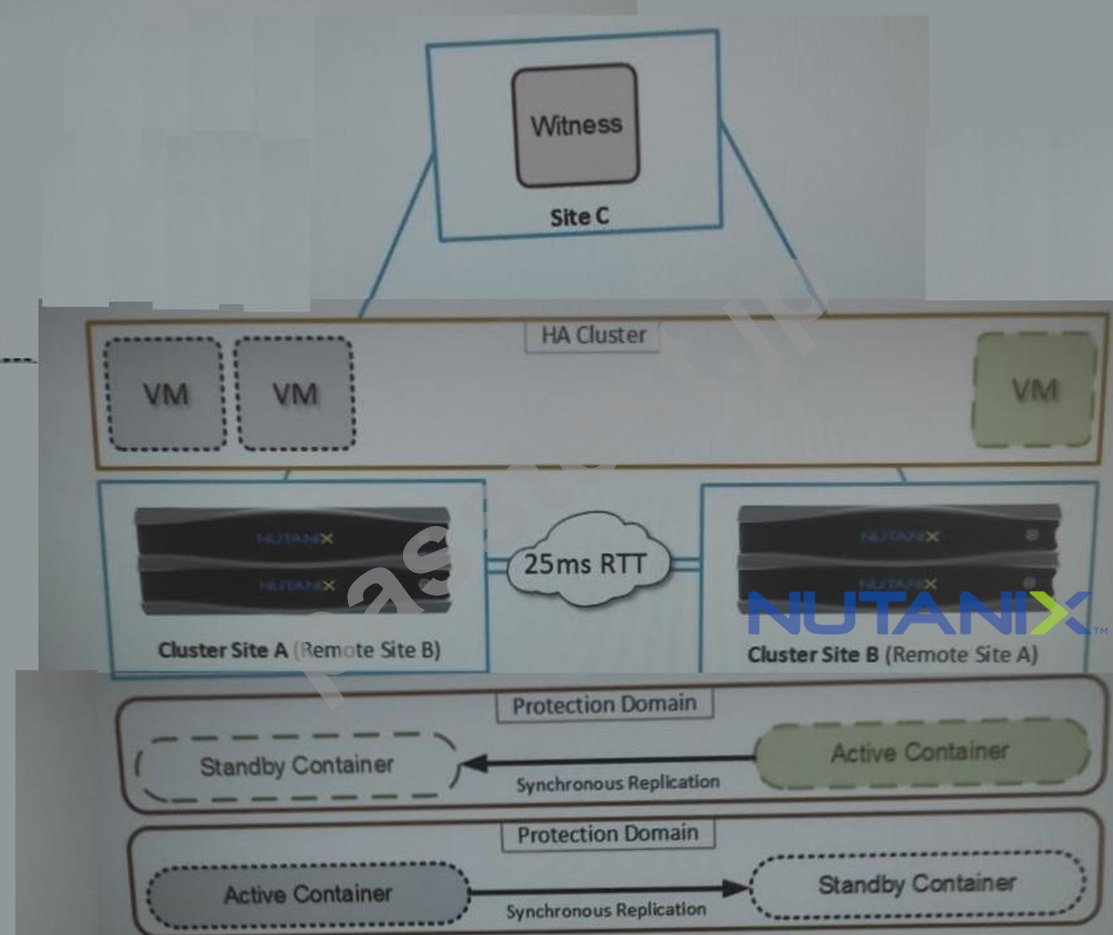
An administrator is trying to implement the solution that is shown in the exhibit, but has been unsuccessful.
Based on the diagram, what is causing the issue?
- A. A remote Witness VM
- B. Unsupported hypervisor
- C. Network latency
- D. Active containers in both sites
正解:C
解説:
The correct answer is C. Network latency.
The diagram shows a solution that uses synchronous replication between two remote protection domains, cluster site A and cluster site B. Synchronous replication is a feature that allows near-zero RPO (recovery point objective) by replicating data to the remote site before acknowledging writes to the local site. However, synchronous replication has some requirements and limitations that must be met for it to work properly. One of these requirements is that the network latency between the two sites must be less than or equal to 5 ms1. If the network latency is higher than 5 ms, the synchronous replication will fail and the protection policy will be suspended2.
Therefore, based on the diagram, the most likely cause of the issue is that the network latency between cluster site A and cluster site B is higher than 5 ms, which prevents the synchronous replication from working. To verify this, the administrator can use the "ncli cluster ping" command to measure the network latency between the two sites3. If the network latency is indeed higher than 5 ms, the administrator can either improve the network performance or switch to a different replication mode, such as near-synchronous or asynchronous.
質問 # 62
On a Nutanix cluster, what does Network Segmentation refer to?
- A. A distributed firewall for security VM to VM traffic.
- B. Physically separating management traffic from guest VM traffic.
- C. Isolating intra-cluster traffic from guest VM traffic.
- D. Isolating management traffic from storage replication traffic.
正解:D
質問 # 63
Which inefficient VM Profile can be used to identify a VM that consumes too many resources and causes other VMs to starve?
- A. Constrained VM
- B. Over-provisioned VM
- C. Inactive VM
- D. Bully VM
正解:D
解説:
A bully VM is a VM that consumes too many resources and causes other VMs to starve. A bully VM can affect the performance and availability of other VMs on the same host or cluster by hogging CPU, memory, disk, or network resources. A bully VM can be identified by using the VM Profile feature in Prism Central2.
The VM Profile feature analyzes the resource utilization of each VM and assigns it a profile based on its efficiency and impact on other VMs. The profiles are as follows3:
* Efficient: The VM is well-provisioned and has optimal resource utilization.
* Over-provisioned: The VM has more resources than it needs and has low resource utilization.
* Constrained: The VM has less resources than it needs and has high resource utilization.
* Inactive: The VM has no resource utilization and is idle or powered off.
* Bully: The VM has high resource utilization and causes contention for other VMs.
To identify a bully VM, the administrator can use Prism Central to view the VM Profile dashboard and filter by profile type. The dashboard shows the number of VMs in each profile type, as well as their resource consumption andefficiency score. The administrator can also drill down into each VM to see its detailed metrics and recommendations for optimization.
質問 # 64
Refer to the exhibit.
System Non-Root Partition Usage shows a warning or critical alert The administrator needs to change the frequency of checks and alerts to respond more quickly.
Where in Prism Element should the administrator change the frequency of checks and alerts?
- A. Health Dashboard > Manage Crocks > Frequency
- B. Health Dashboard > Manage Checks > Schedule
- C. Alerts Dashboard > Manage Checks > Schedule
- D. Alerts Dashboard > Manage Checks > Frequency
正解:B
解説:
According to the Nutanix Support & Insights web search result1, the administrator can change the frequency of checks and alerts for the System Non-Root Partition Usage in Prism Element by going to the Health Dashboard > Manage Checks > Schedule. The administrator can select the check name, such as disk_usage_check, and click on Edit Schedule. The administrator can then choose the desired frequency, such as every 15 minutes, every hour, or every day, and click on Save. This will change how often the check runs and alerts are generated.
質問 # 65
Administrator is creating a Windows 10 VM that will be used for a virtual desktop template. After creating the VM and booting to the ISO, the administrator is unable to install Windows and receives the following error.
What steps does the administrator need to take to install the OS?
- A. Load the Virtual SCSI pass-through controller.
- B. Load the Nutanix VirtIO Serial Bus Driver.
- C. Load the VirtIO Network Ethernet Adaper.
- D. Load the Nutanix Virtual Balloon Driver.
正解:A
解説:
D: Load the Virtual SCSI pass-through controller.
The error message shown in the image indicates that Windows 10 setup cannot find any drives to install the OS. This is because the Nutanix AHV hypervisor uses a virtual SCSI pass-through controller to present disks to the VMs, and Windows 10 does not have a built-in driver for this device. Therefore, the administrator needs to load the Nutanix VirtIO driver for the virtual SCSI pass-through controller during the OS installation process. The Nutanix VirtIO driver package contains various drivers that are specifically used by Windows VMs hosted in the Nutanix environment to enhance their stability and performance1. The administrator can download the latest Nutanix VirtIO driver package from the VirtIO downloads page of the Nutanix support portal. The administrator can then follow these steps to load the driver and install the OS2:
* On the Windows 10 setup screen, click Load driver.
* Insert a USB drive or mount an ISO image that contains the Nutanix VirtIO driver package.
* Browse to the location of the driver package and select the folder that matches the OS architecture (32-bit or 64-bit).
* Select the vioscsi.inf file and click Next.
* Wait for the driver to load and then click Refresh.
* Select the disk where you want to install Windows 10 and click Next.
References: 1: VirtIO Driver Versions for Windows 2: Installing Windows on AHV
質問 # 66
Where can an administrator change a CVM password?
- A. KMS Server Terminal
- B. CVM setting in Prism Element
- C. Prism CVM VM Console
- D. CVM setting in Prism Central
正解:C
質問 # 67
After running an LCM inventory it is noticed that there are a number of firmware and software updates available. The administrator would like to avoid any host reboots, but would like to apply some of the available updates?
- A. M.2 Drives
- B. AHV
- C. Data Drives
- D. AOS
正解:B、D
解説:
Explanation
AHV is the Acropolis Hypervisor that is used to run Nutanix clusters, and firmware and software updates can be applied to it without requiring any host reboots. AOS is the Acropolis Operating System that includes the hypervisor, storage and management components of the Nutanix cluster, and firmware and software updates can also be applied to it without requiring any host reboots.
質問 # 68
......
完全版NCP-MCI-6.5練習テスト問題集で180の別格な問題と解釈、今すぐゲットせよ:https://drive.google.com/open?id=1vjpEEZHbYylo_536R5A0SABLWbCDEDrw
的確で最適なアンサー模擬試験はここにある:https://www.passtest.jp/Nutanix/NCP-MCI-6.5-shiken.html