

最新の2025年04月17日試験エンジン練習問題Professional-Machine-Learning-Engineer最新の有効問題集を提供中です
試験解答はProfessional-Machine-Learning-Engineer最新版テストエンジンをタダで提供します
Google Professional Machine Learning Engineerの認定を取得するには、データ準備と処理、機械学習モデルの開発と実装、ビジネス問題解決など、いくつかの重要な分野での熟練度を証明する必要があります。試験は、データモデリング、分散コンピューティング、TensorFlowやKerasなどの機械学習フレームワークなど、幅広いトピックをカバーしています。さらに、Google Cloud PlatformのサービスであるBigQuery、Dataflow、Kubernetesなどの機械学習に使用されるツールとテクノロジーに精通している必要があります。
質問 # 159
An agency collects census information within a country to determine healthcare and social program needs by province and city. The census form collects responses for approximately 500 questions from each citizen.
Which combination of algorithms would provide the appropriate insights? (Choose two.)
- A. The k-means algorithm
- B. The principal component analysis (PCA) algorithm
- C. The Latent Dirichlet Allocation (LDA) algorithm
- D. The Random Cut Forest (RCF) algorithm
- E. The factorization machines (FM) algorithm
正解:A、B
解説:
Explanation/Reference:
Explanation:
The PCA and K-means algorithms are useful in collection of data using census form.
質問 # 160
You are building an ML model to predict trends in the stock market based on a wide range of factors. While exploring the data, you notice that some features have a large range. You want to ensure that the features with the largest magnitude don't overfit the model. What should you do?
- A. Normalize the data by scaling it to have values between 0 and 1.
- B. Standardize the data by transforming it with a logarithmic function.
- C. Apply a principal component analysis (PCA) to minimize the effect of any particular feature.
- D. Use a binning strategy to replace the magnitude of each feature with the appropriate bin number.
正解:A
解説:
The best option to ensure that the features with the largest magnitude don't overfit the model is to normalize the data by scaling it to have values between 0 and 1. This is also known as min-max scaling or feature scaling, and it can reduce the variance and skewness of the data, as well as improve the numerical stability and convergence of the model. Normalizing the data can also make the model less sensitive to the scale of the features, and more focused on the relative importance of each feature. Normalizing the data can be done using various methods, such as dividing each value by the maximum value, subtracting the minimum value and dividing by the range, or using the sklearn.preprocessing.MinMaxScaler function in Python.
The other options are not optimal for the following reasons:
* A. Standardizing the data by transforming it with a logarithmic function is not a good option, as it can distort the distribution and relationship of the data, and introduce bias and errors. Moreover, the logarithmic function is not defined for negative or zero values, which can limit its applicability and cause problems for the model.
* B. Applying a principal component analysis (PCA) to minimize the effect of any particular feature is not a good option, as it can reduce the interpretability and explainability of the data and the model. PCA is a dimensionality reduction technique that transforms the data into a new set of orthogonal features that capture the most variance in the data. However, these new features are not directly related to the original features, and can lose some information and meaning in the process. Moreover, PCA can be computationally expensive and complex, and may not be necessary for the problem at hand.
* C. Using a binning strategy to replace the magnitude of each feature with the appropriate bin number is not a good option, as it can lose the granularity and precision of the data, and introduce noise and outliers. Binning is a discretization technique that groups the continuous values of a feature into a finite number of bins or categories. However, this can reduce the variability and diversity of the data, and create artificial boundaries and gaps that may not reflect the true nature of the data. Moreover, binning can be arbitrary and subjective, and depend on the choice of the bin size and number.
References:
* Professional ML Engineer Exam Guide
* Preparing for Google Cloud Certification: Machine Learning Engineer Professional Certificate
* Google Cloud launches machine learning engineer certification
* Feature Scaling for Machine Learning: Understanding the Difference Between Normalization vs.
Standardization
* sklearn.preprocessing.MinMaxScaler documentation
* Principal Component Analysis Explained Visually
* Binning Data in Python
質問 # 161
You are a lead ML engineer at a retail company. You want to track and manage ML metadata in a centralized way so that your team can have reproducible experiments by generating artifacts. Which management solution should you recommend to your team?
- A. Store all ML metadata in Google Cloud's operations suite.
- B. Manage all relational entities in the Hive Metastore.
- C. Manage your ML workflows with Vertex ML Metadata.
- D. Store your tf.logging data in BigQuery.
正解:C
解説:
Vertex ML Metadata is a service that lets you track and manage the metadata produced by your ML workflows in a centralized way. It helps you have reproducible experiments by generating artifacts that represent the data, parameters, and metrics used or produced by your ML system. You can also analyze the lineage and performance of your ML artifacts using Vertex ML Metadata.
Some of the benefits of using Vertex ML Metadata are:
* It captures your ML system's metadata as a graph, where artifacts and executions are nodes, and events are edges that link them as inputs or outputs.
* It allows you to create contexts to group sets of artifacts and executions together, such as experiments, runs, or projects.
* It supports querying and filtering the metadata using the Vertex AI SDK for Python or REST commands.
* It integrates with other Vertex AI services, such as Vertex AI Pipelines and Vertex AI Experiments, to automatically log metadata and artifacts.
The other options are not suitable for tracking and managing ML metadata in a centralized way.
* Option A: Storing your tf.logging data in BigQuery is not enough to capture the full metadata of your ML system, such as the artifacts and their lineage. BigQuery is a data warehouse service that is mainly used for analytics and reporting, not for metadata management.
* Option B: Managing all relational entities in the Hive Metastore is not a good solution for ML metadata, as it is designed for storing metadata of Hive tables and partitions, not for ML artifacts and executions. Hive Metastore is a component of the Apache Hive project, which is a data warehouse system for querying and analyzing large datasets stored in Hadoop.
* Option C: Storing all ML metadata in Google Cloud's operations suite is not a feasible option, as it is a set of tools for monitoring, logging, tracing, and debugging your applications and infrastructure, not for ML metadata. Google Cloud's operations suite does not provide the features and integrations that Vertex ML Metadata offers for ML workflows.
質問 # 162
You are developing an ML model that uses sliced frames from video feed and creates bounding boxes around specific objects. You want to automate the following steps in your training pipeline: ingestion and preprocessing of data in Cloud Storage, followed by training and hyperparameter tuning of the object model using Vertex AI jobs, and finally deploying the model to an endpoint. You want to orchestrate the entire pipeline with minimal cluster management. What approach should you use?
- A. Use Vertex AI Pipelines with Kubeflow Pipelines SDK.
- B. Use Cloud Composer for the orchestration.
- C. Use Kubeflow Pipelines on Google Kubernetes Engine.
- D. Use Vertex AI Pipelines with TensorFlow Extended (TFX) SDK.
正解:D
解説:
* Option A is incorrect because using Kubeflow Pipelines on Google Kubernetes Engine is not the most convenient way to orchestrate the entire pipeline with minimal cluster management. Kubeflow Pipelines is an open-source platform that allows you to build, run, and manage ML pipelines using containers1. Google Kubernetes Engine is a service that allows you to create and manage clusters of virtual machines that run Kubernetes, an open-source system for orchestrating containerized applications2. However, this option requires more effort and resources than option B, as it involves creating and configuring the clusters, installing and maintaining Kubeflow Pipelines, and writing and running the pipeline code.
* Option B is correct because using Vertex AI Pipelines with TensorFlow Extended (TFX) SDK is the best way to orchestrate the entire pipeline with minimal cluster management. Vertex AI Pipelines is a service that allows you to create and run scalable and portable ML pipelines on Google Cloud3. TensorFlow Extended (TFX) is a framework that provides a set of components and libraries for building production-ready ML pipelines using TensorFlow4. You can use Vertex AI Pipelines with TFX SDK to ingest and preprocess the data in Cloud Storage, train and tune the object model using Vertex AI jobs, and deploy the model to an endpoint, using predefined or custom components. Vertex AI Pipelines handles the underlying infrastructure and orchestration for you, so you don't need to worry about cluster management or scalability.
* Option C is incorrect because using Vertex AI Pipelines with Kubeflow Pipelines SDK is not the most suitable way to orchestrate the entire pipeline with minimal cluster management. Kubeflow Pipelines SDK is a library that allows you to build and run ML pipelines using Kubeflow Pipelines5. You can use Vertex AI Pipelines with Kubeflow Pipelines SDK to create and run ML pipelines on Google Cloud, using containers. However, this option is less convenient and consistent than option B, as it requires you to use different APIs and tools for different steps of the pipeline, such as Vertex AI SDK for training and deployment, and Kubeflow Pipelines SDK for ingestion and preprocessing. Moreover, this option does not leverage the benefits of TFX, such as the standard components, the metadata store, or the ML Metadata library.
* Option D is incorrect because using Cloud Composer for the orchestration is not the most efficient way to orchestrate the entire pipeline with minimal cluster management. Cloud Composer is a service that allows you to create and run workflows using Apache Airflow, an open-source platform for orchestrating complex tasks. You can use Cloud Composer to orchestrate the entire pipeline, by creating
* and managing DAGs (directed acyclic graphs) that define the dependencies and order of the tasks.
However, this option is more complex and costly than option B, as it involves creating and configuring the environments, installing and maintaining Airflow, and writing and running the DAGs.
References:
* Kubeflow Pipelines documentation
* Google Kubernetes Engine documentation
* Vertex AI Pipelines documentation
* TensorFlow Extended documentation
* Kubeflow Pipelines SDK documentation
* [Cloud Composer documentation]
* [Vertex AI documentation]
* [Cloud Storage documentation]
* [TensorFlow documentation]
質問 # 163
Your data science team needs to rapidly experiment with various features, model architectures, and hyperparameters. They need to track the accuracy metrics for various experiments and use an API to query the metrics over time. What should they use to track and report their experiments while minimizing manual effort?
- A. Use Al Platform Notebooks to execute the experiments. Collect the results in a shared Google Sheets file, and query the results using the Google Sheets API
- B. Use Kubeflow Pipelines to execute the experiments Export the metrics file, and query the results using the Kubeflow Pipelines API.
- C. Use Al Platform Training to execute the experiments Write the accuracy metrics to Cloud Monitoring, and query the results using the Monitoring API.
- D. Use Al Platform Training to execute the experiments Write the accuracy metrics to BigQuery, and query the results using the BigQueryAPI.
正解:C
解説:
AI Platform Training is a service that allows you to run your machine learning experiments on Google Cloud using various features, model architectures, and hyperparameters. You can use AI Platform Training to scale up your experiments, leverage distributed training, and access specialized hardware such as GPUs and TPUs1. Cloud Monitoring is a service that collects and analyzes metrics, logs, and traces from Google Cloud, AWS, and other sources. You can use Cloud Monitoring to create dashboards, alerts, and reports based on your data2. The Monitoring API is an interface that allows you to programmatically access and manipulate your monitoring data3.
By using AI Platform Training and Cloud Monitoring, you can track and report your experiments while minimizing manual effort. You can write the accuracy metrics from your experiments to Cloud Monitoring using the AI Platform Training Python package4. You can then query the results using the Monitoring API and compare the performance of different experiments. You can also visualize the metrics in the Cloud Console or create custom dashboards and alerts5. Therefore, using AI Platform Training and Cloud Monitoring is the best option for this use case.
Reference:
AI Platform Training documentation
Cloud Monitoring documentation
Monitoring API overview
Using Cloud Monitoring with AI Platform Training
Viewing evaluation metrics
質問 # 164
You work for a company that sells corporate electronic products to thousands of businesses worldwide. Your company stores historical customer data in BigQuery. You need to build a model that predicts customer lifetime value over the next three years. You want to use the simplest approach to build the model and you want to have access to visualization tools. What should you do?
- A. Create a Vertex Al Workbench notebook to perform exploratory data analysis and create input features Save the features as a CSV file in Cloud Storage Import the CSV file as a new BigQuery table Use the BigQuery console to run the create model statement Validate the results by using the ml. evaluate and ml. predict statements.
- B. Create a Vertex Al Workbench notebook to perform exploratory data analysis. Use IPython magics to create a new BigQuery table with input features Use the BigQuery console to run the create model statement Validate the results by using the ml. evaluate and ml. predict statements.
- C. Create a Vertex Al Workbench notebook to perform exploratory data analysis Use IPython magics to create a new BigQuery table with input features, create the model and validate the results by using the create model, ml. evaluates, and ml. predict statements.
- D. Run the create model statement from the BigQuery console to create an AutoML model Validate the results by using the ml. evaluate and ml. predict statements.
正解:D
解説:
BigQuery is a service that allows you to store and query large amounts of data in a scalable and cost-effective way. You can use BigQuery to build a model that predicts customer lifetime value over the next three years, by using the create model statement. The create model statement is a SQL command that allows you to create and train an ML model using your data in BigQuery. You can use the create model statement to create an AutoML model, which is a type of model that automatically selects the best features and architecture for your data. By using an AutoML model, you can use the simplest approach to build the model, without writing any code or performing any feature engineering. You can also use the ml.evaluate and ml.predict statements to validate the results of your model. The ml.evaluate statement is a SQL command that allows you to evaluate the performance and quality of your model using various metrics. The ml.predict statement is a SQL command that allows you to make predictions using your model and new data. You can also use the BigQuery console to access visualization tools, such as charts and graphs, to explore and analyze your data and model results. By using the BigQuery console, the create model statement, and the ml.evaluate and ml.predict statements, you can build and validate a model that predicts customer lifetime value over the next three years, and have access to visualization tools. Reference:
BigQuery documentation
create model statement documentation
ml.evaluate statement documentation
ml.predict statement documentation
Preparing for Google Cloud Certification: Machine Learning Engineer Professional Certificate
質問 # 165
You are an ML engineer at a manufacturing company. You need to build a model that identifies defects in products based on images of the product taken at the end of the assembly line. You want your model to preprocess the images with lower computation to quickly extract features of defects in products. Which approach should you use to build the model?
- A. Recurrent Neural Networks (RNN)
- B. Reinforcement learning
- C. Convolutional Neural Networks (CNN)
- D. Recommender system
正解:C
解説:
* Option A is incorrect because reinforcement learning is not a suitable approach to build a model that identifies defects in products based on images of the product taken at the end of the assembly line. Reinforcement learning is a type of machine learning that learns from its own actions and rewards, rather than from labeled data or explicit feedback1. Reinforcement learning is more suitable for problems that involve sequential decision making, such as games, robotics, or control systems1.
However, defect detection is a problem that involves image classification or segmentation, which requires supervised learning, not reinforcement learning.
* Option B is incorrect because a recommender system is not a relevant approach to build a model that identifies defects in products based on images of the product taken at the end of the assembly line. A recommender system is a system that suggests items or actions to users based on their preferences, behavior, or context2. A recommender system is more suitable for problems that involve personalization, such as e-commerce, entertainment, or social media2. However, defect detection is a problem that involves image classification or segmentation, which requires supervised learning, not recommender system.
* Option C is incorrect because recurrent neural networks (RNN) are not the most efficient approach to build a model that identifies defects in products based on images of the product taken at the end of the assembly line. RNNs are a type of neural networks that can process sequential data, such as text, speech, or video, by maintaining a hidden state that captures the temporal dependencies3. RNNs are more suitable for problems that involve natural language processing, speech recognition, or video analysis3.
However, defect detection is a problem that involves image classification or segmentation, which does not require temporal dependencies, but rather spatial dependencies. Moreover, RNNs are computationally expensive and prone to vanishing or exploding gradients4.
* Option D is correct because convolutional neural networks (CNN) are the best approach to build a model that identifies defects in products based on images of the product taken at the end of the assembly line. CNNs are a type of neural networks that can process image data, by applying convolutional filters that extract local features and reduce the dimensionality of the data5. CNNs are more suitable for problems that involve image classification, object detection, or segmentation5. CNNs can preprocess the images with lower computation to quickly extract features of defects in products, by using techniques such as pooling, dropout, or batch normalization6.
References:
* Reinforcement learning
* Recommender system
* Recurrent neural network
* Vanishing and exploding gradients
* Convolutional neural network
* CNN techniques
* [Defect detection]
* [Image classification]
* [Image segmentation]
質問 # 166
You are collaborating on a model prototype with your team. You need to create a Vertex Al Workbench environment for the members of your team and also limit access to other employees in your project. What should you do?
- A. 1 Grant the Vertex Al User role to the primary team member.
2. Grant the Notebook Viewer role to the other team members.
3. Provision a Vertex Al Workbench user-managed notebook instance that uses the primary users account. - B. 1. Grant the Vertex Al User role to the default Compute Engine service account.
2. Grant the Service Account User role to each team member on the default Compute Engine service account.
3. Provision a Vertex Al Workbench user-managed notebook instance that uses the default Compute Engine service account. - C. 1 Create a new service account and grant it the Vertex Al User role.
2 Grant the Service Account User role to each team member on the service account.
3. Grant the Notebook Viewer role to each team member.
4 Provision a Vertex Al Workbench user-managed notebook instance that uses the new service account. - D. 1. Create a new service account and grant it the Notebook Viewer role.
2 Grant the Service Account User role to each team member on the service account.
3 Grant the Vertex Al User role to each team member.
4. Provision a Vertex Al Workbench user-managed notebook instance that uses the new service account.
正解:C
質問 # 167
You have successfully deployed to production a large and complex TensorFlow model trained on tabular dat a. You want to predict the lifetime value (LTV) field for each subscription stored in the BigQuery table named subscription. subscriptionPurchase in the project named my-fortune500-company-project.
You have organized all your training code, from preprocessing data from the BigQuery table up to deploying the validated model to the Vertex AI endpoint, into a TensorFlow Extended (TFX) pipeline. You want to prevent prediction drift, i.e., a situation when a feature data distribution in production changes significantly over time. What should you do?
- A. Add a model monitoring job where 10% of incoming predictions are sampled every hour.
- B. Add a model monitoring job where 90% of incoming predictions are sampled 24 hours.
- C. Implement continuous retraining of the model daily using Vertex AI Pipelines.
- D. Add a model monitoring job where 10% of incoming predictions are sampled 24 hours.
正解:B
質問 # 168
You work for a bank. You have created a custom model to predict whether a loan application should be flagged for human review. The input features are stored in a BigQuery table. The model is performing well and you plan to deploy it to production. Due to compliance requirements the model must provide explanations for each prediction. You want to add this functionality to your model code with minimal effort and provide explanations that are as accurate as possible What should you do?
- A. Update the custom serving container to include sampled Shapley-based explanations in the prediction outputs.
- B. Upload the custom model to Vertex Al Model Registry and configure feature-based attribution by using sampled Shapley with input baselines.
- C. Create a BigQuery ML deep neural network model, and use the ML. EXPLAIN_PREDICT method with the num_integral_steps parameter.
- D. Create an AutoML tabular model by using the BigQuery data with integrated Vertex Explainable Al.
正解:B
解説:
The best option for adding explanations to your model code with minimal effort and providing explanations that are as accurate as possible is to upload the custom model to Vertex AI Model Registry and configure feature-based attribution by using sampled Shapley with input baselines. This option allows you to leverage the power and simplicity of Vertex Explainable AI to generate feature attributions for each prediction, and understand how each feature contributes to the model output. Vertex Explainable AI is a service that can help you understand and interpret predictions made by your machine learning models, natively integrated with a number of Google's products and services. Vertex Explainable AI can provide feature-based and example-based explanations to provide better understanding of model decision making. Feature-based explanations are explanations that show how much each feature in the input influenced the prediction. Feature-based explanations can help you debug and improve model performance, build confidence in the predictions, and understand when and why things go wrong. Vertex Explainable AI supports various feature attribution methods, such as sampled Shapley, integrated gradients, and XRAI. Sampled Shapley is a feature attribution method that is based on the Shapley value, which is a concept from game theory that measures how much each player in a cooperative game contributes to the total payoff. Sampled Shapley approximates the Shapley value for each feature by sampling different subsets of features, and computing the marginal contribution of each feature to the prediction. Sampled Shapley can provide accurate and consistent feature attributions, but it can also be computationally expensive. To reduce the computation cost, you can use input baselines, which are reference inputs that are used to compare with the actual inputs. Input baselines can help you define the starting point or the default state of the features, and calculate the feature attributions relative to the input baselines. By uploading the custom model to Vertex AI Model Registry and configuring feature-based attribution by using sampled Shapley with input baselines, you can add explanations to your model code with minimal effort and provide explanations that are as accurate as possible1.
The other options are not as good as option C, for the following reasons:
Option A: Creating an AutoML tabular model by using the BigQuery data with integrated Vertex Explainable AI would require more skills and steps than uploading the custom model to Vertex AI Model Registry and configuring feature-based attribution by using sampled Shapley with input baselines. AutoML tabular is a service that can automatically build and train machine learning models for structured or tabular data. AutoML tabular can use BigQuery as the data source, and provide feature-based explanations by using integrated gradients as the feature attribution method. However, creating an AutoML tabular model by using the BigQuery data with integrated Vertex Explainable AI would require more skills and steps than uploading the custom model to Vertex AI Model Registry and configuring feature-based attribution by using sampled Shapley with input baselines. You would need to create a new AutoML tabular model, import the BigQuery data, configure the model settings, train and evaluate the model, and deploy the model. Moreover, this option would not use your existing custom model, which is already performing well, but create a new model, which may not have the same performance or behavior as your custom model2.
Option B: Creating a BigQuery ML deep neural network model, and using the ML.EXPLAIN_PREDICT method with the num_integral_steps parameter would not allow you to deploy the model to production, and could provide less accurate explanations than using sampled Shapley with input baselines. BigQuery ML is a service that can create and train machine learning models by using SQL queries on BigQuery. BigQuery ML can create a deep neural network model, which is a type of machine learning model that consists of multiple layers of neurons, and can learn complex patterns and relationships from the data. BigQuery ML can also provide feature-based explanations by using the ML.EXPLAIN_PREDICT method, which is a SQL function that returns the feature attributions for each prediction. The ML.EXPLAIN_PREDICT method uses integrated gradients as the feature attribution method, which is a method that calculates the average gradient of the prediction output with respect to the feature values along the path from the input baseline to the input. The num_integral_steps parameter is a parameter that determines the number of steps along the path from the input baseline to the input. However, creating a BigQuery ML deep neural network model, and using the ML.EXPLAIN_PREDICT method with the num_integral_steps parameter would not allow you to deploy the model to production, and could provide less accurate explanations than using sampled Shapley with input baselines. BigQuery ML does not support deploying the model to Vertex AI Endpoints, which is a service that can provide low-latency predictions for individual instances. BigQuery ML only supports batch prediction, which is a service that can provide high-throughput predictions for a large batch of instances. Moreover, integrated gradients can provide less accurate and consistent explanations than sampled Shapley, as integrated gradients can be sensitive to the choice of the input baseline and the num_integral_steps parameter3.
Option D: Updating the custom serving container to include sampled Shapley-based explanations in the prediction outputs would require more skills and steps than uploading the custom model to Vertex AI Model Registry and configuring feature-based attribution by using sampled Shapley with input baselines. A custom serving container is a container image that contains the model, the dependencies, and a web server. A custom serving container can help you customize the prediction behavior of your model, and handle complex or non-standard data formats. However, updating the custom serving container to include sampled Shapley-based explanations in the prediction outputs would require more skills and steps than uploading the custom model to Vertex AI Model Registry and configuring feature-based attribution by using sampled Shapley with input baselines. You would need to write code, implement the sampled Shapley algorithm, build and test the container image, and upload and deploy the container image. Moreover, this option would not leverage the power and simplicity of Vertex Explainable AI, which can provide feature-based explanations natively integrated with Vertex AI services4.
Reference:
Preparing for Google Cloud Certification: Machine Learning Engineer, Course 3: Production ML Systems, Week 4: Evaluation Google Cloud Professional Machine Learning Engineer Exam Guide, Section 3: Scaling ML models in production, 3.3 Monitoring ML models in production Official Google Cloud Certified Professional Machine Learning Engineer Study Guide, Chapter 6: Production ML Systems, Section 6.3: Monitoring ML Models Vertex Explainable AI AutoML Tables BigQuery ML Using custom containers for prediction
質問 # 169
Your team needs to build a model that predicts whether images contain a driver's license, passport, or credit card. The data engineering team already built the pipeline and generated a dataset composed of 10,000 images with driver's licenses, 1,000 images with passports, and 1,000 images with credit cards. You now have to train a model with the following label map: ['driversjicense', 'passport', 'credit_card']. Which loss function should you use?
- A. Sparse categorical cross-entropy
- B. Binary cross-entropy
- C. Categorical cross-entropy
- D. Categorical hinge
正解:C
解説:
Categorical cross-entropy is a loss function that is suitable for multi-class classification problems, where the target variable has more than two possible values. Categorical cross-entropy measures the difference between the true probability distribution of the target classes and the predicted probability distribution of the model. It is defined as:
L - sum(y_i * log(p_i))
where y_i is the true probability of class i, and p_i is the predicted probability of class i. Categorical cross-entropy penalizes the model for making incorrect predictions, and encourages the model to assign high probabilities to the correct classes and low probabilities to the incorrect classes.
For the use case of building a model that predicts whether images contain a driver's license, passport, or credit card, categorical cross-entropy is the appropriate loss function to use. This is because the problem is a multi-class classification problem, where the target variable has three possible values: ['drivers_license', 'passport', 'credit_card']. The label map is a list that maps the class names to the class indices, such that 'drivers_license' corresponds to index 0, 'passport' corresponds to index 1, and 'credit_card' corresponds to index 2. The model should output a probability distribution over the three classes for each image, and the categorical cross-entropy loss function should compare the output with the true labels. Therefore, categorical cross-entropy is the best loss function for this use case.
質問 # 170
You deployed an ML model into production a year ago. Every month, you collect all raw requests that were sent to your model prediction service during the previous month. You send a subset of these requests to a human labeling service to evaluate your model's performance. After a year, you notice that your model's performance sometimes degrades significantly after a month, while other times it takes several months to notice any decrease in performance. The labeling service is costly, but you also need to avoid large performance degradations. You want to determine how often you should retrain your model to maintain a high level of performance while minimizing cost. What should you do?
- A. Train an anomaly detection model on the training dataset, and run all incoming requests through this model. If an anomaly is detected, send the most recent serving data to the labeling service.
- B. Identify temporal patterns in your model's performance over the previous year. Based on these patterns, create a schedule for sending serving data to the labeling service for the next year.
- C. Compare the cost of the labeling service with the lost revenue due to model performance degradation over the past year. If the lost revenue is greater than the cost of the labeling service, increase the frequency of model retraining; otherwise, decrease the model retraining frequency.
- D. Run training-serving skew detection batch jobs every few days to compare the aggregate statistics of the features in the training dataset with recent serving data. If skew is detected, send the most recent serving data to the labeling service.
正解:D
解説:
The best option for determining how often to retrain your model to maintain a high level of performance while minimizing cost is to run training-serving skew detection batch jobs every few days. Training-serving skew refers to the discrepancy between the distributions of the features in the training dataset and the serving data. This can cause the model to perform poorly on the new data, as it is not representative of the data that the model was trained on. By running training-serving skew detection batch jobs, you can monitor the changes in the feature distributions over time, and identify when the skew becomes significant enough to affect the model performance. If skew is detected, you can send the most recent serving data to the labeling service, and use the labeled data to retrain your model. This option has the following benefits:
* It allows you to retrain your model only when necessary, based on the actual data changes, rather than on a fixed schedule or a heuristic. This can save you the cost of the labeling service and the retraining process, and also avoid overfitting or underfitting your model.
* It leverages the existing tools and frameworks for training-serving skew detection, such as TensorFlow Data Validation (TFDV) and Vertex Data Labeling. TFDV is a library that can compute and visualize descriptive statistics for your datasets, and compare the statistics across different datasets. Vertex Data Labeling is a service that can label your data with high quality and low latency, using either human labelers or automated labelers.
* It integrates well with the MLOps practices, such as continuous integration and continuous delivery (CI/CD), which can automate the workflow of running the skew detection jobs, sending the data to the labeling service, retraining the model, and deploying the new model version.
The other options are less optimal for the following reasons:
* Option A: Training an anomaly detection model on the training dataset, and running all incoming requests through this model, introduces additional complexity and overhead. This option requires building and maintaining a separate model for anomaly detection, which can be challenging and time-consuming. Moreover, this option requires running the anomaly detection model on every request, which can increase the latency and resource consumption of the prediction service. Additionally, this option may not capture the subtle changes in the feature distributions that can affect the model performance, as anomalies are usually defined as rare or extreme events.
* Option B: Identifying temporal patterns in your model's performance over the previous year, and creating a schedule for sending serving data to the labeling service for the next year, introduces
* additional assumptions and risks. This option requires analyzing the historical data and model performance, and finding the patterns that can explain the variations in the model performance over time. However, this can be difficult and unreliable, as the patterns may not be consistent or predictable, and may depend on various factors that are not captured by the data. Moreover, this option requires creating a schedule based on the past patterns, which may not reflect the future changes in the data or the environment. This can lead to either sending too much or too little data to the labeling service, resulting in either wasted cost or degraded performance.
* Option C: Comparing the cost of the labeling service with the lost revenue due to model performance degradation over the past year, and adjusting the frequency of model retraining accordingly, introduces additional challenges and trade-offs. This option requires estimating the cost of the labeling service and the lost revenue due to model performance degradation, which can be difficult and inaccurate, as they may depend on various factors that are not easily quantifiable or measurable. Moreover, this option requires finding the optimal balance between the cost and the performance, which can be subjective and variable, as different stakeholders may have different preferences and expectations. Furthermore, this option may not account for the potential impact of the model performance degradation on other aspects of the business, such as customer satisfaction, retention, or loyalty.
質問 # 171
Your company manages an application that aggregates news articles from many different online sources and sends them to users. You need to build a recommendationmodel that will suggest articles to readers that are similar to the articles they are currently reading. Which approach should you use?
- A. Encode all articles into vectors using word2vec, and build a model that returns articles based on vector similarity.
- B. Build a logistic regression model for each user that predicts whether an article should be recommended to a user.
- C. Create a collaborative filtering system that recommends articles to a user based on the user's past behavior.
- D. Manually label a few hundred articles, and then train an SVM classifier based on the manually classified articles that categorizes additional articles into their respective categories.
正解:A
解説:
* Option A is incorrect because creating a collaborative filtering system that recommends articles to a user based on the user's past behavior is not the best approach to suggest articles that are similar to the articles they are currently reading. Collaborative filtering is a method of recommendation that uses the ratings or preferences of other users to predict the preferences of a target user1. However, this method does not consider the content or features of the articles, and may not be able to find articles that are similar in terms of topic, style, or sentiment.
* Option B is correct because encoding all articles into vectors using word2vec, and building a model that returns articles based on vector similarity is a suitable approach to suggest articles that are similar to the articles they are currently reading. Word2vec is a technique that learns low-dimensional and dense representations of words from a large corpus of text, such that words that are semantically similar have similar vectors2. By applying word2vec to the articles, we can obtain vector representations of the articles that capture their meaning and usage. Then, we can use a similarity measure, such as cosine similarity, to find articles that have similar vectors to the current article3.
* Option C is incorrect because building a logistic regression model for each user that predicts whether an article should be recommended to a user is not a feasible approach to suggest articles that are similar to the articles they are currently reading. Logistic regression is a supervised learning method that models the probability of a binary outcome (such as recommend or not) based on some input features (such as user profile or article content)4. However, this method requires a large amount of labeled data for each user, which may not be available or scalable. Moreover, this method does not directly measure the similarity between articles, but rather the likelihood of a user's preference.
* Option D is incorrect because manually labeling a few hundred articles, and then training an SVM classifier based on the manually classified articles that categorizes additional articles into their respective categories is not an effective approach to suggest articles that are similar to the articles they are currently reading. SVM (support vector machine) is a supervised learning method that finds a hyperplane that separates the data into different classes (suchas news categories) with the maximum margin5. However, this method also requires a large amount of labeled data, which may be costly and time-consuming to obtain. Moreover, this method does not account for the fine-grained similarity between articles within the same category, or the cross-category similarity between articles from different categories.
References:
* Collaborative filtering
* Word2vec
* Cosine similarity
* Logistic regression
* SVM
質問 # 172
You are deploying a new version of a model to a production Vertex Al endpoint that is serving traffic You plan to direct all user traffic to the new model You need to deploy the model with minimal disruption to your application What should you do?
- A. 1 Create a new endpoint.
2 Create a new model Set it as the default version Upload the model to Vertex Al Model Registry.
3. Deploy the new model to the new endpoint.
4 Update Cloud DNS to point to the new endpoint - B. 1 Create a new model Set the parentModel parameter to the model ID of the currently deployed model Upload the model to Vertex Al Model Registry.
2 Deploy the new model to the existing endpoint and set the new model to 100% of the traffic. - C. 1, Create a new model Set it as the default version Upload the model to Vertex Al Model Registry
2 Deploy the new model to the existing endpoint - D. 1. Create a new endpoint.
2. Create a new model Set the parentModel parameter to the model ID of the currently deployed model and set it as the default version Upload the model to Vertex Al Model Registry
3. Deploy the new model to the new endpoint and set the new model to 100% of the traffic
正解:B
解説:
The best option for deploying a new version of a model to a production Vertex AI endpoint that is serving traffic, directing all user traffic to the new model, and deploying the model with minimal disruption to your application, is to create a new model, set the parentModel parameter to the model ID of the currently deployed model, upload the model to Vertex AI Model Registry, deploy the new model to the existing endpoint, and set the new model to 100% of the traffic. This option allows you to leverage the power and simplicity of Vertex AI to update your model version and serve online predictions with low latency. Vertex AI is a unified platform for building and deploying machine learning solutions on Google Cloud. Vertex AI can deploy a trained model to an online prediction endpoint, which can provide low-latency predictions for individual instances. A model is a resource that represents a machine learning model that you can use for prediction. A model can have one or more versions, which are different implementations of the same model. A model version can have different parameters, code, or data than another version of the same model. A model version can help you experiment and iterate on your model, and improve the model performance and accuracy. A parentModel parameter is a parameter that specifies the model ID of the model that the new model version is based on. A parentModel parameter can help you inherit the settings and metadata of the existing model, and avoid duplicating the model configuration. Vertex AI Model Registry is a service that can store and manage your machine learning models on Google Cloud. Vertex AI Model Registry can help you upload and organize your models, and track the model versions and metadata. An endpoint is a resource that provides the service endpoint (URL) you use to request the prediction. An endpoint can have one or more deployed models, which are instances of model versions that are associated with physical resources. A deployed model can help you serve online predictions with low latency, and scale up or down based on the traffic. By creating a new model, setting the parentModel parameter to the model ID of the currently deployed model, uploading the model to Vertex AI Model Registry, deploying the new model to the existing endpoint, and setting the new model to 100% of the traffic, you can deploy a new version of a model to a production Vertex AI endpoint that is serving traffic, direct all user traffic to the new model, and deploy the model with minimal disruption to your application1.
The other options are not as good as option C, for the following reasons:
Option A: Creating a new endpoint, creating a new model, setting it as the default version, uploading the model to Vertex AI Model Registry, deploying the new model to the new endpoint, and updating Cloud DNS to point to the new endpoint would require more skills and steps than creating a new model, setting the parentModel parameter to the model ID of the currently deployed model, uploading the model to Vertex AI Model Registry, deploying the new model to the existing endpoint, and setting the new model to 100% of the traffic. Cloud DNS is a service that can provide reliable and scalable Domain Name System (DNS) services on Google Cloud. Cloud DNS can help you manage your DNS records, and resolve domain names to IP addresses. By updating Cloud DNS to point to the new endpoint, you can redirect the user traffic to the new endpoint, and avoid breaking the existing application. However, creating a new endpoint, creating a new model, setting it as the default version, uploading the model to Vertex AI Model Registry, deploying the new model to the new endpoint, and updating Cloud DNS to point to the new endpoint would require more skills and steps than creating a new model, setting the parentModel parameter to the model ID of the currently deployed model, uploading the model to Vertex AI Model Registry, deploying the new model to the existing endpoint, and setting the new model to 100% of the traffic. You would need to write code, create and configure the new endpoint, create and configure the new model, upload the model to Vertex AI Model Registry, deploy the model to the new endpoint, and update Cloud DNS to point to the new endpoint. Moreover, this option would create a new endpoint, which can increase the maintenance and management costs2.
Option B: Creating a new endpoint, creating a new model, setting the parentModel parameter to the model ID of the currently deployed model and setting it as the default version, uploading the model to Vertex AI Model Registry, and deploying the new model to the new endpoint and setting the new model to 100% of the traffic would require more skills and steps than creating a new model, setting the parentModel parameter to the model ID of the currently deployed model, uploading the model to Vertex AI Model Registry, deploying the new model to the existing endpoint, and setting the new model to 100% of the traffic. A parentModel parameter is a parameter that specifies the model ID of the model that the new model version is based on. A parentModel parameter can help you inherit the settings and metadata of the existing model, and avoid duplicating the model configuration. A default version is a model version that is used for prediction when no other version is specified. A default version can help you simplify the prediction request, and avoid specifying the model version every time. By setting the parentModel parameter to the model ID of the currently deployed model and setting it as the default version, you can create a new model that is based on the existing model, and use it for prediction without specifying the model version. However, creating a new endpoint, creating a new model, setting the parentModel parameter to the model ID of the currently deployed model and setting it as the default version, uploading the model to Vertex AI Model Registry, and deploying the new model to the new endpoint and setting the new model to 100% of the traffic would require more skills and steps than creating a new model, setting the parentModel parameter to the model ID of the currently deployed model, uploading the model to Vertex AI Model Registry, deploying the new model to the existing endpoint, and setting the new model to 100% of the traffic. You would need to write code, create and configure the new endpoint, create and configure the new model, upload the model to Vertex AI Model Registry, and deploy the model to the new endpoint. Moreover, this option would create a new endpoint, which can increase the maintenance and management costs2.
Option D: Creating a new model, setting it as the default version, uploading the model to Vertex AI Model Registry, and deploying the new model to the existing endpoint would not allow you to inherit the settings and metadata of the existing model, and could cause errors or poor performance. A default version is a model version that is used for prediction when no other version is specified. A default version can help you simplify the prediction request, and avoid specifying the model version every time. By setting the new model as the default version, you can use the new model for prediction without specifying the model version. However, creating a new model, setting it as the default version, uploading the model to Vertex AI Model Registry, and deploying the new model to the existing endpoint would not allow you to inherit the settings and metadata of the existing model, and could cause errors or poor performance. You would need to write code, create and configure the new model, upload the model to Vertex AI Model Registry, and deploy the model to the existing endpoint. Moreover, this option would not set the parentModel parameter to the model ID of the currently deployed model, which could prevent you from inheriting the settings and metadata of the existing model, and cause inconsistencies or conflicts between the model versions2.
Reference:
Preparing for Google Cloud Certification: Machine Learning Engineer, Course 3: Production ML Systems, Week 2: Serving ML Predictions Google Cloud Professional Machine Learning Engineer Exam Guide, Section 3: Scaling ML models in production, 3.1 Deploying ML models to production Official Google Cloud Certified Professional Machine Learning Engineer Study Guide, Chapter 6: Production ML Systems, Section 6.2: Serving ML Predictions Vertex AI Cloud DNS
質問 # 173
You have deployed a model on Vertex AI for real-time inference. During an online prediction request, you get an "Out of Memory" error. What should you do?
- A. Send the request again with a smaller batch of instances.
- B. Use batch prediction mode instead of online mode.
- C. Use base64 to encode your data before using it for prediction.
- D. Apply for a quota increase for the number of prediction requests.
正解:A
解説:
* Option A is incorrect because using batch prediction mode instead of online mode does not solve the
"Out of Memory" error, but rather changes the latency and throughput of the prediction service. Batch prediction mode is suitable for large-scale, asynchronous, and non-urgent predictions, while online prediction mode is suitable for low-latency, synchronous, and real-time predictions1.
* Option B is correct because sending the request again with a smaller batch of instances can reduce the memory consumption of the prediction service and avoid the "Out of Memory" error. The batch size is the number of instances that are processed together in one request. A smaller batch size means less data to load into memory at once2.
* Option C is incorrect because using base64 to encode your data before using it for prediction does not reduce the memory consumption of the prediction service, but rather increases it. Base64 encoding is a way of representing binary data as ASCII characters, which increases the size of the data by about 33%
3. Base64 encoding is only required for certain data types, such as images and audio, that cannot be represented as JSON or CSV4.
* Option D is incorrect because applying for a quota increase for the number of prediction requests does not solve the "Out of Memory" error, but rather increases the number of requests that can be sent to the prediction service per day. Quotas are limits on the usage of Google Cloud resources, such as CPU, memory, disk, and network5. Quotas do not affect the performance of the prediction service, but rather the availability and cost of the service.
References:
* Choosing between online and batch prediction
* Online prediction input data
* Base64 encoding
* Preparing data for prediction
* Quotas and limits
質問 # 174
You have a functioning end-to-end ML pipeline that involves tuning the hyperparameters of your ML model using Al Platform, and then using the best-tuned parameters for training. Hypertuning is taking longer than expected and is delaying the downstream processes. You want to speed up the tuning job without significantly compromising its effectiveness. Which actions should you take?
Choose 2 answers
- A. Set the early stopping parameter to TRUE
- B. Decrease the number of parallel trials
- C. Change the search algorithm from Bayesian search to random search.
- D. Decrease the maximum number of trials during subsequent training phases.
- E. Decrease the range of floating-point values
正解:A、D
解説:
Hyperparameter tuning is the process of finding the optimal values for the parameters of a machine learning model that affect its performance. AI Platform provides a service for hyperparameter tuning that can run multiple trials in parallel and use different search algorithms to find the best combination of hyperparameters.
However, hyperparameter tuning can be time-consuming and costly, especially if the search space is large and the model training is complex. Therefore, it is important to optimize the tuning job to reduce the time and resources required.
One way to speed up the tuning job is to set the early stopping parameter to TRUE. This means that the tuning service will automatically stop trials that are unlikely to perform well based on the intermediate results. This can save time and resources by avoiding unnecessary computations for trials that are not promising. The early stopping parameter can be set in the trainingInput.hyperparameters field of the training job request1 Another way to speed up the tuning job is to decrease the maximum number of trials during subsequent training phases. This means that the tuning service will use fewer trials to refine the search space after the initial phase. This can reduce the time required for the tuning job to converge to the optimal solution. The maximum number of trials can be set in the trainingInput.hyperparameters.maxTrials field of the training job request1 The other options are not effective ways to speed up the tuning job. Decreasing the number of parallel trials will reduce the concurrency of the tuning job and increase the overall time required. Decreasing the range of floating-point values will reduce the diversity of the search space and may miss some optimal solutions. Changing the search algorithm from Bayesian search to random search will reduce the efficiency of the tuning job and may require more trials to find the best solution1 References: 1: Hyperparameter tuning overview
質問 # 175
You work on the data science team for a multinational beverage company. You need to develop an ML model to predict the company's profitability for a new line of naturally flavored bottled waters in different locations. You are provided with historical data that includes product types, product sales volumes, expenses, and profits for all regions. What should you use as the input and output for your model?
- A. Use latitude, longitude, and product type as features. Use profit as model output.
- B. Use latitude, longitude, and product type as features. Use revenue and expenses as model outputs.
- C. Use product type and the feature cross of latitude with longitude, followed by binning, as features. Use profit as model output.
- D. Use product type and the feature cross of latitude with longitude, followed by binning, as features. Use revenue and expenses as model outputs.
正解:C
質問 # 176
You have trained a deep neural network model on Google Cloud. The model has low loss on the training data, but is performing worse on the validation dat a. You want the model to be resilient to overfitting. Which strategy should you use when retraining the model?
- A. Apply a L2 regularization parameter of 0.4, and decrease the learning rate by a factor of 10.
- B. Apply a dropout parameter of 0 2, and decrease the learning rate by a factor of 10
- C. Run a hyperparameter tuning job on Al Platform to optimize for the L2 regularization and dropout parameters
- D. Run a hyperparameter tuning job on Al Platform to optimize for the learning rate, and increase the number of neurons by a factor of 2.
正解:A
解説:
Applying a L2 regularization parameter of 0.4 and decreasing the learning rate by a factor of 10 can help to reduce overfitting and make the model more resilient. Source: Google Cloud
質問 # 177
Your organization's call center has asked you to develop a model that analyzes customer sentiments in each call. The call center receives over one million calls daily, and data is stored in Cloud Storage. The data collected must not leave the region in which the call originated, and no Personally Identifiable Information (Pll) can be stored or analyzed. The data science team has a third-party tool for visualization and access which requires a SQL ANSI-2011 compliant interface. You need to select components for data processing and for analytics. How should the data pipeline be designed?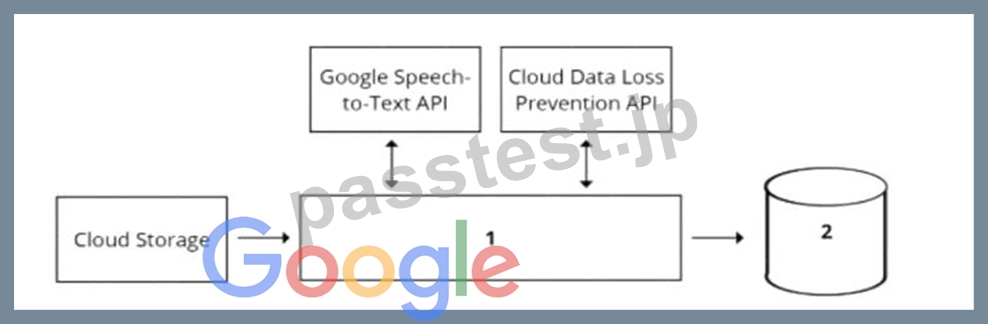
- A. 1 = Pub/Sub, 2 = Datastore
- B. 1 = Dataflow, 2 = BigQuery
- C. 1 = Dataflow, 2 = Cloud SQL
- D. 1 = Cloud Function, 2 = Cloud SQL
正解:B
解説:
A data pipeline is a set of steps or processes that move data from one or more sources to one or more destinations, usually for the purpose of analysis, transformation, or storage. A data pipeline can be designed using various components, such as data sources, data processing tools, data storage systems, and data analytics tools1 To design a data pipeline for analyzing customer sentiments in each call, one should consider the following requirements and constraints:
* The call center receives over one million calls daily, and data is stored in Cloud Storage. This implies that the data is large, unstructured, and distributed, and requires a scalable and efficient data processing tool that can handle various types of data formats, such as audio, text, or image.
* The data collected must not leave the region in which the call originated, and no Personally Identifiable Information (Pll) can be stored or analyzed. This implies that the data is sensitive and subject to data privacy and compliance regulations, and requires a secure and reliable data storage system that can enforce data encryption, access control, and regional policies.
* The data science team has a third-party tool for visualization and access which requires a SQL ANSI-2011 compliant interface. This implies that the data analytics tool is external and independent of the data pipeline, and requires a standard and compatible data interface that can support SQL queries and operations.
One of the best options for selecting components for data processing and for analytics is to use Dataflow for data processing and BigQuery for analytics. Dataflow is a fully managed service for executing Apache Beam pipelines for data processing, such as batch or stream processing, extract-transform-load (ETL), or data integration. BigQuery is a serverless, scalable, and cost-effective data warehouse that allows you to run fast and complex queries on large-scale data23 Using Dataflow and BigQuery has several advantages for this use case:
* Dataflow can process large and unstructured data from Cloud Storage in a parallel and distributed manner, and apply various transformations, such as converting audio to text, extracting sentiment scores, or anonymizing PII. Dataflow can also handle both batch and stream processing, which can enable real-time or near-real-time analysis of the call data.
* BigQuery can store and analyze the processed data from Dataflow in a secure and reliable way, and enforce data encryption, access control, and regional policies. BigQuery can also support SQL
* ANSI-2011 compliant interface, which can enable the data science team to use their third-party tool for visualization and access. BigQuery can also integrate with various Google Cloud services and tools, such as AI Platform, Data Studio, or Looker.
* Dataflow and BigQuery can work seamlessly together, as they are both part of the Google Cloud ecosystem, and support various data formats, such as CSV, JSON, Avro, or Parquet. Dataflow and BigQuery can also leverage the benefits of Google Cloud infrastructure, such as scalability, performance, and cost-effectiveness.
The other options are not as suitable or feasible. Using Pub/Sub for data processing and Datastore for analytics is not ideal, as Pub/Sub is mainly designed for event-driven and asynchronous messaging, not data processing, and Datastore is mainly designed for low-latency and high-throughput key-value operations, not analytics.
Using Cloud Function for data processing and Cloud SQL for analytics is not optimal, as Cloud Function has limitations on the memory, CPU, and execution time, and does not support complex data processing, and Cloud SQL is a relational database service that may not scale well for large-scale data. Using Cloud Composer for data processing and Cloud SQL for analytics is not relevant, as Cloud Composer is mainly designed for orchestrating complex workflows across multiple systems, not data processing, and Cloud SQL is a relational database service that may not scale well for large-scale data.
References: 1: Data pipeline 2: Dataflow overview 3: BigQuery overview : [Dataflow documentation] :
[BigQuery documentation]
質問 # 178
You are an ML engineer at a bank. You have developed a binary classification model using AutoML Tables to predict whether a customer will make loan payments on time. The output is used to approve or reject loan requests. One customer's loan request has been rejected by your model, and the bank's risks department is asking you to provide the reasons that contributed to the model's decision. What should you do?
- A. Use the feature importance percentages in the model evaluation page.
- B. Use the correlation with target values in the data summary page.
- C. Vary features independently to identify the threshold per feature that changes the classification.
- D. Use local feature importance from the predictions.
正解:A
質問 # 179
You are implementing a batch inference ML pipeline in Google Cloud. The model was developed using TensorFlow and is stored in SavedModel format in Cloud Storage You need to apply the model to a historical dataset containing 10 TB of data that is stored in a BigQuery table How should you perform the inference?
- A. Export the historical data to Cloud Storage in Avro format. Configure a Vertex Al batch prediction job to generate predictions for the exported data.
- B. Import the TensorFlow model by using the create model statement in BigQuery ML Apply the historical data to the TensorFlow model.
- C. Configure a Vertex Al batch prediction job to apply the model to the historical data in BigQuery
- D. Export the historical data to Cloud Storage in CSV format Configure a Vertex Al batch prediction job to generate predictions for the exported data.
正解:C
解説:
The best option for implementing a batch inference ML pipeline in Google Cloud, using a model that was developed using TensorFlow and is stored in SavedModel format in Cloud Storage, and a historical dataset containing 10 TB of data that is stored in a BigQuery table, is to configure a Vertex AI batch prediction job to apply the model to the historical data in BigQuery. This option allows you to leverage the power and simplicity of Vertex AI and BigQuery to perform large-scale batch inference with minimal code and configuration. Vertex AI is a unified platform for building and deploying machine learning solutions on Google Cloud. Vertex AI can run a batch prediction job, which can generate predictions for a large number of instances in batches. Vertex AI can also provide various tools and services for data analysis, model development, model deployment, model monitoring, and model governance. A batch prediction job is a resource that can run your model code on Vertex AI. A batch prediction job can help you generate predictions for a large number of instances in batches, and store the prediction results in a destination of your choice. A batch prediction job can accept various input formats, such as JSON, CSV, or TFRecord. A batch prediction job can also accept various input sources, such as Cloud Storage or BigQuery. A TensorFlow model is a resource that represents a machine learning model that is built using TensorFlow. TensorFlow is a framework that can perform large-scale data processing and machine learning. TensorFlow can help you build and train various types of models, such as linear regression, logistic regression, k-means clustering, matrix factorization, and deep neural networks. A SavedModel format is a type of format that can store a TensorFlow model and its associated assets. A SavedModel format can help you save and load your TensorFlow model, and serve it for prediction. A SavedModel format can be stored in Cloud Storage, which is a service that can store and access large-scale data on Google Cloud. A historical dataset is a collection of data that contains historical information about a certain domain. A historical dataset can help you analyze the past trends and patterns of the data, and make predictions for the future. A historical dataset can be stored in BigQuery, which is a service that can store and query large-scale data on Google Cloud. BigQuery can help you analyze your data by using SQL queries, and perform various tasks, such as data exploration, data transformation, or data visualization.
By configuring a VertexAI batch prediction job to apply the model to the historical data in BigQuery, you can implement a batch inference ML pipeline in Google Cloud with minimal code and configuration. You can use the Vertex AI API or the gcloud command-line tool to configure a batch prediction job, and provide the model name, the model version, the input source, the input format, the output destination, and the output format.
Vertex AI will automatically run the batch prediction job, and apply the model to the historical data in BigQuery. Vertex AI will also store the prediction results in a destination of your choice, such as Cloud Storage or BigQuery1.
The other options are not as good as option D, for the following reasons:
* Option A: Exporting the historical data to Cloud Storage in Avro format, configuring a Vertex AI batch prediction job to generate predictions for the exported data would require more skills and steps than configuring a Vertex AI batch prediction job to apply the model to the historical data in BigQuery, and could increase the complexity and cost of the batch inference process. Avro is a type of format that can store and serialize data in a binary format. Avro can help you compress and encode your data, and support schema evolution and compatibility. By exporting the historical data to Cloud Storage in Avro format, configuring a Vertex AI batch prediction job to generate predictions for the exported data, you can perform batch inference with minimal code and configuration. You can use the BigQuery API or the bq command-line tool to export the historical data to Cloud Storage in Avro format, and use the Vertex AI API or the gcloud command-line tool to configure a batch prediction job, and provide the model name, the model version, the input source, the input format, the output destination, and the output format. However, exporting the historical data to Cloud Storage in Avro format, configuring a Vertex AI batch prediction job to generate predictions for the exported data would require more skills and steps than configuring a Vertex AI batch prediction job to apply the model to the historical data in BigQuery, and could increase the complexity and cost of the batch inference process. You would need to write code, export the historical data to Cloud Storage, configure a batch prediction job, and generate predictions for the exported data. Moreover, this option would not use BigQuery as the input source for the batch prediction job, which can simplify the batch inference process, and provide various benefits, such as fast query performance, serverless scaling, and cost optimization2.
* Option B: Importing the TensorFlow model by using the create model statement in BigQuery ML, applying the historical data to the TensorFlow model would not allow you to use Vertex AI to run the batch prediction job, and could increase the complexity and cost of the batch inference process.
BigQuery ML is a feature of BigQuery that can create and execute machine learning models in BigQuery by using SQL queries. BigQuery ML can help you build and train various types of models, such as linear regression, logistic regression, k-means clustering, matrix factorization, and deep neural networks. A create model statement is a type of SQL statement that can create a machine learning model in BigQuery ML. A create model statement can help you specify the model name, the model type, the model options, and the model query. By importing the TensorFlow model by using the create model statement in BigQuery ML, applying the historical data to the TensorFlow model, you can perform batch inference with minimal code and configuration. You can use the BigQuery API or the bq command-line tool to import the TensorFlow model by using the create model statement in BigQuery ML, and provide the model name, the model type, the model options, and the model query. You can also use the BigQuery API or the bq command-line tool to apply the historical data to the TensorFlow model, and provide the model name, the input data, andthe output destination. However, importing the TensorFlow model by using the create model statement in BigQuery ML, applying the historical data to the TensorFlow model would not allow you to use Vertex AI to run the batch prediction job, and could increase the complexity and cost of the batch inference process. You would need to write code, import
* the TensorFlow model, apply the historical data, and generate predictions. Moreover, this option would not use Vertex AI, which is a unified platform for building and deploying machine learning solutions on Google Cloud, and provide various tools and services for data analysis, model development, model deployment, model monitoring, and model governance3.
* Option C: Exporting the historical data to Cloud Storage in CSV format, configuring a Vertex AI batch prediction job to generate predictions for the exported data would require more skills and steps than configuring a Vertex AI batch prediction job to apply the model to the historical data in BigQuery, and could increase the complexity and cost of the batch inference process. CSV is a type of format that can store and serialize data in a comma-separated values format. CSV can help you store and exchange your data, and support various data types and formats. By exporting the historical data to Cloud Storage in CSV format, configuring a Vertex AI batch prediction job to generate predictions for the exported data, you can perform batch inference with minimal code and configuration. You can use the BigQuery API or the bq command-line tool to export the historical data to Cloud Storage in CSV format, and use the Vertex AI API or the gcloud command-line tool to configure a batch prediction job, and provide the model name, the model version, the input source, the input format, the output destination, and the output format. However, exporting the historical data to Cloud Storage in CSV format, configuring a Vertex AI batch prediction job to generate predictions for the exported data would require more skills and steps than configuring a Vertex AI batch prediction job to apply the model to the historical data in BigQuery, and could increase the complexity and cost of the batch inference process. You would need to write code, export the historical data to Cloud Storage, configure a batch prediction job, and generate predictions for the exported data. Moreover, this option would not use BigQuery as the input source for the batch prediction job, which can simplify the batch inference process, and provide various benefits, such as fast query performance, serverless scaling, and cost optimization2.
References:
* Batch prediction | Vertex AI | Google Cloud
* Exporting table data | BigQuery | Google Cloud
* Creating and using models | BigQuery ML | Google Cloud
質問 # 180
You work as an analyst at a large banking firm. You are developing a robust, scalable ML pipeline to train several regression and classification models. Your primary focus for the pipeline is model interpretability. You want to productionize the pipeline as quickly as possible What should you do?
- A. Use Tabular Workflow for Wide & Deep through Vertex Al Pipelines to jointly train wide linear models and deep neural networks.
- B. Use Tabular Workflow forTabel through Vertex Al Pipelines to train attention-based models.
- C. Use Google Kubernetes Engine to build a custom training pipeline for XGBoost-based models.
- D. Use Cloud Composer to build the training pipelines for custom deep learning-based models.
正解:D
解説:
According to the official exam guide1, one of the skills assessed in the exam is to "automate and orchestrate ML pipelines using Cloud Composer". Cloud Composer2 is a fully managed workflow orchestration service that uses Apache Airflow to create, schedule, monitor, and manage workflows. Cloud Composer allows you to build custom training pipelines for deep learning-based models and integrate them with other Google Cloud services. You can also use Cloud Composer to implement model interpretability techniques, such as feature attributions, explainable AI, or model debugging3. The other options are not relevant or optimal for this scenario. Reference:
Professional ML Engineer Exam Guide
Cloud Composer
Model interpretability with Cloud Composer
Google Professional Machine Learning Certification Exam 2023
Latest Google Professional Machine Learning Engineer Actual Free Exam Questions
質問 # 181
You are developing a custom image classification model in Python. You plan to run your training application on Vertex Al Your input dataset contains several hundred thousand small images You need to determine how to store and access the images for training. You want to maximize data throughput and minimize training time while reducing the amount of additional code. What should you do?
- A. Store image files in Cloud Filestore and access them directly by using an NFS mount point.
- B. Store image files in Cloud Storage and access them by using serialized records.
- C. Store image files in Cloud Storage and access them directly.
- D. Store image files in Cloud Filestore, and access them by using serialized records.
正解:B
解説:
Cloud Storage is a scalable and cost-effective storage service for any type of data. By storing image files in Cloud Storage, you can access them from anywhere and avoid the overhead of managing your own storage infrastructure. However, accessing image files directly from Cloud Storage can be slow and inefficient, especially for large-scale training. A better option is to use serialized records, such as TFRecord or Apache Avro, which are binary formats that store multiple images and their labels in a single file. Serialized records can improve the data throughput and reduce the network latency, as well as enable data compression and sharding. You can use TensorFlow or Apache Beam APIs to create and read serialized records from Cloud Storage. This solution requires minimal code changes and can speed up your training time significantly.
References:
* Cloud Storage | Google Cloud
* TFRecord and tf.Example | TensorFlow Core
* Apache Avro 1.10.2 Specification
* Using Apache Beam with Cloud Storage | Cloud Storage
質問 # 182
You have a custom job that runs on Vertex Al on a weekly basis The job is Implemented using a proprietary ML workflow that produces the datasets. models, and custom artifacts, and sends them to a Cloud Storage bucket Many different versions of the datasets and models were created Due to compliance requirements, your company needs to track which model was used for making a particular prediction, and needs access to the artifacts for each model. How should you configure your workflows to meet these requirement?
- A. Configure a TensorFlow Extended (TFX) ML Metadata database, and use the ML Metadata API.
- B. Create a Vertex Al experiment, and enable autologging inside the custom job
- C. Register each model in Vertex Al Model Registry, and use model labels to store the related dataset and model information.
- D. Use the Vertex Al Metadata API inside the custom Job to create context, execution, and artifacts for each model, and use events to link them together.
正解:C
質問 # 183
......
Professional-Machine-Learning-Engineer試験問題集で無料サンプルは365日更新されます:https://www.passtest.jp/Google/Professional-Machine-Learning-Engineer-shiken.html
合格させるProfessional-Machine-Learning-Engineer試験問題と最新のProfessional-Machine-Learning-Engineerテスト問題集PDF:https://drive.google.com/open?id=14XPDKO7HF8llpieeJmGCGhd28GvhwWLP